
glikfbmekciefodedaajifoljdebpkni
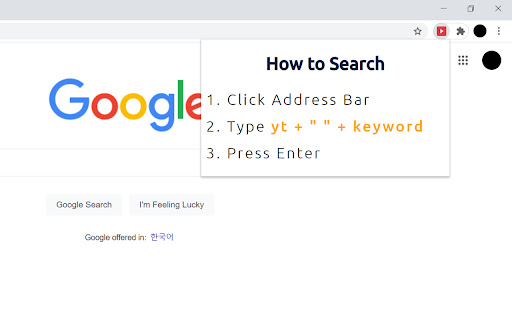
This extension allows user to search for keywords on Youtube by simply entering command words on the address bar.

Search on YouTube
Search for anything on YouTube by selecting the text and right clicking. A simple extension for the Google Chrome browser that allows you to search on YouTube by right clicking highlighted text and using the context menu. Similar to how the built in "Search Google for..." context menu item works. 1) Select some text 2) Right click the mouse to open context menu 3) Select "Search YouTube for [your text]" option Icons and logos done by @liamcaindesigns on Instagram.

TimeTags for YouTube
Create YouTube time tags with simple keyboard shortcuts TimeTags for Youtube is a tool designed to simplify the task of tagging specific moments in YouTube videos. Say goodbye to manually writing timestamps in a separate text editor. With yt-timetag, you can conveniently add and adjust tags within the YouTube interface using your keyboard. The extension provides precise and accurate timestamps, enhancing your experience when tagging longer videos. Browse to any YouTube video, click the icon of the extension in browser bar to activate it. - [delete, backspace] remove tag (affects active tag) - [left] backward 5 seconds (affects active tag) - [alt+left] backward 1 second (affects active tag) - [right] forward 5 seconds (affects active tag) - [alt+right] forward 1 second (affects active tag) - [space] play/pause - [a] add a tag at current time - [d] edit the description of active tag - [esc] cancel active tag Shortcuts won't work when YouTube's bulit-in shortcuts is active (which means your focus is currently on the video element). - Fix: Icons color for YouTube dark mode - Fix: mouse wheel behavior in tag/comment list - Add "Trash" tab for temporarily holding removed tags - Add options page - Explorer - Custom shortcuts - Data import/export - Standalone Explorer is also available at https://cloud.pymaster.tw/yt-timetag-explorer/ - Remove unnecessary site `permissions` specified for Firefox support in Chrome build - Add `chrome.storage.local` as primary storage option - "Sync" feature of Chrome - Now syncs recently updated 100 videos only - Compress `chrome.storage.sync` data to better utilize the quota (100kB max) - Store video id, video title information for upcoming features - Export in Markdown format - CommentList UI: add time tags in comments to your collection ## 1.2.0 - Remove "tabs" permission - Default to sync storage of Chrome - Add shortcut for "remove" - Update for new YouTube design component change ## 1.1.0 - Support new YouTube design - Tag list will become scrollable when it feels overwhemled - Add keyboard shortcut `d` for editing active tag description, due to `/` is already used by the new YouTube

Youtube Tags
Youtube meta Tags are considered as an important factor in ranking of videos for a particular query. There are times where you need to find the tags of popular videos to analyse. Now you can view the tags of the YouTube video you are watching with this extension. The only thing you need to do is to install this extension, then go to the YouTube video and below the video player, you can find the tags of the video are shown in the screenshot.

YT Quick Actions
YT Quick Actions is a web extension for YouTube making actions related to watch later playlist management quicker to access. YT Quick Actions is a web extension for YouTube making actions related to watch later playlist management quicker to access. Concretely, YT Quick Actions offers the following features: - Add a remove button in playlists next to the more options button - Add a watch later button as an action under videos - Add a watch later button as an action in home page videos - Add a watch later button as an action in the subscriptions feed - Add a remove button for playlists being watched The source code for the extension can be found on GitHub: https://github.com/Compile-Time/yt-quick-actions The following permissions are required: - Host "https://www.youtube.com/*" Modify the YouTube web page to add custom elements. - storage Store extension settings in browser storage. - tabs Access the URL from YouTube tabs
