
glgaegbgegomicnedooifcbnmppmofkf
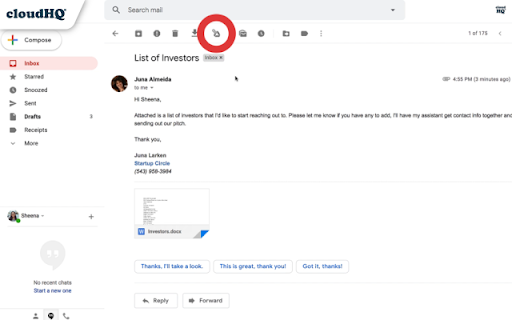
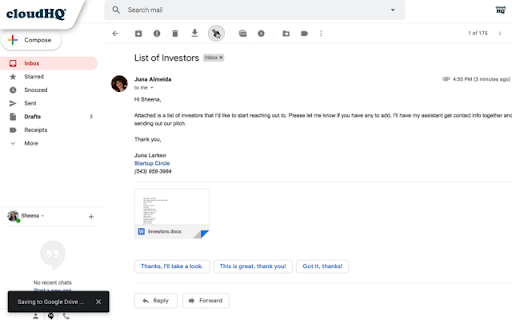

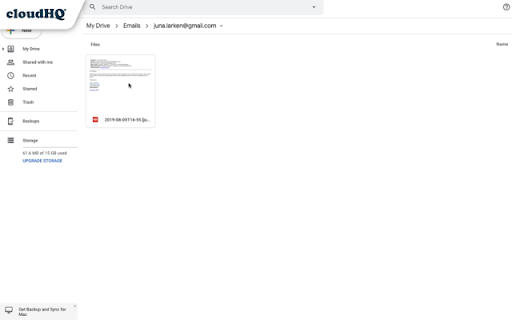
Save any Gmail™ email to Google Drive™ with one click. Autosave of all emails in a label. Multiple formats: PDF, HTML, EML, TXT, ... In just 1 click, save your Gmail™ emails (and its attachments) or labels directly to your Google Drive™. This is a perfect solution to liberate your emails from Gmail so that you can file emails in your Google Drive™. Tip: You can organize emails in a file under your client folder, where you can easily add your comments and share them with a colleague. There's no complicated downloads, and 100% free for you to use. Key features: ✅ Quick save of any email - save it and share it with just one click ✅ Auto save of labels ✅ Google Workspace™ support ✅ Team integration and Google Shared Drive™ support ✅ Google Workspace™ admin integration: admin can control and configure everything from the console ✅ Real time backup and archive of your emails You can save emails into following formats, and includes attachments in: - PDF - TXT - HTML - EML (email archive) Furthermore, you can save emails to your Google Drive in the following formats: * A single file for each conversation * A separate file for each individual email * One file for all emails under a specific label Saving your emails/labels to Google Drive™ offers excellent benefits: ✔️ Allows law firms to automatically archive emails pertinent to specific cases or clients. ✔️ Enables any company to back up emails to Google Shared Drive for enhanced security and collaboration. ✔️ Employees can quickly save and share emails with their teams. ✔️ Individuals can create hard copy backups of emails for personal record-keeping. For best practices and real-world examples of how law and real estate firms use our product, please refer to these support notes: https://support.cloudhq.net/best-practice-how-real-estate-firms-use-save-emails-to-google-drive/ https://support.cloudhq.net/organizing-workflow-in-law-firms-with-cloudhq-save-emails-to-google-drive/ The free plan includes 50 emails/month. Our Premium Plan allow unlimited email saves and backup. cloudHQ website: https://www.cloudhq.net/ App website: https://www.save-emails-to-google-drive.com/ Pricing: https://www.save-emails-to-google-drive.com/pricing Support page: https://support.cloudhq.net/category/browser-extensions/save-emails-to-google-drive/ Blog: https://blog.cloudhq.net Gmail, Google Shared Drive, Google Drive, and Google Workspace are trademarks of Google LLC. Use of these trademarks is subject to Google Permissions.

Sort Gmail Inbox by cloudHQ
Find an email in seconds with free preset filters Find an email in seconds with these free preset filters We know how much you hate having to spend time searching for email. We hate it too! No more searching for the emails you need to find quickly—have the most popular filters set up in your Gmail label area so that you can easily find what you need in seconds. With this free Chrome extension, you'll be able to sort your Gmail inbox by: ✅ Unread emails ✅ Contacts who you need to respond back to ✅ Contacts who need to respond back to you ✅ Received Date organized by year, month, or exact date ✅ A specific person ✅ A specific company, like anyone with emails that have the domain "@youtube.com" ✅ Attachment size, and attachment type, too (no more searching for your presentation when you're about to present!) You'll also be able to: ✅ Save your contacts' emails to a PDF doc for backing them up for safekeeping ✅ Save your contacts' emails in a Google Spreadsheet to view them easily as a report ✅ Set up SMS text alerts for when important contacts email you If you're looking for a way to methodically work through your emails, this is the most effective way to get through them in an organized way that will help you get your work done, lightening bolt fast. cloudHQ. Helping your productivity, 1 click at a time. cloudHQ website: https://www.cloudhq.net/ App website: https://www.sort-gmail-inbox.com/ Pricing: https://www.sort-gmail-inbox.com/pricing Support page: https://support.cloudhq.net/category/browser-extensions/sort-gmail-inbox/ Blog: https://blog.cloudhq.net Demo: https://www.cloudhq.net/demo Google Workspace, Google Sheets, Google Drive, Google Alerts and Gmail are trademarks of Google LLC. Use of this trademark is subject to Google Permissions.

Time Tracker for Gmail™ by cloudHQ
Time logging service to help you track your reading and writing in email, so that you can include it in your billable hours. Any time you open an email, you'll be able to log how much time you've spent reading it, or writing it. You can then export that information into a spreadsheet, and include that in your billing hours. This is an **excellent** service for any professionals who charge hourly like: lawyers, doctors, construction managers, contractors, etc. cloudHQ website: https://www.cloudhq.net Website: https://www.gmail-time-tracker.com/ Pricing: https://www.gmail-time-tracker.com//pricing Support page: https://support.cloudhq.net/list-of-all-cloudhq-chrome-extensions/ Support email: support@cloudhq.net Blog: https://blog.cloudhq.net Gmail and Google Workspace are trademarks of Google LLC. Use of these trademark is subject to Google Permissions.

Email Reply Status
Stop wasting time sorting through emails: Instantly know which of your emails needs a reply back. Never drop the ball again. Now you can know exactly which emails need a reply with Email Reply Status. You'll have an inbox indicator that will tell you: 1. Which emails you need to reply to 2. The emails that you already replied to 3. Those that you don't need to reply to at all *NOTE*: For best performances set Gmail page size to 50 emails or less. It's a perfect tool for: ✅ Small business owners ✅ Sales people ✅ Business people who are just too busy to keep track of emails ✅ Customer service representatives ✅ Customer support personnel With Email Reply Status, never miss another opportunity again! cloudHQ. Helping your productivity, 1 click at a time. cloudHQ website: https://www.cloudhq.net/ App website: https://www.email-reply-status.com/ Pricing: https://www.email-reply-status.com/pricing Support page: https://support.cloudhq.net/category/browser-extensions/gmail-reply-status/ Blog: https://blog.cloudhq.net

Get My Receipts by cloudHQ
Extract digital receipts and invoices from your email Managing digital receipts and invoices should not be a headache. Yet inboxes are full of them, and too often they get lost or forgotten when it is time to prepare tax returns, claim deductions, or file expense reports. Get My Receipts by cloudHQ is the simplest way to automatically collect, organize, and export receipts and invoices directly from Gmail™. With 99.2% accuracy, powered by artificial intelligence and machine learning, this app scans your inbox and generates a clean, well-structured spreadsheet. How it works: 1. Open Gmail™ and click on Get My Receipts. 2. The app instantly finds receipts and invoices across your inbox. 3. A spreadsheet is created for you with two tabs: one for receipts and one for invoices. The spreadsheet is stored for you in your Google Drive account to edit and share as you see fit. Each entry is organized into useful columns: ✅ Date ✅ Amount ✅ Taxes ✅ Merchant ✅ Subject line ✅ Email text ✅ PDF copy of the receipt Perfect for: - Tax planning and capturing every deduction - Audit-ready expense reporting - Small business owners, freelancers, and contractors - Anyone who wants receipts and invoices organized in seconds Stop wasting time searching your inbox when you need receipts most. With Get My Receipts, you will always have an accurate, audit-ready record of your expenses. cloudHQ. Helping your productivity, 1 click at a time. cloudHQ website: https://www.cloudhq.net/ App website: https://www.get-my-receipts.com/ Pricing: https://www.get-my-receipts.com/pricing Support page: https://support.cloudhq.net/category/browser-extensions/get-my-receipts/ Blog: https://blog.cloudhq.net
