
glelkmjlfnjmjejlnimifmmopjnocgkk
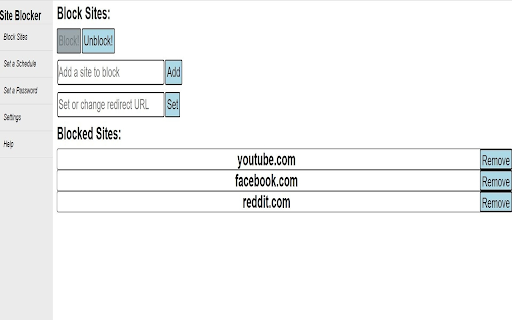
Block websites to stay productive and on task. This extension allows you to block websites to help you stay focused and productive. You can block sites at all times, or set up schedules for when you want site blocking to take place. You can also set up a password system that requires you to enter your password before modifying any of the settings in the extension. There is no limit to the number of sites you can block or the number of schedules you can set up.

StayFocusd – Website Blocker & Focus Timer & Shorts Blocker
Boost your productivity by limiting the amount of time you spend on time-wasting websites. You sit down at the computer, and you swear you'll be productive. Next thing you know, it's twelve hours later. You've checked your email, updated your Facebook status, blown through 200 pages of Reddit, read every article in your Twitter feed, looked up your favorite band on Wikipedia, vanity googled yourself, cyber-stalked your ex, browsed through all your high-school crushes' Instagram feeds, and lost a week's pay playing online poker. What you haven't done is WORK. StayFocusd, by Sensor Tower, is a productivity extension for Google Chrome that helps you stay focused on work by restricting the amount of time you can spend on time-wasting websites. It provides analytics to help you understand and control your internet usage, ensuring you remain productive throughout the day. 📊 Website usage history: Get statistics of your daily website usage history. 🚫 Configurable blocking: Block entire sites, specific subdomains, specific paths, specific pages, or even in-page content (videos, images, forms, etc). ☢️ The Nuclear Option: This powerful feature allows you to block access to websites for the number of hours you specify on the days you choose. Once activated, it cannot be canceled, ensuring you remain focused and productive. 📱Require Challenge: To change any settings, you must complete a challenging task. This reduces the temptation to alter settings, helping you stick to your productivity goals. 🗓️ Active Days/Hours: Customize the days and hours during which StayFocusd will restrict your access to distracting websites. This ensures that your productivity is maintained during critical work periods. ▶️ In App Blocking: Block all distracting components on YouTube and other major social media platforms. Hide shorts, comments, recommended videos, and more. 🤖 Gen AI Analytics: Track and analyze your usage of AI chat platforms directly from the StayFocusd. 🔒 Privacy protection: StayFocusd does not collect personal data from the web pages you visit. 🔗 Sync Usage Limits across devices: Connect Android devices and other browsers to view website and mobile app usage and limits in one place. ✦ YOU ARE IMPORTANT We value your feedback! Please rate us 5 stars on the Chrome Web Store to help us grow. Problems? Questions? Suggestions? Effusive praise? Email support@stayfocusd.com PRIVACY NOTICE: When you install StayFocusd, it will ask you to grant a number of permissions, including “Read and change all your data on the websites you visit.” This permission is required in order for StayFocusd to run on any site which you may visit—without this permission, StayFocusd would not be able to block websites. While this permission technically grants StayFocusd the ability to read and change data, we will never collect personal data from the web page content that you are browsing.

Detach Site Blocker
Blocks the unwanted sites and boosts your productivity. Your smart focus companion — block websites, keywords, and digital distractions instantly. We all get distracted — social media, endless scrolling, or random websites stealing our focus. Detach: Site & Keyword Blocker helps you take control of your attention and build better digital habits. Whether you want to block entire websites or specific keywords, Detach gives you the power to create your own custom blocklist in just one click. Each time you try to visit a blocked site, Detach gently reminds you to stay focused — helping you save time and reduce stress. Add sites to your custom blocklist with one click Clean, minimal UI designed for focus and clarity Boost your productivity and mindfulness every day Detach isn’t just a site blocker — it’s your digital focus partner. Stay mindful. Stay productive. Stay detached.

Block Site
Blocks access to distracting websites to improve your productivity. Block Site is a simple Chrome extension that improves your productivity by blocking access to distracting websites as you specify. To configure, click on the B icon in the toolbar.

Unplug: Simple Site Blocker
Block distracting websites to increase productivity and maintain focus. Tailor your browsing experience for maximum productivity. Easily block distracting websites and stop the mindless scrolling. 🟢 Recommendation: Pin the Unplug extension for easy access to blocking information and settings. ⛔ Block List Add distracting websites to your block list to deny access to them. Block single pages, paths, or entire websites. ✅ Allow List Add productive websites to your allow list. You can also add any productive pages or paths of websites that are on your block list to fine tune your browsing experience. 🛑 Exclusive Allow Mode This toggleable mode blocks any website that is not on your Allow List. ⭐ Motivational Block Page When a site is blocked, you get a random motivational quote. Unplug is completely free to use and always will be. ℹ️ Privacy Information Unplug: Simple Site Blocker does not collect or share your personal data, browsing history, or any other personal information. Your website block list and allow list information is stored in Chrome's sync storage to allow you to sync blocking information between computers. 💡 Updates 1.0.5 Changelog: • Added: Option to show blocked URLs on the block page • Added: Option to toggle motivational quotes • Added: More quotes • Fixed: Password placeholder text • Fixed: Password input padding issue • Change: Settings page opens in new tab from the block page 1.0.2 Changelog: • Added: Re-enable duration: automatically re-enable Unplug after a user-selected duration (10 Minutes, 24 hours, Never, etc.) if Unplug is disabled from its settings page • Added: More quotes • Change: Search parameters are now considered when determining if a website should be blocked/allowed. Search parameters occur after a '?' in a URL
