
glclhpipfpfammoflcfnknnlddkgpdoe

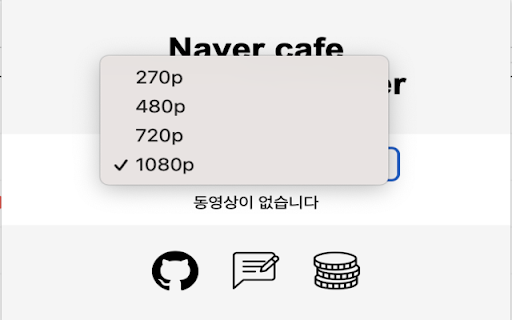
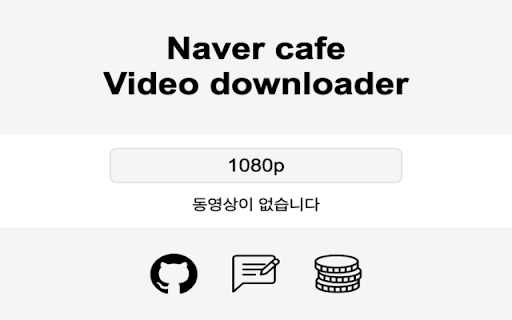
네이버 카페의 동영상들을 쉽게 다운로드 할 수 있는 서비스. 네이버 카페에 등록된 영상을 다운받는 일은 어렵습니다. 네이버에서는 영상 다운로드 기능을 제공하고 있지 않기 때문입니다. 이런 불편함을 해결하기 위해 이 확장 프로그램을 만들었습니다. 카페에서 동영상이 있는 게시물에 들어가면 확장 프로그램 팝업에 동영상을 바로 다운받을 수 있는 기능을 제공합니다. 확장 프로그램을 핀으로 고정시켜 항상 보이게 두면 사용하기 편리합니다. - 사용방법 원하는 화질 [270p, 480p, 720p, 1080p] 을 선택하고, 다운로드 버튼을 누르기만 하면 즉시 다운로드가 진행됩니다. 문의사항이 있거나 버그를 발견했다면 Feedback 페이지를 이용해 제보해주세요. 탭별로 다른 페이지 열어 다른 동영상을 다운받을 수 있습니다. 팝업을 다시 로드하더라도 화질이 1080p로 고정되지 않습니다. 다운받던 화질로 계속 다운받을 수 있어요! 다운로드 버튼 클릭시 메시지 표시 다운로드 한 파일 이름이 동영상 제목과 동일하게 표시됩니다. 버그 수정 제목 표시 안되던 버그 수정 아직 버그가 남아있을 수 있습니다. 있다면 제보해주세요. 개발자가 창업을 하다 와서 버그 수정이 늦었던 점 죄송합니다. 그리고 프로그램 많이 써주셔서 감사합니다! 360p 화질의 동영상도 다운받을 수 있습니다. 동영상 제목이 나오지 않는 버그를 수정했습니다. 이전 게시물들 중 아직 안나오는 경우가 있으나 곧바로 수정될 예정입니다. Naver api 업데이트로 동영상을 찾지 못하는 버그를 수정했습니다. + 이제 동영상 제목 옆에 있는 다운로드 버튼으로도 영상을 다운받을 수 있습니다.

Video Downloader Plus
Download and save videos from any website instantly. A fast, simple video downloader that just works. Video Downloader Plus detects videos as you browse and lets you save them in a few clicks. It picks up HLS, DASH, and MP4 streams the moment they load — no searching, no pasting links, no extra steps. 1. Visit any page with playable media 2. The icon lights up when something is found 3. Click it, choose your quality and format 4. Save to your device or upload to cloud storage WHAT YOU GET • Stream Detection — A smart video downloader that goes beyond direct file links. It captures adaptive HLS and DASH streams that basic tools miss entirely. • Up to 8K Quality — Whatever resolution the site offers, you can grab it. 720p, 1080p, 4K, and even 8K. • Audio + Video Merge — Some sites deliver audio and video separately. This video downloader combines them into one file automatically, ready to play. • Format Conversion — Convert to popular formats like MP4 or extract just the audio track. Multiple output options available. • Chromecast & AirPlay — Cast what you find to your TV directly from the browser. • Cloud Storage — Connect your preferred cloud provider and send files straight to the cloud. • Video Library — Save videos to your list and come back to them later. Syncs across devices when you are signed in. • Live Recording — Record live streams as they happen, before they disappear. • Filter by minimum file size to skip tiny clips and ad prerolls • Pick which formats to watch for • Block specific sites from detection • Set a preferred folder for all saves • Dark mode, light mode, or match your system • Badge style: video count or a simple dot FREE AND PREMIUM The free plan includes unlimited standard-quality saves and a daily allowance for HLS and DASH. Premium unlocks unlimited resolution, cloud uploads, format conversion, and priority support for users who need more from their video downloader. Choose monthly, yearly, or pay once with the lifetime option. Any site that delivers media over HLS, DASH, or plain HTTP is supported — news, education, social media, embedded players, and thousands more. Available in 59 languages. This video downloader does not support YouTube. Chrome Web Store rules do not allow it, and we follow those rules. Everything else that uses standard streaming is fair game.

Free and fast video downloader
Our free video downloader will allow you to quickly download any video from any website. Free Video Downloader allows you to download videos of all known formats: mp4, webm, mpeg, ogg, etc. The extension also allows you to download HTTP Live Streaming (HLS) videos. HLS video is saved to your computer in a file with the .ts extension, which you can later view in any media player. In the new version, the extension can download streaming MPEG-DASH video and combine audio and video into one file. The extension is very easy to use. First, you need to open the page with the desired video and start playing it. Then click on the extension icon in your browser and in the window that appears, select the video file you need. Click download in a few seconds you will start downloading the video to your computer. The extension is convenient to use for downloading movies when you are going on long trips or travels. Download your favorite stories from Instagram, videos from TikTok. Also all kinds of videos for preparing presentations. Free Video Downloader does not have the ability to download YouTube videos as YouTube's privacy policy prohibits this. ⚠️ Important: YouTube: In line with Google policies, downloading from YouTube is not supported. Ads: The extension may contain banner ads for other extensions.

Telegram Video Downloader - TVDownloader
Telegram Content downloader: Restricted videos/images with a single click. (Telegram Movie Downloader) Telegram Video Downloader fully supports one-click downloads of Telegram videos (movies, audio) and more. You can watch saved Telegram videos (movies) offline anytime, anywhere on your PC or mobile device. 🚀 Key Features: 1. One-Click Download: With just one step, TG Video Downloader automatically downloads Telegram videos, images, or audio 2. High-Speed Download: Supports high-speed, unlimited downloads of content from Telegram public channels and private groups 3. Original File Titles: Preserves original file titles, making it easy for you to identify downloaded media content 4. Multi-Format Support: Compatible with various media formats supported by web.telegram.org/a and web.telegram.org/k, including MP4, MKV, FLV, and more 5. Restricted Content: Suitable for downloading restricted videos, series, , audio, photos, etc. on Telegram 6. Privacy Protection: No data collection, no password required, ensuring your privacy and security 7. Cross-Platform Support: Supports all operating systems 8. Instant Download: No need to search or input video links, or download bot, supports instant downloading 9. Free to Use: Free to use after installing the TG Video Downloader plugin 10.Batch Download: Upcoming feature for easy downloading of multiple files (Stay tuned!) 📥User Guide: How to Download Telegram Videos/Images/Audio? 1. Activate: For first-time use, please activate the plugin's download function. You can turn it off when not in use 2. Download: Simply click the download icon at the bottom right of the video/image message to complete the automatic download 3. View: Click on the download history in the upper right corner of the browser to view the downloaded video content 🔒Disclaimer: All features are developed and maintained by independent third-party developers. We strongly recommend that you comply with legal requirements and use the tool responsibly. Use TVD Telegram Video Downloader to make downloading Telegram videos easier and more efficient than ever. Download now and experience it for yourself!

Video downloader that works! Save online videos
Download video now, watch it later. Fast, light and reliable video downloader Video Downloader is a free video downloader browser extension that lets you save videos from Facebook, Instagram, Twitter, and hundreds of other websites directly to your device. Free Video Downloader – Download videos from Facebook, Instagram, Twitter, and more at no cost. Fast Downloads – Consistent and reliable download speeds across all supported websites. One-Click Download – Detect and download any video with a single click directly from your browser. Multiple Formats – Save videos in MP4 and other popular formats compatible with any device. Auto Video Detection – Automatically detects downloadable videos on Facebook, Instagram, Twitter, and any webpage you visit. Unlimited Downloads – No caps on the number of videos you can save from any website. Lightweight – Designed to be resource-efficient so it doesn't slow down your browser. Easy to Use – Simple, clean design that's easy for anyone to use. Quick Support – Friendly and responsive support team available anytime. Save Facebook Videos – Download any public Facebook video directly to your device for offline viewing. Download Instagram Videos – Save Instagram videos, reels, and stories before they disappear. Download Twitter Videos – Capture and save Twitter videos and GIFs instantly with one click. Download Videos from Any Website – Save streaming videos, tutorials, and clips from hundreds of websites. Offline Viewing – Keep your favourite videos saved locally so you can watch them anywhere without internet.
