
glbhholiponiojenpebooobahmljdjge


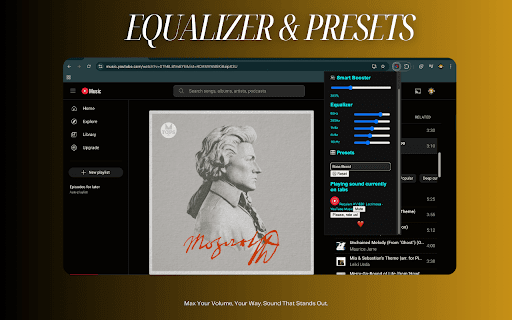


🔊 Boost beyond 900%, fine-tune with EQ presetes, and switch themes in a click total audio control in your browser! Take control of your browser's audio like never before. Smart Sound Booster lets you amplify volume, customize sound frequencies, and enhance clarity all from a clean, intuitive interface. 🎛️ 5-Band Equalizer with presets (Bass Boost, Treble Boost, etc. and premium features ) 🌗 Dark/Light mode toggle with theme memory 💾 Auto-saves your volume and EQ settings 💡 Works on YouTube, Spotify, and all media-rich sites ❤️ Subtle animated heart for a delightful touch 🛠️ How to Use: Click the extension icon. Slide to set your desired volume. Toggle the theme or mute audio instantly. skip and pause. (Media time) That’s it—your tab's audio is now customized! 🔐 Privacy First: We do not collect or store any user data. 100% safe and local. If you enjoy Smart Sound Booster, please ⭐ rate us and share with friends!

Audio Master - Equalizer, Sound Booster, Auto Volume
Audio Master is a tool that allows you to control the audio of your browser. It's simple, beautiful and easy to use. Take full control of your browser’s audio with Audio Master, the ultimate sound enhancement extension for Chrome. Whether you’re watching videos, listening to music, or in a video call, Audio Master lets you fine-tune sound with a built-in equalizer, boost volume beyond normal limits, and automatically balance audio levels for a better listening experience. Works seamlessly with YouTube, Spotify, and all major streaming platforms, delivering enhanced sound exactly where you need it. ✅ 10-band audio equalizer – Customize sound to your preference ✅ Volume booster – Increase sound beyond 100% for low-volume content ✅ Auto volume control – Automatically balance audio levels across tabs ✅ Preset modes – Choose from music, movie, bass boost, and more ✅ Per-tab audio control – Adjust sound individually for each tab ✅ Simple, clean interface – Easy to use with quick access controls ✅ Lightweight & efficient – No lag, minimal resource usage Enhance your online audio experience with Audio Master – the all-in-one solution for better sound. Download now and hear the difference! 🔊🚀

Ultra Volume Booster
Ultra Volume Booster - Take control of your audio experience! 🔊 Boost video volume up to 1000% on any website with this lightweight yet powerful extension. Perfect for quiet videos, language learners, or when you need that extra punch from your media. Key Features: ✅ Massive Volume Boost - Amplify sound beyond normal limits (10x default volume) ✅ Precision Control - Adjustable slider for perfect volume levels (100%-1000%) ✅ Works Everywhere - YouTube, Netflix, Twitch, Facebook, and all HTML5 video sites ✅ Real-Time Adjustment - Change volume while videos play ✅ Automatic Detection - Works with both embedded and fullscreen videos ✅ Safety First - Built-in warnings to protect your hearing

Volume Booster 1000
Increase and amplify the maximum volume by up to 1000% Struggling to hear faint videos or music on your laptop? Tired of fiddling with system volume settings? Volume Booster 1000 is the FREE Chrome extension you need! Amplify website audio by a whopping 1000% - that's 10 times louder! Features: ✓ Unleash the Volume: Boost website audio to ear-splitting levels, perfect for weak laptop speakers. ✓ Persistent Power: Enjoy your boosted volume even after page reloads - no need to constantly adjust settings. ✓ Clean Interface: Volume Booster 1000 keeps your tabs clutter-free with no additional icons required. ✓ Listen to what you love, at the volume you deserve. Install Volume Booster 1000 today!

Sundai EQ - YouTube Audio Equalizer
🎵 Professional audio equalizer for YouTube! Perfect for YouTube music, videos, & live streams. 🎧 Sundai EQ - The Ultimate YouTube Audio Equalizer 🎵 Transform your experience with professional-grade audio enhancement! Sundai EQ is the premier audio equalizer extension designed specifically for YouTube. Whether you're listening to music videos, watching tutorials, enjoying podcasts, or streaming live content, Sundai EQ gives you complete control over your audio experience with real-time equalizer effects. 🎬 YouTube Optimized - Music: Perfect EQ for all your favorite songs and playlists - Videos: Enhanced audio for tutorials, vlogs, and entertainment - Podcasts**: Crystal clear dialogue and optimized voice clarity - Live: Real-time EQ for live streams and premieres - Shorts**: Enhanced audio for short-form content 🎚️ Professional 8-Band Equalizer - Precise frequency control: 60Hz, 170Hz, 310Hz, 600Hz, 1kHz, 3kHz, 6kHz, 8kHz - ±15dB gain range for maximum flexibility - Smooth, professional-grade audio filtering - Real-time adjustments without interrupting playback 🎨 Live Audio Visualizer - Real-time frequency spectrum display for your audio - Retro-style visual feedback - See your EQ adjustments in action - Perfect for music visualization while listening ⚡ Instant Presets for Content - Flat: Neutral sound for accurate audio representation - Bass: Perfect for EDM, hip-hop, and bass-heavy music videos - Vocal: Optimized for podcasts, interviews, and spoken content - Treble: Enhanced clarity for classical music and acoustic performances 💾 Smart Memory - Remembers your EQ settings between sessions - Automatic state restoration when you return to YouTube - Seamless experience across all your browsing 🎯 Perfect For Users 🎵 Music Enthusiasts - Enhance Music streaming quality - Perfect EQ for music videos and live performances - Custom sound tuning for different music genres - Professional audio quality for your favorite artists 🎧 Podcast Listeners - Crystal clear dialogue for podcasts - Enhanced voice clarity for interviews and talks - Optimized audio for educational and news content - Better listening experience for long-form content 📚 Educational Content - Improved audio clarity for tutorial videos - Enhanced dialogue for online courses and lectures - Better sound quality for language learning videos - Professional audio for educational channels 🎮 Gaming & Entertainment - Enhanced audio for gaming videos and streams - Better sound effects and music in gaming content - Improved dialogue in movie reviews and entertainment shows - Optimized audio for reaction videos and commentary 1. Install Sundai EQ from the Chrome Web Store 2. Click the Sundai EQ icon in your browser toolbar 3. Toggle ON the equalizer 4. Choose a preset or customize the 8-band EQ to your liking 5. Go to YouTube and start playing any video
