
gkkpdckaoccmoefdlopdjdbhahlpfnkj
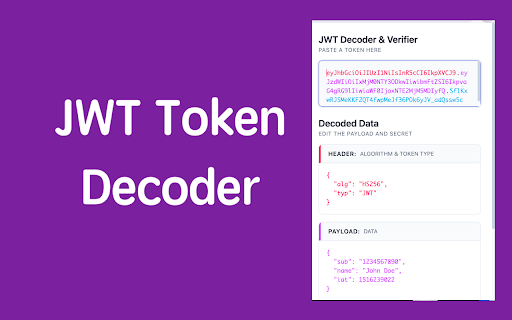

Decode and verify JWT tokens (JSON Web Token) with a beautiful interface JWT Decoder & Verifier is a browser extension that helps developers and security professionals work with JSON Web Tokens (JWT). It provides real-time decoding and signature verification in a beautiful, user-friendly interface. ### Why Choose This Extension? - **Real-time Decoding**: Instantly see the decoded header and payload as you paste your JWT - **Visual Clarity**: Color-coded token sections for better readability - **Secure Verification**: Verify JWT signatures with your secret key - **Base64 Support**: Built-in support for Base64 encoded secrets - **Developer Friendly**: Clean interface designed for daily development workflow - **Multi-language Support**: Available in 20+ languages - **Privacy First**: All processing happens locally - no data leaves your browser ### Perfect For: - Backend Developers working with JWT authentication - Frontend Developers debugging JWT-based APIs - Security Professionals analyzing JWT tokens - QA Engineers testing JWT implementations - DevOps Engineers troubleshooting JWT issues

JSON Viewer
Validates and makes JSON documents easy to read. Open source. JSONViewer port for Chrome is an updated version of Gildas' JSOnView extension. Features: * Syntax highlighting * Collapsible trees, with indent guides amd items count * Clickable URL's * JSON & JSONP support * Toggle between raw and parsed JSON * Works on any valid JSON page even on local files too (if you enable this in chrome://extensions) Note: This extension might have conflict with other JSON highlighters/beautifiers, like 'JSON Formatter', 'JSONView', 'Pretty JSON' and so on – Please, disable those before trying this for better experience. Try it out on these URLs: https://jsonplaceholder.typicode.com/todos/1 1 todo https://jsonplaceholder.typicode.com/posts 100 posts https://jsonplaceholder.typicode.com/comments 500 comments https://jsonplaceholder.typicode.com/albums 100 albums https://jsonplaceholder.typicode.com/photos 5000 photos https://jsonplaceholder.typicode.com/todos 200 todos https://jsonplaceholder.typicode.com/users 10 users Original firefox extension is here: http://benhollis.net/software/jsonview/ v.0.8.17 - Removed Traffzilla for interfering with other websites v.0.8.13 - Removed Traffzilla for interfering with other websites v.0.8.11 - Added Traffzilla and disclaimer v.0.8.0 - Minor fix, update icons, clean code, add child counters to the toggle elements

JWT Token Decode
With JWT Token Decode: automatically inspect JWTs from web requests & manually decode JSON tokens. Quick, easy online token decoder. JWT Token Decode is a powerful Chrome extension for developers, testers, and security professionals. Inspect authentication data directly in the browser with jwt token decode. It auto-captures credentials, formats them instantly, and shows headers, payloads, claims, signatures, and metadata in a clear, collapsible view — all processed locally for secure decoding of complex JWT structures. It integrates cleanly with modern tools like jwt-decode for smooth workflows. This extension is open-source. Source code:https://github.com/softcoredevman/jwttokendecode/ 📘 How to Use 1. Open the extension panel 2. Paste your secure key or let the auto-capture feature extract it 3. Instantly view headers, payloads, signatures, and claims 4. Copy any decoded section if needed This turns Chrome into a secure, efficient workspace for inspecting authentication credentials without switching tools or compromising privacy. 🚀 Why JWT Token Decode Stands Out 1️ Fully local processing — no server requests, no data exposure 2️ Automatic token capture from browser traffic, including bearer token authentication flows 3️ Manual input mode for decoding any pasted credential 4️ Clean, intuitive UI optimized for productivity 5️ Professional JSON viewer with highlighting and smart formatting 6️⃣ Works offline for secure JWT token decode online operations 7️⃣ Supports all token formats, including custom claims and extended fields 8️⃣ Light/Dark mode for comfortable long-term use With its combination of automatic detection and manual verification, the extension adapts to real-world development, debugging, and security workflows. 🔧 Core Features ➤ One-click panel with a built-in JWT token decoder ➤ Automatic formatting and syntax highlighting ➤ Full breakdown of headers, payloads, signatures, and claims ➤ Auto-capture for access keys and authorization credentials ➤ Support for advanced metadata, scopes, and roles ➤ Copy-to-clipboard actions for any decoded section ➤ Offline-only processing for maximum privacy ➤ Works seamlessly with common tools like jsonwebtoken, API clients, test frameworks, and even acts as a convenient hash decoder in certain workflows ➤ Perfect for jwt token decode js workflows ➤ Apply insights directly to debugging or authentication checks ➤ Ideal for decode jwt token online and jwt token decoder tasks Whether you're troubleshooting API responses or validating the structure of incoming authentication data, the extension ensures everything stays clear, fast, and secure. 🧩 What You Can Do ✅ Inspect authentication headers, payloads, exp/iat fields, scopes, roles, and issuer data ✅ Validate signing structure and perform JSON Web Signature decode checks ✅ Debug authentication workflows in SPAs, backend services, and microservices ✅ Jwt decode online manually or use automatic extraction from network requests ✅ Verify formatting and claims during development, QA, or security audits ✅ Learn how to decode JWT token with clear visualization and instant results 🎯 Ideal For • Backend and frontend developers working with token-based authentication • Security engineers analyzing signatures and session integrity • QA testers validating API responses • Students learning decoding JWT token workflows • Anyone who needs a fast, privacy-focused JWT decoding tool inside Chrome • Works well for jwt decode token in real-world testing 🌙 Designed for Real-World Use The interface is built for speed and clarity. Smart formatting, collapsible sections, and theme switching ensure effortless navigation through complex claims and nested fields. Whether you're reviewing session information occasionally or performing daily security checks, the extension keeps everything readable and efficient. • Also supports jwt token – decode operations for advanced users 🔥 Why Users Love It ⏰ • Saves time across development, testing, and debugging 🔓 • Completely safe — no external services involved ⚡️ • Instant, structured data analysis 🚀 • Faster and more reliable than online tools 🔨 • Simple, modern UI that stays out of your way 💻 • Works as a jwt token decode solution for developers ❓ FAQ Does the extension send tokens to any server? 💡 No. All decoding happens locally in your browser. Can I decode tokens manually? 💡 Yes. Paste any JWT into the input field to perform decoding JWT token safely. Is it safe for sensitive data? 💡 Absolutely. Offline-only processing ensures maximum security. Start using JWT Token Decode today and take full control of your authentication workflows. Instantly decode JWT token, explore claims with clarity, and work faster than ever — securely, privately, and directly inside Chrome.

Virtual Json Viewer
JSON browser extension with virtual DOM, search and JQ filtering Features - **Extremely fast** JSON rendering using virtual DOM - Full text search - JQ filtering - JSON Lines support - Shareable URLs - Customisable theme and settings - Prettify/minify - Raw JSON viewer - Download JSON Bugs and suggestions https://github.com/paolosimone/virtual-json-viewer/issues Note: JQ filtering availability relies on WebAssembly and is subject to website Content Security Policy

JSON Viewer
Pretty JSON Viewer – an online json formatter, validator, and viewer for easy formatting and validation of json files. If you regularly work with json files, you know how crucial it is to have an efficient and user-friendly tool for viewing, formatting, and validating your data. Whether you're a developer or data analyst, json viewer online is the perfect solution. With its intuitive interface, this tool makes it easy to explore and interact with complex json objects. By using this powerful tool, you can quickly format raw data, ensuring that your file is structured correctly for easy reading and debugging. It's designed to handle even the most complex documents seamlessly, offering features like tree viewer, json formatter online, and built-in json validator to ensure accuracy and efficiency in your workflow. 🧑💻 Why Choose This Tool? Extension is a must-have extension for anyone who needs to view, format, and validate data files quickly and easily. Here's why: JSON Viewer is a must-have extension for anyone who needs to view, format, and validate json files quickly and easily. Here's why: ✅ Quick and Simple to Use: No complicated setups. Just install and start using the online json viewer instantly. ✅ Format Your Text: Instantly format, making it easier to read and debug. ✅ Validator: Validate your text to ensure it's error-free and properly structured. 🛠️ What Can You Do With This Software? Whether you're dealing with a simple data structure or a more complex document, this tool lets you perform a range of tasks: 💡 Validate JSON Files: Check the validity with the built-in validator. 💡 Format and Beautify: Use the json beautifier to properly indent and structure your data for easier reading and debugging. 💡 View File: Instantly content in an organized, readable format. 💡 JSON Parser: Use the tool to correctly format and structure, making it easier to read and debug. 💡 Edit Files: With the json editor online, you can modify content directly in the browser. 💡 Tree Viewer: View your structure in a tree format for a more visual representation. This is an essential online json viewer for anyone who wants to effortlessly manage and manipulate data. ⭐ Key Features of Tool ▸ Formatter and Beautifier: The software helps you transform your raw into a properly formatted version, while the json beautify feature makes your documents neat and readable. ▸ Validator: Ensures your data is correctly formatted, preventing errors when working with APIs or databases. ▸ Parser: Easily parse data to extract information or troubleshoot errors in your code. ▸ Pretty: The json pretty feature organizes data in a structured format, enhancing clarity. 🔍 How to View JSON Files The json viewer is extremely user-friendly. Here’s a step-by-step guide on how to use it: 1️⃣ Open the extension in your browser. 2️⃣ Paste your document or upload your file. 3️⃣ The tool will automatically parse and display your data in a clear, formatted view. 4️⃣ You can now format, validate, or edit your file as needed. 🔝 Benefits of Using JSON Viewer 🔑 Online: You don’t need to download any software; access the online json viewer directly from your browser. 🔑 Save Time: Instantly format, validate, and view documents, saving you valuable development time. 🔑 No Registration Needed: Unlike other tools, document viewer doesn’t require an account or registration to use. 🔑 Works with Large Documents: The extension supports extensive structures, making it ideal for complex content handling. These benefits make software the go-to solution for anyone working. ❓ How to Open JSON File If you're wondering how to open a document, the process is quick and easy with software. Here's how to do it: 💭 Open the Tool: Navigate to the online json viewer in your browser. 💭 Upload or Paste: Paste your data directly into the tool or upload a file. 💭 View Your File: After uploading, the tool will instantly show the content in a readable format. 💭 Expand and Explore: Use online json viewer to easily explore different sections. This simple process ensures that you can access and online view content in no time, no matter how complex it is. 🌳 The JSON Tree Viewer One of the standout features of the tool is the tool. This visual format lets you see your document as a collapsible tree, making it easy to: 🌱 Expand and collapse different sections of your data. 🌱 View nested objects clearly. 🌱 Quickly navigate large and complex files. 🚀 Conclusion: Why Choose JSON Viewer In conclusion, this software is a powerful yet easy-to-use extension that helps your tasks, validate your data, and format it for better readability. Whether you're a seasoned developer or just learning about json files, this tool will save you time and effort by simplifying the process of working with data.
