
gkkageieaggihppmdiefkcknmkjgeffl


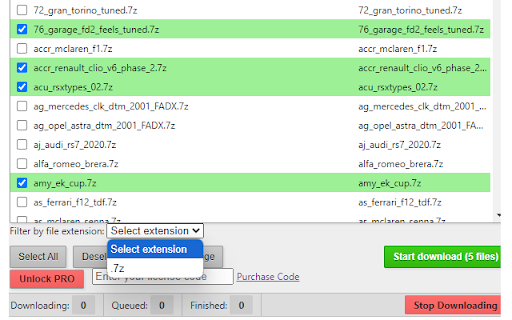
Download all files/links from any web page. Includes URLs direct download and Bulk Link Scraper for multiple pages! 🔗 All Links Downloader is a feature-rich yet easy-to-use extension designed to simplify the process of bulk downloading content from any webpage. Whether you're a researcher, designer, developer, or just a curious browser, this extension helps you quickly extract and download all types of files — including 📁 documents, 🖼️ images, 📄 PDFs, 🎥 videos, 📦 ZIP/RAR archives, and more — directly from the web with just a few clicks . 🧩 The extension integrates smoothly into your browser with a clean, user-friendly interface. Even if you're not tech-savvy, you'll find it incredibly easy to use. Just click the extension icon, and it instantly scans the current webpage, detecting and listing every available link. From there, you can filter and select exactly what you want to download — whether it's only images, videos, compressed files, or other formats. ⚡The latest version of All links downloader also features a Bulk Mode feature that allows you to scan all pages of a website or a list of URLs, then search for and download all files from those pages in batch mode. 🔍 The powerful filtering system allows you to refine your download list based on file types, file name or extensions (like .jpg, .pdf, .zip, etc.), giving you full control over what gets downloaded. This ensures you only get the files you need, saving time and bandwidth while avoiding unnecessary clutter. ⏳ Custom Download Delay You can set a custom delay between each download ⏱️. This is especially useful when downloading a large number of files, as it helps prevent overwhelming your network, reduces server load, and avoids triggering anti-bot protections on certain websites 🚦. Just set your preferred delay in seconds, and let the extension handle the rest — smoothly and responsibly. 🛠️ Whether you're backing up resources, collecting research materials, or just saving content for offline use, All Links Downloader offers a fast, flexible, and reliable solution to streamline your workflow. > One-click scan and extraction of all links from any webpage > Bulk download of files including images, PDFs, videos, archives, and more > Bulk Scraper mode: to scan an entire website or a list of URLs and download all files from those pages > Direct URLs downloader: import or add a list of file URLs and the download all that files in batch mode > Smart filtering by file type or extension > Save files with their original file name or with their description Lightweight, efficient, and easy to use Upgrade your downloading experience — install All Links Downloader today and take full control over the content you collect from the web! 🌟 NOTE: Free version has following limitations > max 7 downloads from Single Page tab > max 25 downloads from Bulk Mode tab Upgrade to PRO version to download UNLIMITED files.

Batch Link and File Downloader
Download all files / links from the current webpage. It supports pdf, documents, archives, images, video and other media file. Finds and downloads all files from any webpage with just one click. Perfect for bulk downloading PDF files, documents (Word, Excel, Powerpoint, etc.), images (jpg, png, gif,etc) , archives (zip, rar, tar, etc.), and more. ✨ Key Features 🔍 Smart Detection - Automatically finds all downloadable files on any page ☑️ Selective Downloads - Choose which files to download with checkboxes 🔄 Background Downloads - Close the popup, downloads continue running 🛑 Stop Anytime - Cancel downloads with accurate progress reporting ⏱️ Configurable Delays - Be respectful to servers (0-5 second delays) 📊 Real-time Progress - Visual progress bar with file counts and percentages 🎯 File Filtering - Filter by Documents, Archives, Media, or Code files 🎨 Modern UI - Clean, responsive interface

AA40 Multi Link Downloader
Download multiple files at once from any webpage. Filter by type, select what you need, and download in bulk. Fast and free! Tired of clicking "Save As" dozens of times? Download multiple files from any webpage with just a few clicks! ⚡ Bulk Downloads - Scan any webpage for downloadable links - Download dozens of files simultaneously - Save hours of repetitive clicking 🎯 Smart Filtering - Filter by file extension (PDF, ZIP, JPG, MP3, etc.) - Find exactly what you need instantly - Comma-separated filters: "pdf,zip,docx" 📊 Perfect For: - Researchers downloading academic papers - Students collecting study materials - Designers grabbing image galleries - Anyone who needs to download multiple files 💡 HOW TO USE: 1. Visit any webpage with downloadable files 2. Click the AA40 extension icon 3. Click "Scan Page for Links" 4. Filter by file type (optional) 5. Select files you want 6. Click "Download Selected" 7. Done! Files start downloading 🌟 PRO TIPS: - Use filters like "pdf" to find only PDFs - Enable "Save without prompting" for faster downloads - Works great with file hosting sites, galleries, and document libraries Created with ❤️ by aposenteaos40.org - Tools for financial independence Need help? Visit aposenteaos40.org for support and more free tools!

Basic File Mass Downloader
Basic File Mass Downloader is a lightweight extension that lets you: ✅ Automatically collect and download all file links (e.g.… Basic File Mass Downloader is a lightweight extension that lets you: ✅ Automatically collect and download all file links (e.g. .pdf, .docx, .zip) from the current page ✅ Filter downloads by file extension (you choose which types) ✅ Stay in control — no background collection or data tracking ✅ Free version allows up to 10 files download, paid version – unlimited. This tool is designed for simplicity and speed — perfect for students, researchers, or anyone who frequently downloads from webpages.

Simple mass downloader
A lightweight batch download manager with flexible filtering and mass-renaming options for easier, more efficient downloads. Simple Mass Downloader is a lightweight and unobtrusive Chrome download manager and batch/bulk/mass downloader. GOOD FOR: Downloading multiple resources from the web: ● Extract only the desired links from web pages using an advanced filtering system. ● Generate better file names using contextual information from the corresponding links (name masks). ● Organize downloads into custom directories using Favorite Folders or Automatic Folders. NOT SO GOOD FOR: ● Downloading streaming media or embedded videos. ● JavaScript-heavy websites where download links are generated on the fly after user interaction. In such cases, the extension cannot detect the links in advance. ● Extract links from the active tab, multiple open tabs, or selected text on web pages. You can also import links from the clipboard, a local file, or a pattern URL. ● Advanced filtering and mass-renaming capabilities using various name masks. You can also define custom categories for resource filtering. ● A dedicated thumbnail grid view for images. Images can be sorted by size or filtered by width and height. ● Flexible download management: a) Pause, resume, and open downloaded files. b) Set server limits or enable sequential downloading mode. ● Development and testing are mainly performed on Windows, with limited testing on Linux. The extension has not been tested on macOS. ● Before using the extension, verify that the “Ask where to save each file before downloading” option is disabled in Chrome’s download settings. Otherwise, multiple “Save As” dialog boxes will appear, defeating the purpose of a mass-downloading extension.
