
gkihajmjffefinkmpokfepcdbhnpflee

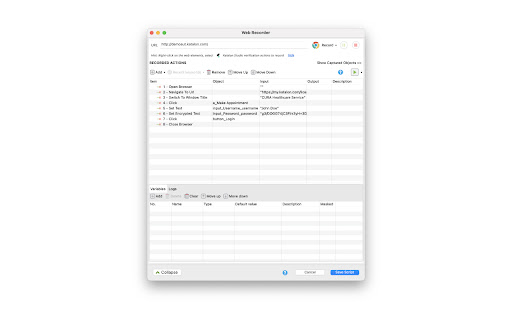

Record, Spy, and Smart Wait all in one extension. This optional Chrome extension offers an alternative to the default option using unpacked extensions with an anonymous profile of features like Record, Spy and Smart Wait in Katalon Studio. Only download this extension if you are receiving the message when using Katalon Studio: “Loading the unpacked extensions is disabled by the administrators”. Before downloading and installing Katalon Compact Utility, make sure you are using the Chrome profile that you intend to use for the features. You can check which Chrome profile is currently active on the right side of the address bar on your browser. To use Katalon Compact Utility with Katalon Studio, follow our official document: https://docs.katalon.com/docs/author/record-and-spy/webui-record-and-spy-utilities/katalon-compact-utility-for-katalon-studio

Stylus
Redesign the web with Stylus, a user styles manager. Stylus allows you to easily install themes and skins for many popular sites. Redesign your favorite websites with Stylus, an actively developed and community driven userstyles manager. Easily install custom themes from popular online repositories, or create, edit, and manage your own personalized CSS stylesheets. * Versatility of theme installation options. Stylus supports installs from popular online repositories. Additionally, styles can now also be installed from .user.css or .user.styl URLs (see Usercss format documentation in our github wiki). * A backup feature for your entire database of installed styles which is compatible with other userstyles managers. * An intuitive and configurable automatic update function for installed styles. * A highly customizable UI, including theming, optional layouts, icon and badge color choices, along with many other tweaks. * Two different optional code validators with user configurable rules. * Beta version: https://chrome.google.com/webstore/detail/stylus-beta/apmmpaebfobifelkijhaljbmpcgbjbdo * Source code: https://github.com/openstyles/stylus * Video tutorial: https://youtu.be/fCVvGwoF5cQ * Chat room: https://discord.gg/tzXVNJz * Frequently asked questions: https://github.com/openstyles/stylus/wiki/FAQ * Technical bug report: https://github.com/openstyles/stylus/issues * General discussion and bug report: https://add0n.com/stylus.html#reviews * Localization: https://www.transifex.com/github-7/Stylus/dashboard/ Stylus uses only a small subset of each permission. As you can see in WebExtensions API documentation or simplified tutorials, there's no way to apply any modifications to a web page without gaining the full access permission to that page. Stylus is mostly used to apply global themes, which is why it requests a global permission. In the future we might be able to implement a more granular approach but it's not exactly trivial. * Read and change all your data on the websites you visit - required for the style elements to be added into the page, not to access any of your data. Unlike other similar extensions, we don't find you to be all that interesting. Your questionable browsing history should remain between you and the NSA. Stylus collects nothing. Period.

Clear Cache
Powerful, user-friendly browser data management, right from your toolbar. ♻️ Clear your browser's cache and data with a single click ♻️ Fine-grained control over what gets cleared ♻️ Developed by an independent developer committed to privacy and performance Key Features: --------------------- ✅ One-click cache clearing ✅ Preview exactly what will be cleared ✅ Customize which domains are cleared ✅ Clear data from active tab only ✅ Customize time period to clear ✅ Sync settings across devices ✅ Schedule automatic clearing ✅ Clear web, app and extension data ✅ Import browser settings ✅ Dark/light mode Clear Cache Plus: ---------------------------- ♻️ Upgrade for advanced features including custom presets, per-data-type domain customization, and automated scheduling. Clear Cache remains free to use with ongoing improvements. Plus subscription supports independent development and unlocks premium features. Latest Changes: ---------------------------- Version 2.4.2, May 17, 2026 - Fix advanced domain filters not appearing for long lists of custom origins Version 2.4.0, April 15, 2026 - Added confirmation with preview of what data will be cleared - Changed how domain filters are applied for better clarity and more narrow - Fixed several edge cases with domain filters not applying correctly Version 2.3.4, December 9, 2025 - Improved handling of excluded domains in rare edge cases - Included and excluded domains are now case insensitive - Default to http:// instead of https:// for local domains, unless explicitly specified

SEO META in 1 CLICK
Displays all meta data and main SEO information for the best SEO SEO META in 1 CLICK is a tool that displays all meta tags/data and main seo information clearly. By using this tool, we hope you can better manage and improve your SEO and visibility on Internet We focus on displaying: ✔ title and its length, ✔ description and its length, ✔ URL (and meta-canonical url too), ✔ meta-robots, ✔ displaying headers in order of their appearance in HTML (H1, H2, H3, H4, H5 and H6), ✔ number of images with and without ALT, ✔ the number of links (internal, unique, ...) ✔ Open Graph and twitter social data ✔ Robots.txt and sitemap.xml ✔ and much more... (See printscreens) You can also via ETERNAL TOOLS analyse your site and know how improve it (html, css, Google Rich Snippet, PageSpeed...)

ColorPick Eyedropper
A zoomed eyedropper & color chooser tool that allows you to select color values from webpages and more. If you feel the need to alert the developer about a bug use the feedback forum instead of writing a review. Note: by default "Attempt to auto copy value to clipboard" disabled. You will be warned during install about a request for clipboardWrite permissions, but this is disabled by default until you enable it in settings because automatically overwriting the clipboard may be annoying. If you do use this setting you can decide whether to auto copy the hex or the rgb css. ColorPick needs permission on all websites so that it is at the ready when you need it. In order to use the tabs API this permission is required. Color pick does not abuse this permission and is highly configurable. You can always review the source code yourself, which is available online here https://github.com/qufighter/ColorPick PRs welcome! Please note that colors are picked from a snapshot of the page that is updated only when you scroll. To take a new snapshot press r or use the re-snap button. Sometimes if you just changed tabs, you may see a snapshot error - this is an intentional security feature. Press R or scroll to correct this, or exit color pick and try again. As with most extensions of this nature, it will not work out of the box on the web store, or on file:// pages. It will work on local file pages only after you "Allow access to file URLs" from the tools->extensions manager. However there is also an alternative feature "snap mode" that uses the active tab permission to take a screenshot anyway, which is then sent to a new tab where permission to run the extension may be granted, however you will have to click the extension icon again on this new tab at present. If you experience an issue, try the following: - Try a new website in a different tab and see if it works there - Try the same website in a new tab and see if that works - Reloading the extension or tab may sometimes be needed If you need to operate on unsupported pages try the desktop app version (mac+pc) at color-pick.com or if you are selecting colors from screenshots, images or photos try the mobile phone/tablet app for IOS and Android - search the store for "ColorPick" (which also includes color based mini games). If you're looking for a quick and easy to use color eye dropper with zoomed drag-able preview for fine tuning you've come to the right place. If you experience any bugs PLEASE report them using the feedback button, I want to fix them if they can be fixed. It has been reported that it may take a few tries before it starts working initially. You may have to refresh the page or re-load the extension. I have personally experienced bugs where mousemove event does not fire, etc, but then when I switch out of chrome and back, it starts working. There is little that can be done to fix this except be patient and try again. Keep in mind that your display's color space matters - if it or chrome is not set to sRGB (and restarted chrome) then some colors set to one value will pick as a different value (as if from a screenshot, which in some cases can have a similar effect). Color Pick attempts to use lossless PNG quality to detect colors. If you experience bugs or distorted snapshot of the page disable this feature to use JPEG quality. If your business is using this extension or the desktop app than you should urge them to purchase the appropriate license. Thank You, Sam ------------------------------------------- This program is a Color Picker, or an Eye Dropper, also a ColorPicker or EyeDroper depending on how you wish to spell it. It also contains webpage region magnification/zoom loupe features. Zoom features may help you to see pixel perfect alignment accuracy during web development adjustments. This extension may someday be supported by URL rewriting affiliate links. This may be disabled from options and is disabled by default. When you uninstall this extension you may be asked to complete a survey - you can disable this survey from options.
