
gkceaaphhbeanfciglgpffnncfpipjpa

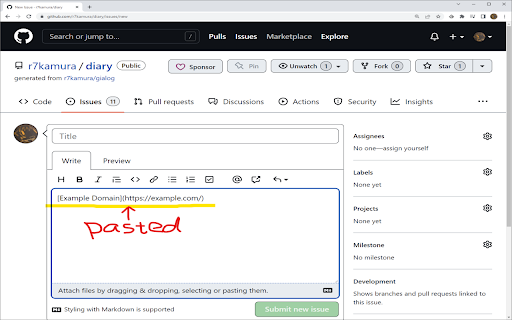
Click the extension icon or press the keyboard shortcut to copy link in Markdown format. The default keyboard shortcut is Ctrl + M. This can be changed from the browser's extension settings.

Copy as Markdown
Browser extension to copy hyperlinks, images, and selected text as Markdown The extension allows you to copy selected text on a page as Markdown with support for features including the following - Ability to copy links, images, and selected text as Markdown. - Linked images, will have options to individually select link or images. - Formatted text such as Italic, bold, strike-through, and inline code. - Unordered and ordered lists, with task lists support. - Tables, with respect to GFM. - Fenced code blocks, with language detection using info strings. Note: When copying links and images, Chrome doesn’t let you extract images alt text or anchors text content to be used in Markdown, instead the links themselves are used as link title. Firefox doesn’t have this limitation though. The extension requires the following permission from you for working. 1. `contextMenus`: to show option when right-clicking. 2. `activeTab`: to be able to access content on page. The extension can only write to your clipboard and not read from it in any way. File an issue at https://github.com/notlmn/copy-as-markdown/issues for bug reports or requesting new features.

Copy Rich Link
Copy the page title and URL as rich text. Copy the page title and URL as rich text. Useful for pasting links to Slack, Google Docs, etc. Click the extension icon or execute the keyboard shortcut to copy the link to the page as rich text. The default keyboard shortcut is Ctrl + Shift + L, and Command + Shift + L on Mac. This can be changed from the browser's extension settings. As a fallback, we also copy in plain text format in the form `"{title}" {url}`, so that if you paste where rich text is not available or paste explicitly as plain text (Ctrl + Shift + V on Windows), this plain text format will be pasted.

Copy Title and Url as Markdown Style
Copy the title and url of the page as Markdown style This extension enables you to copy title and url of current page as Markdown style with 1 click (or 1 shortcut key). Source: https://github.com/zaki-yama/copy-title-and-url-as-markdown Donation for the author: https://www.buymeacoffee.com/zakiyama

Copy as Markdown
Alt+C to copy selected web content as Markdown, support headings, links, images, tables and more. Use Alt+C (Option+C on Mac) to copy any web page as plain-text Markdown, preserving headings, links, images, code blocks, tables, and lists with perfect formatting! Ideal for working with LLMs, creating .md files, or sharing web content via messaging apps. When you copy something, your clipboard stores up to three formats: plain text, HTML, and RTF (rich text format). In browsers, it’s typically plain text and HTML. The app where you paste determines which format to use. This works fine with editors like Notion, which take HTML and convert it into their internal format to preserve structure. However, it’s frustrating when working with LLMs because their input fields often only accept plain text, causing you to lose important context like table structures, link URLs, and headings. Before this extension, I had to copy from a webpage, paste it into Notion, copy from Notion, paste it into Sublime, and finally paste it into the LLM interface. This Chrome extension solves the problem by using the same technology that powers markdown editors—a library called ProseMirror. It directly processes the selected HTML from your browser to generate Markdown and places it in your clipboard. All the processing happens securely in your browser, bundled entirely within the extension, ensuring your content is processed offline for complete privacy. Update • v0.0.6: Improved manifesto file and setup GitHub repo, please use the github repo for feature request or bug report etc. https://github.com/ghcpuman902/copy-as-markdown Roadmap • 2024/11/13: Conceptualized the idea • 2024/11/15: Prototype completed • 2024/11/19: Published TODO: • Improve handling of relative URLs • Add more customizable key combinations • Further beautify Markdown output, especially for tables
