
gjpheonblhjlkmhmkagacbjopagbpclo
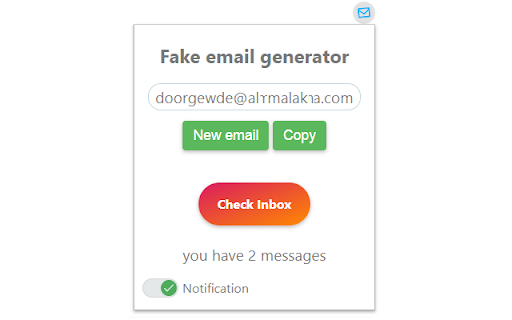
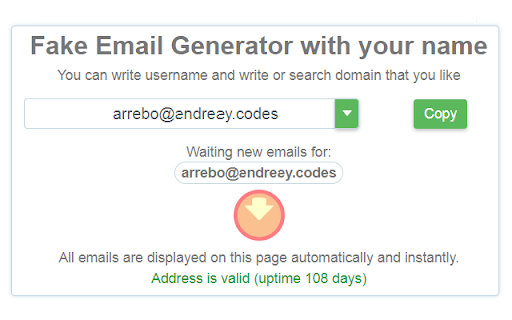
Unlimited number of mailboxes. Ability to create your own mailbox or use existing ones. Instantly receive mail and fight spam. Online email for different needs. Protect your primary email from spam and receive emails for temporary mail. You can also use your domain and make permanent mail without any registrations. Main features: - Unlimited number of email. - Large number of domains. - Notification of new email. - Your own email name. - Your own email domain. - There are no spam and viruses. - The email is displayed immediately without delay.

Free Unlimited Email Tracker for Gmail, No Signature | TrackMailBox
Free unlimited email tracker for Gmail. Real-time open & click tracking. No signatures, no branding, no limits. Free forever. TrackMailBox is a free, unlimited email tracking Chrome extension for Gmail. with no signatures, no branding, and no hidden limits. The best free alternative to Mailtrack, Snov.io, and MailTag. Know exactly when your emails are opened, how many times they're read, and when your links are clicked. All in real time, directly inside Gmail. Works with Gmail. Most email trackers either add embarrassing "Sent with [Tool Name]" signatures to your emails, cap free tracking at 10-20 emails per month, or lock basic features behind expensive paid plans ($10–$30/month). ✅ Truly free - no paid plans required for core tracking ✅ No signatures - your recipients never know you're tracking ✅ Unlimited tracking - no daily or monthly caps ✅ No branding on your emails - looks 100% professional ✅ No credit card required - install and start tracking in 30 seconds ✅ Invisible email tracker - completely undetectable by recipients Unlike Mailtrack (which adds a signature on free plans), unlike MailTracker by Hunter (which limits you to 20 emails/month), and unlike MailTag (which requires a paid plan for no-branding tracking) - TrackMailBox gives you everything for free. No catches. 👁️ Real-Time Open Tracking & Email Read Receipts Get notified the instant someone opens your email. See exactly when they read it and how many times they came back to it. Think of it as a free read receipt for Gmail - without the recipient knowing. 🔗 Link Click Tracking Know when recipients click the links inside your emails. Track which links get the most engagement. Understand what content drives action. 📊 Email Performance Dashboard & Analytics Analyze your email performance with a built-in dashboard. See open rates, click rates, and engagement patterns at a glance. Track email open history for every message you send. 🔔 Instant Desktop Notifications Receive real-time Chrome notifications and email open alerts when your emails are opened - never miss the perfect moment to follow up. Know the exact right time to send a follow-up email. 📧 Seamless Gmail Integration No separate app to open. No external dashboard to check. TrackMailBox integrates directly into your Gmail compose window and inbox - works natively inside Gmail as if it were built in. 🔒 Privacy First & GDPR-Aware We never store or read your email body content. We never sell your data to third parties. Your tracking data is encrypted. Minimal permissions - we only request what's needed. 👤 WHO IS TRACKMAILBOX FOR? → Sales professionals & SDRs - Know which prospects are engaged before you follow up. Close deals faster with real-time email open tracking. → Freelancers & consultants - See when clients open your proposals and invoices. Follow up at the perfect moment. → Recruiters & HR professionals - Track which candidates are reading your outreach messages. Prioritize warm leads. → Job seekers - Know if hiring managers opened your application email. Time your follow-ups strategically. → Startup founders - Track investor outreach, partnership emails, and pitch deck views. → Real estate agents - See when buyers and sellers engage with your listings and offers. → Small business owners - Track customer emails, follow-ups, and sales outreach for free. → Anyone who sends important emails and wants to stop guessing whether they were read. 1. Install TrackMailBox from the Chrome Web Store (takes 30 seconds) 2. Open Gmail and compose an email as you normally would 3. TrackMailBox automatically adds an invisible tracking pixel (no signature added - ever) 4. Get real-time notifications when your email is opened or links are clicked 5. View detailed open and click history for every tracked email in your dashboard Q: Is TrackMailBox really free? A: Yes. Core email open tracking and link click tracking are completely free with no limits. Free forever - no trial period, no credit card, no hidden upgrades. Q: Does TrackMailBox add a signature to my emails? A: No. Unlike Mailtrack/Mailsuite (which adds "Sent with Mailtrack" on free plans), TrackMailBox never adds any branding, signature, logo, or watermark to your emails. Your recipients will never know you're tracking. This is what makes us the best free Mailtrack alternative. Q: How does email tracking work? A: TrackMailBox adds an invisible tracking pixel to your outgoing emails. When the recipient opens the email and loads images, the pixel fires and you're notified in real time. It works like a Gmail read receipt - but invisible. Q: Is this a Mailtrack alternative? A: Yes! If you're looking for a free Mailtrack alternative without signatures, TrackMailBox is the best option. Unlike Mailtrack, we don't add branding to your emails on the free plan, and we don't limit how many emails you can track. Q: Does it work with Google Workspace (G Suite)? A: Yes. TrackMailBox works with both personal Gmail accounts and Google Workspace (formerly G Suite) business accounts. Q: Can I track emails on my phone? A: The Chrome extension works on desktop. Tracking data is available anytime you open Gmail on any device. - We never read or store your email content - We never sell your data to third parties - Your tracking data is encrypted - GDPR-aware practices - Minimal permissions - we only request what's needed - No external servers sending your emails - everything goes through Gmail's trusted infrastructure 🏆 COMPARE TRACKMAILBOX VS COMPETITORS - Mailtrack/Mailsuite: Adds signature on free plan, charges $10/mo to remove it → TrackMailBox: No signature, free forever - MailTracker by Hunter: Limits free plan to 20 emails/month, $30/mo for unlimited → TrackMailBox: Unlimited free - MailTag: Requires paid plan for no-branding, only 14-day trial → TrackMailBox: Free forever, no trial - Snov.io: Free but shares credits with email finder tool → TrackMailBox: Dedicated email tracker, unlimited - RightInbox: Only 5 tracked emails/month free → TrackMailBox: Unlimited free - Boomerang: Only 10 emails/month free → TrackMailBox: Unlimited free Get started in 30 seconds. Install TrackMailBox - the best free email tracker for Gmail - and never wonder "did they read my email?" again.

Inboxes: Create Disposable Temp Mail Addresses
Inboxes lets you quickly create & delete temp mail addresses. Stay private and stop spam with this disposable email generator Let's face it, we've all been there - whether its to access a recipe, or try out a "free" demo. Websites always demand your email address - and it sucks - because you know they'll spam you. So we made Inboxes App, a super easy to use browser extension which creates long lasting temporary email addresses for you. You can create new email addresses and delete them from within the extension, saving your real email from unwanted marketing messages 🎉 There's no sign up required, and Inboxes App has already saved our users from receiving over 12.7 million unwanted messages through the use of disposable email accounts. By using a long lasting temp mail generator instead of a regular temp email website, you keep access to the address for as long as you want, allowing you to control who you want to be able to contact you. While sites like 10 minute mail, Guerrilla Mail, mailinator and Temp Mail recycle short term emails, Inboxes lets you keep your address indefinitely offering you even more more privacy than a traditional temp mail.

Fake Email Generator
Create a temp email with Fake Email generator. Our temp mail generator offers anonymous, disposable addresses for daily use. Fake Email Generator – your reliable solution for creating disposable email and temporary inboxes. This powerful tool lets you generate a temp mail or temp email account in seconds, ensuring your real inbox stays safe from spam and unwanted attention. Whether you need a temporary inbox for quick sign-ups or a secure disposable account for online testing, Fake Email Generator has you covered. - Privacy is essential in today’s digital landscape. - Our 10minmail service provides a reliable way to protect your personal data. - Fast performance and a streamlined interface ensure you get a quality Fake Email Generator output every time. 1️⃣ Privacy protection – secure your real contact details 2️⃣ Quick setup – generate a tempmail instantly 3️⃣ Versatility – use for registrations, surveys, or testing Our tool supports various formats such as temp mail, temporary email, and even 10 minute mail options. It also offers additional variants like 10 min mail, 10 minute inbox, and alternative forms such as fakemail and fake email generator. This variety ensures that you can optimize your digital workflow without compromising on security. ▸ Instant Generation: Create a fake email address with one click. ▸ Auto-fill Functionality: Quickly populate online forms using your generated temp account. ▸ Blacklist Management: Easily exclude specific sites from auto-fill operations. ▸ Download Options: Save your incoming messages in standard formats. ▸ Unlimited Accounts: Generate as many temporary addresses as needed. When choosing Fake Email Generator, consider the wide range of applications it offers. For online shopping and social media, a temporary 10 minute email keeps your personal data secure. Developers and testers can benefit from creating multiple disposable accounts without the risk of using real credentials. 1. Generate: Use our random email generator to produce a temp account instantly. 2. Utilize: Apply the generated disposable address for sign-ups, forms, or testing. 3. Dispose: Once finished, let the temporary account expire or delete it manually to ensure no residual data remains. Fake Email Generator not only produces a temp mail but also offers variations like temporary inbox and disposable address that suit different scenarios. By integrating both high-frequency and low-frequency key phrases, our service is optimized to reach a broad audience. ⚡️ Advantages for Different Users: • For Casual Users: Avoid spam by using a temporary account during registrations. • For Professionals: Enhance privacy and maintain productivity with disposable addresses. • For Developers: Test functionalities without compromising real user data. • For Marketers: Use varied formats such as temp mail and 10 min mail to secure campaigns. Our tool is designed with an intuitive layout that minimizes learning time. The system supports different variants – including temp mail, anonymous fake email generator, temporary email, and even 10minutemail – to cover every possible need. This ensures that you are well-prepared for any scenario where privacy is paramount. ➤ Online registrations – safeguard your main contact ➤ Testing and development – create multiple disposable accounts ➤ Market research – participate in surveys without sharing personal details For those looking to streamline digital communication, Fake Email Generator provides a secure and versatile solution. By offering multiple variations, such as fakemail maker, the tool covers every aspect of temporary address creation. ❓ I've only heard of throwaway email – is this the same thing? 💡 Yes, Fake Email Generator is another name for services that provide temporary and disposable inboxes. It is also known by names like temp mail, 10minmail, fakemail, burner mail, trash mail, and others. These terms all refer to the same type of service. ❓ What happens if I need a mailbox for longer than 10 minutes? 💡 A tempmail allows you to use your temporary accounts for as long as you need. They remain active until you choose to delete them, providing flexibility beyond the standard 10 minute mail duration. ❓ Can I disable the auto-fill feature for specific websites? 💡 Yes, you can add websites to a blacklist to remove the auto-fill functionality from those sites.

Temp Mail - Instant Disposable Email Generator
Create instant disposable email addresses. Protect privacy, stop spam, maintain anonymity with secure temporary emails. 💡 Features 🚀 Instant Email Generation - Create disposable emails in seconds 📱 QR Code Sharing - Share emails across devices easily 📬 Real-time Inbox - Auto-refresh every 10 seconds ⚡ One-Click Actions - Copy, reset, access inbox instantly 🛡️ Spam Protection - Keep your real email clean ⚙️ How to Use 1. Click Extension Icon - TempMail opens with a temporary email ready 2. Copy Email - Click "Copy" button to copy the address 3. Use Anywhere - Paste in websites, forms, registrations 4. Check Inbox - Click "Inbox" to see received emails 5. Generate QR Code - Click QR icon for mobile sharing 6. Reset - Click "Reset" for a new email address 📖 Perfect For Account Registration - Social media, shopping, newsletters Email Verification - Confirmations, password resets, 2FA Privacy Protection - Avoid spam and data collection Testing - Developers creating test accounts 🔒 Data Privacy No Registration Required - Start using immediately without accounts Local Storage Only - All data stored locally on your device No Personal Data - We never collect or store your information Secure Communication - HTTPS-only with encrypted data transfer Auto-Expire - Temporary emails automatically expire for security 👋 Contact Website: https://tempmail.cv Support: Available through Chrome Web Store reviews Protect your privacy with TempMail - never worry about spam again!
