
gjmgjfohldfchecccakdeddbebjonccl


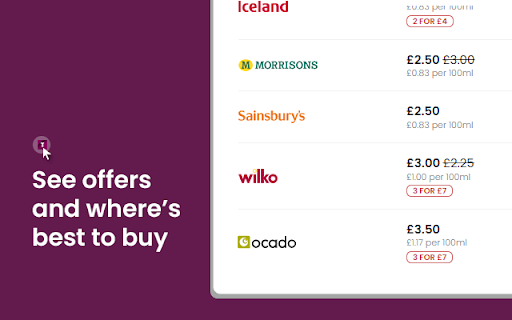
Compare over 10,000 products across supermarkets and shops. Your free online price comparison website. Introducing Grocery Price Check by Trolley.co.uk - a first-of-its-kind scanner that helps you save money on your groceries. Grocery Price Check helps you easily compare supermarkets to get the cheapest prices for your favourite groceries. Once added to your Chrome, you’ll be able to instantly compare prices at: Here’s the clever part… You don’t have to do anything differently! Simply shop as usual at one of the above stores’ websites and visit a product. From there, simply click Grocery Price Check in your toolbar and see the best prices within an instant. A single click is all it takes! Don’t forget, every price is updated every day - that’s over 100,000 possible groceries that you’ll be able to scan and compare!

Property Tracker
Tracks changes to property prices on the RightMove website. If you would like to support this extension, why not consider becoming a Patreon? https://www.patreon.com/codemwnci Property Track allows you to track price changes on popular property websites, currently supporting the RightMove website. It allows you to see how properties you are searching for have changed in value since first coming on to the market. It discreetly adds an image next to the price on search result page, indicating if the price has risen, fallen or stayed the same since first coming on to the market. By hovering the mouse over the icon, you can see details of how the price has changed over time. This extension collects the price information every time you and other users visit the websites, so the more users, the more accurate the information will be, so share this tool with your friends! You can read the privacy policy here --> https://codemwnci.github.io/propertytrack-privacy.html Update: Version 1.1 - Now also shows the price changes on the property page, not just the search list page. Thanks Darren for the suggestion. Update: Version 1.1.1 - Updated with RightMove site changes. Prices are now shown on single property pages again. Update: Version 1.1.4 - Google changed some rules, so I had to update to continue to all the extension to work, also made some changes enforced by a few RightMove site changes. Should all work again now. Update: Version 1.1.5 - RightMove site changes, spotted and patch supplied by Oliver Jowett. Thanks! Update: Version 1.1.7 - My hosting company became very expensive, so have moved to Amazon Web Services. Have also fixed a few rendering issues in the latest version. Update: Version 1.1.8 - Fixed a bug where some times the icons and price changes were not showing up. Update: Version 1.1.9 - Fixed a bug following RightMove's most recent updates. However, this now does require the extension to click on the unauthorised sources (because the extension does not originate from RightMove) Update: Version 1.1.16 - Behind the scenes changes to make sure the extension doesn't break when Chrome makes its upcoming changes (Chrome v85 onwards) Update: Version 1.1.18 - Updated to the new ManifestV3 required later this year by Google. No meaningful changes to PropertyTracker, as property tracker was already compliant with the new stricter rules.

AZInsight Amazon FBA Product Analytics Tool
AZInsight, the ultimate Amazon Product Research tool allowing Amazon Sellers to stay on top of the game by analyzing deals AZInsight is the all-in-one Amazon Product Research tool trusted by thousands of sellers to dominate the marketplace with powerful insights. Why juggle multiple extensions when AZInsight combines everything you need into one seamless solution? With AZInsight, you'll also get the ScanEZ mobile app, enabling product research on the go, and the asinzen Insight Google Sheet add-on for advanced data integration. Together, these tools create the ultimate solution for Online Arbitrage, Retail Arbitrage, Private Label, and Wholesale sellers. - Mobile Research with ScanEZ: Take your product research anywhere with the ScanEZ mobile app. - Google Sheet Integration: Connect Amazon and historical data to Google Sheets with the asinzen Insight add-on. Update supplier prices directly in your sheet, making it easy for OA sellers to stay on top of changing costs and analyze profit margins in real time. - Eligibility & Risk Alerts: Detect hazmat items, seller restrictions, and brand IP risks. - Comprehensive Fee Calculations: View FBA/FBM fees and customize costs. - Advanced Analytics: Track buy/sell history, estimate sales and revenue, and forecast slow movers. - Team Collaboration: Multi-user sub-accounts to streamline team performance. - Powerful Tools: Variations Viewer, Inventory Stock Checker, and much more. Start your FREE trial today (no credit card required) and experience the future of Amazon product research.

Propbar - Property Data Enhancer
Enhances property data on Zoopla, Rightmove, OnTheMarket and other property websites. Propbar - The Smarter Way to Explore Property 🌟 Propbar is the one-stop solution for obtaining comprehensive property information as you browse UK property portals. Our cutting-edge extension equips you with an extensive array of data to enable you to make well-informed decisions. Whether you're a real estate agent, property investor, home buyer, solicitor, or property professional, Propbar is tailor-made to cater to your every need, transforming the way you view the property market and make decisions. It's truly a must-have. Features you'll love: 🧠 AI Summarised Property Data: Get concise, relevant information at a glance 📊 Market History: Access historical listings, agent details, and price changes 📅 Timeline: Visualise the property market with an intuitive interface 🕰️ Time Machine: View historical property images and floor plans 🌍 Area & Demographic Information: Understand the neighbourhood and local property market better 🔍 In-Depth Comparables: Compare properties with ease and precision 🚦 Planning Constraint Health Checks: Identify potential issues before they arise 🍃 EPC: Review current and past energy performance certificates for properties Coming Soon: 🏘️ HMO Register: View local HMOs on a map and compare non-HMO property prices 🔨 Planning Permissions: Property and local area planning permissions Enhance your property browsing experience with Propbar, the ultimate tool to revolutionise the way you navigate the property market.

FBA calculator for Amazon Sellers : SellerApp
Is FBA the better choice for a product or FBM? Analyze profits with a single click . A trusted choice by 6-figure Amazon sellers. Researching and calculating the cost of goods sold, shipping fees, Amazon fees, and other expenses is crucial for your business. Understanding your true profit margins per unit ensures you make informed decisions, maximize profits, and scale your business successfully. A. Why use the SellerApp Amazon FBA Calculator? - The free Amazon FBA calculator provides multiple benefits for Amazon sellers, including: 1. Estimating all expenses upfront, including Amazon FBA fees, shipping charges, and seller fees. 2. Choosing products with lower fees to maximize profit margins. 3. Determining exactly how much you'll earn per sale, including total revenue and net profit. 4. Evaluating whether a product is worth selling by comparing expected revenue and costs. 5. Deciding between FBA and FBM based on estimated fees and profitability. Additionally, the FBA calculator extension gives you quick insights into: 1. Net profit 2. Net margin 3. Return on investment (ROI) B. How to use the SellerApp FBA Calculator? - If you're wondering how to use the FBA revenue calculator Amazon, follow these simple steps: 1. Install the SellerApp Amazon FBA Fee Calculator. 2. Visit Amazon.com and open the product listing you're interested in. 3. Launch the SellerApp FBA calculator for Amazon sellers. 4. Enter key cost factors, such as Cost of Goods Sold (COGS), shipping fees, fulfillment fees, and storage fees. The calculator will instantly generate your net profit, margin, and ROI, helping you make data-driven decisions. A. Is the FBA calculator free? - Yes! The SellerApp Amazon FBA calculator is 100% free to use. Just click the "Install" button to get started. B. Is the Amazon revenue calculator accurate? - The SellerApp FBA revenue calculator uses real-time data to provide highly accurate estimates. However, actual costs may vary due to Amazon’s dynamic pricing and fee structures. C. Is there any hidden cost for the Amazon seller fees calculator? - Absolutely not! The Amazon FBA fee calculator is completely free. D. How do I calculate the profit margin on Amazon FBA? - To calculate your profit margin, subtract all costs (COGS, fulfillment fees, and other expenses) from your total sales, then divide by the total sales price. Amazon determines FBA fees based on three key factors: product weight, size (dimensions), and category. You can learn more about the Amazon FBA price calculator and fee breakdown in our blog. Don't miss out on maximizing your profits! Use the SellerApp FBA Calculator today. For any questions, contact us at support@sellerapp.com.
