
giodggilgkidjieneifhmiidfgeefgdj


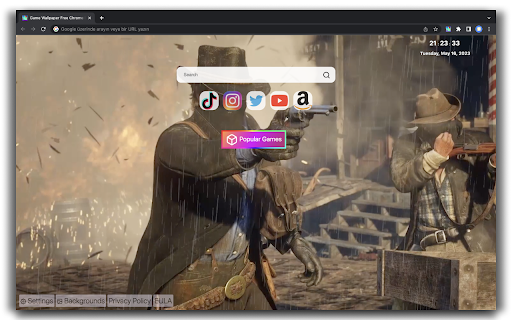
Customize your new tab with the popular games wallpaper extension and display your favorite game in the background. Beautify your new tab page with a useful, beautiful and fun theme. Game Wallpaper New Tab is here to enhance your new tab experience. Choose the background theme of your favorite game, make your daily trip quickly thanks to the social media icons. Click 'ADD TO CHROME' to install the Game Wallpaper New Tab extension. Main Features: * Choose from among many game background images and change them * Select preferred background change feature from settings menu * Quickly access your social media accounts * Popular games menu for fun * Follow the time, date and day information from the top right * Search the internet quickly and accurately using the search box in the middle top Note: For the best experience, click the "Keep changes" button after installing Game Wallpaper New Tab. This will show Game Wallpaper Theme on every new tab as intended. ➤ Search Box: You can use the search box in the middle to search on the website www.tabssearch.com and access search results provided by Google. www.tabssearch.com is a search engine website designed for the best results. Enter your search terms, and the most relevant results will be displayed instantly. To see more detailed results, narrow down your search for social media, images, news, videos, music, shopping, etc. In your image searches, you can use the multiple filter features to find the desired image more quickly. The image search filters include License, File Type, Color, Type, and more, allowing you to conduct detailed image searches. ➤ Background: Game Wallpaper New Tab offers a selection of backgrounds with many games directly in the new tab. Change background images with few clicks from new tab. ➤ The Game Wallpaper New Tab theme contains the background image of the following games: The Legend of Zelda: Tears of the Kingdom Minecraft Injustice GTA 5 (Grand Theft Auto 5) The Witcher 3 Wild Hunt PUBG: BATTLEGROUNDS Fortnite: Battle Royale fallout The Legend Of Zelda Breath Of The Wild Red Dead Redemption 2 Call of Duty Warzone Call Of Duty Modern Warfare For more information about privacy and Eula, visit: https://wallpapertab.com/privacy-policy/ https://wallpapertab.com/eula/

Humble New Tab Page
Redesigned new tab page featuring your bookmarks, apps, most visited, and recently closed in a custom layout. Features: • Simple, clean design • Highly customizable • Fast loading and lightweight This extension replaces the default new tab page. Drag and drop folders to create new columns or reorder them. The font, colors, spacing, and more can be customized from the options menu. The source code is available under the MIT license github.com/ibillingsley/HumbleNewTabPage Version 1.26 - July 2, 2023 • Added font-weight option • Replaced Apps folder with a link to chrome://apps Version 1.23 - December 2, 2018 • Added tooltips for truncated text • Added option to remember open folders Version 1.14 - May 11, 2014 • Reduced memory usage • Added option to set number of items for recently closed, recent bookmarks, and most visited • Added option for background image size • Added link to bookmark manager in folder context menu Version 1.12 - August 18, 2013 • Reorder apps via drag and drop Version 1.11 - August 3, 2013 • Fixed launching packaged apps (Google Keep) • Fixed launching file:/// and chrome:// URLs • Fixed Mobile Bookmarks folder not being removable • Disable weather if geolocation is denied • Default layout changed to 2 columns • Uninstall apps from the context menu • Hide Google Wallet Service from apps Version 1.9 - December 30, 2012 • Uses geolocation for weather by default • Fixed bug with drag and drop • Added Chrome Web Store to apps Version 1.8 - November 9, 2012 • Redesigned options panel • Added several new settings • Performance tweaks • Source code released under the MIT license Version 1.7 - September 8, 2012 • Added custom CSS field for advanced users • Added option to hide Bookmarks bar and Other bookmarks • Added option to open links in new tabs • Support local file for background image • Weather errors fixed Version 1.4 - August 10, 2012 • Added option to disable the weather and other special folders • Minor bug fixes Version 1.2 - August 8, 2012 • Added apps, most visited, recently closed, and weather • More flexible layout with unlimited columns • Open all links in folder from context menu • Color themes and new default style • Added smooth animation and highlight shadow • Drag and drop to reorder folders and columns • Background image support • Bug fixes • New name (formerly New Tab + Bookmark Tree)

vToad New Tab Page - Custom Live Wallpaper Engine, and more!
Upload your own live wallpapers for your vToad New Tab Page, the experience is yours! 🚀 IN BETA — NEW THEME COLORS, REQUESTED FEATURES, AND MORE! vToad turns your New Tab into a visual playground by letting you upload your own videos, GIFs, and images as live wallpapers. It has pleasing and satisfying UI while being customizable and made to feel personal — let the theme colors match your media automatically or set your own theme colors to make it yours! (Brave, Opera & Opera GX users — please scroll to the bottom for setup notes and Opera video guide.) I’m a solo dev who built this with love, based on feedback and feature requests from users like you. If you enjoy vToad, leaving a review or sharing it means the world. Thank you! 💚 /////////////////////////////////////////////////////////////////////////// 🆕 What's New in vToad 0.0.0.5 (6/21/2025) Major additions & improvements: 🐸 Image & GIF Upload Support — Not just video anymore! 🐸 Manual Background Preview — Instantly see what your tab will look like without refreshing 🐸 Auto Theme Now Supports Light or Dark Mode! 🐸 Manual Theme Upgrade — Pick a Main Color and an Accent Color 🐸 Clock Customization — Move it anywhere, resize it however you like 🐸 Search Bar Change — Now uses your browser’s default engine (due to updated Chrome extension policies) 🐸 Quality of Life Tweaks — smoother sliders, smarter auto-theme colors, updated popup 🐸 Btw I created a reddit page for any support, wallpaper resources, and for just sharing your new tabs pages! Check it out at r/vtoad!

Drop Tab
Install Drop Tab - a custom New Tab with beautiful wallpapers and backgrounds to make your day! Having a bad day? Having trouble concentrating? Use this extension to get the most out of your day! Cheer up and focus with amazing color and widgets! By clicking “add to Chrome”, I accept and agree to installing the Drop Tab extension and setting Chrome New Tab search provider to Microsoft Bing as described by the service in the Terms of use and Policy. 📌 Drop Tab is a cheerful extension that will change the importance of your browser and help you to use it in a completely different way. 📌 If you enjoy the beauty of the drops, the background on each new tab will wow you. You may select from a number of lovely backdrops. You are free to modify it whenever you wish. These wallpapers are intended to spark your imagination and improve your day! 📌 Aside from the backgrounds, the screen displays a number of functions. We incorporated a clock function to ensure that you are always aware of the time. You have the option of dividing your clock into 12 hours or using the standard one. It's vital not to lose track of time, especially if you're swamped with important activities. 📌 Another basic but vital tool is the weather feature. If you have it on your tab, you can check the weather and arrange your duties and leisure time accordingly. In case you are not from the US, we got you covered! There is an option on click so you can change from Fahrenheit to Celsius in a second! 📌 In the middle of the screen, just there where you can see our logo, we made a feature so you can search for anything that comes to your mind instantly. If the logo is too much for you, you can make it less visible by using opacity option in settings. Learn all about our Privacy Policy and Terms of Service by visiting these links: PP: https://droptab.net/privacy-policy.html TOS: https://droptab.net/tos.html 📌 We created a page especially for you so you can contact us and ask any questions. You just have to click on this page https://droptab.net/#contact and fill a quick form about anything that interests you or use the information below to approach us: - By mail: Girema Holdings Limited Karaiskaki 13, 3032 Limassol, Cyprus - By email: info@giremaholdings.com We do not recommend uninstalling this joyful extension- but there is an option if you are willing to remove it. Follow these steps: 1. In the Chrome Icon menu - click on the three lines/dots at the top-right corner and click on Add-ons 2. Select Extensions 3. Click on the Remove button to complete the uninstallation when you find Drop Tab 4. Click remove again in the pop-up 5. That's it. You have uninstalled this extension successfully.

Gameograf ONE - Live Wallpapers
Transform your new tab with animated live wallpapers. Browse Gameograf gallery & set any wallpaper instantly. 100% FREE Gameograf ONE – All-in-One Chrome Live Wallpaper Bring your favorite wallpapers to your desktop with a single click! Once installed, the extension opens gameograf.com/wallpapers. Hit the “Set as Wallpaper” button on any wallpaper you like, and your Chrome background updates instantly. Simple, fast, and interactive! Extension Features 🍥 Dynamic HD looped live wallpaper scene. 📰 News Feed Bar – Stay updated with trending anime, gaming, K-pop, and entertainment news. 🔗 Popular Shortcuts – Quick access to YouTube, Netflix, ChatGPT, Amazon, and more. ➕ Custom Shortcuts – Add your favorite websites for instant access. 🔍 Search Bar – Works seamlessly with your default search engine. 🕒 Clock & Date – Minimalist, always-on time & date widget. 📝 Sticky Notes – Colorful, draggable notes on your new tab. 🔔 Notifications – Get alerts about new wallpapers & features. 📧 Google Apps – One-click access to Gmail, Maps, Drive, and more. 🤖 ChatGPT Widget – Ask questions and get instant AI-powered answers. ✅ To-Do List – Organize your daily tasks directly on your new tab. 📅 Calendar Tool – Keep track of important dates. 🧮 Calculator – Perform calculations without leaving Chrome. ⏳ Timer – Built-in countdown for productivity or breaks. 🛠 More Tools – Includes privacy settings, uninstall guide, and support. Affiliate Policy Notice When installed, this extension opens a new tab at https://gameograf.com , where you can explore similar themes. Some links on our website, including Amazon links, may include affiliate partnerships, meaning Gameograf.com may earn a small commission if you purchase through them. These commissions help us maintain and improve our free extensions.
