
gibodibakfcbemghaghlmpkebogccoii
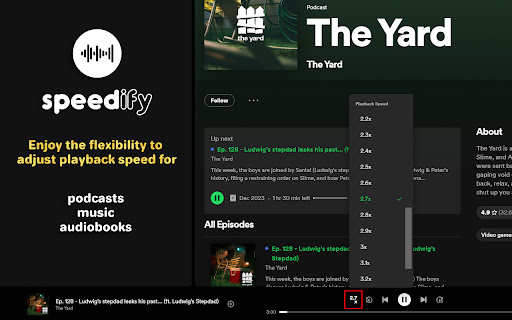
Restore playback speed control in the Spotify Web Player with Speedify. Open source: github.com/edenb-dev/Speedify Speedify restores playback speed control in the Spotify Web Player, even when you're not logged in. Adjust playback speed for podcasts, music, or audiobooks and customize your listening experience at your preferred pace. This extension is an independent project and is not affiliated with, endorsed by, or sponsored by Spotify AB. Spotify is a registered trademark of Spotify AB. **** 🛠 Updates 🛠 version 1.0.4: - Chrome Page: Updated extension branding and description for compliance and clarity. version 1.0.3: - Fixed: Resolved an issue where the control panel for adjusting playback speed was not created / detected on slower PCs. - Fixed: Updated speed control functionality to apply to all detected media elements, ensuring proper playback speed adjustment across multiple audio/video elements. version 1.0.2: - Fixed: Resolved a visual bug where the playback speed controller was not displaying in the menu. version 1.0.1: - Fixed: Resolved a visual bug affecting check mark styling in the playback speed control menu.

Lyrics for Spotify
This is an unofficial extension that puts back the Spotify Lyrics! It puts back the lyrics for us. Look for the mic icon and click on it, that's it :D NOTE: This extension uses free resources and can be unavailable for a while when You first open Spotify. Yeah yeah, its kinda sad, but this is a simple extension made initially for myself :P

Chorus - Spotify Enhancer
Enhance Spotify with controls to save favourite snips, auto-skip tracks, and set global and custom speed. More to come! 👋 Welcome! I hope you enjoy using chorus as much as I do building it! ⭐ Please leave a review/rating and share if you find it useful. For community, support, feature requests, or bug reports: Discord: https://discord.gg/6nwYZsBw8G (most active & quick to respond) Google Forms: https://forms.gle/hxUed8wcfYUoYBeQ7 Github: https://github.com/chorus-studio/chorus-dev This is an open-source project—your support (feedback, feature ideas, bug reports, reviews, ratings) is greatly appreciated and motivates me to maintain and build new features! Become a supporter to support the developer! I release updates semi-frequently, so check for new features often! Join the discord for questions, issues, requests, and just music sharing! Let's build a community for music lovers! 🚀 ✅ Apply pitch shifting and semitone (key) changes to audio ✅ Save Favourite Track Section – Replay your favourite part of any song or podcast. ✅ Custom Equalizer Effects - Select from a wide range of equalizer presets based on Spotify's own and some custom common ones. ✅ Custom Reverb Effects – Apply unique audio effects like mufflers, filtered phone, or drum reverb. Additionally, common simulated reverbs like bathroom, large room, arena, etc, are available. ✅ Playback Audio Controls – Set custom rate, pitch, and semitone (key) for songs, podcasts, and audiobooks. ✅ Block Songs Forever – Skip unwanted tracks in albums, playlists, and queues. ✅ Artist Discography Playlists – Create playlists from an artist’s full discography. ✅ Share Your Snips – Generate and share links to your saved snips (future social sharing support). ✅ Advanced Looping - Toggle between Infinite & Counter Loop. Counter Loop allows for looping a track or snip a set amount of times before going to next track. ✅ Keyboard Shortcuts – Control playback, skip tracks, toggle features, and more. For setup, see: How to set extension shortcuts: https://www.makeuseof.com/open-browser-extensions-keyboard-shortcut/ ✅ Track notifications - Show quick track info as a notification. Notifications can be auto-triggered on track change or shortcut key. Notification buttons can also be used to block and toggle track liked state (not supported on FireFox). ✅ PiP V2 - Upgrade to Spotify PiP. Quick access all chorus features and UI in a floating window. ✅ Volume V2 - Increased volume up to 300%. Toggle between linear and logarithmic volume scaling. ✅ Progress Bar V2 - Click to exact song position based on time. Also available in popup. ✅ Popup Theming V2 - Select theme for popup based on vibrant colours from track cover image Blocks tracks natively from the Spotify Queue (requires the Queue Sidebar to stay open, for now). If the sidebar is closed, the extension mutes and skips blocked songs until an unblocked one plays. Future update: Option to reinsert a blocked track if it hasn't been skipped yet. Stay tuned for more updates! 🚀

Speed Sail - Playback Speed Controls
Change the playback speed of videos and audio clips in your current tab. Speed Sail gives you the power to change the speed of videos and audio clips in your current tab! From slowing down videos or audio to help with learning a new language, to speeding up lectures to save time, Speed Sail has many uses to make your life easier! -Whats new: -Update 1.1.0 is here! -When opening the extension pop up the slider will now be set to the last speed you applied. This makes it easier to quickly re-apply a speed selection if it was lost by the page being refreshed or an ad being shown over the video. -Now values on the slider from 0.25 to 2 are incremented by 0.25, while values from 2 to 16 are incremented by 1. This makes the slider less cluttered with values and makes it easier to pick the value you want without skipping over it. -For update history vist: https://github.com/RyanHelgoth/speed-sail/wiki/Update-History -Features: -Applies speed change to every supported video and audio clip in the current tab. -Default speed button to quickly switch back to 1x speed. -Speed ranges from 0.25x to 16x. -Supports many websites including YouTube, Reddit, Twitter, and Facebook. -Note: -While Speed Sail works with most websites, some are not currently supported such as Spotify and SoundCloud. -Currently only supports English. -Credits: -Ryan Helgoth: Wrote all JavaScript, HTML, and CSS for Speed Sail. -References used can be found in code as comments at: https://github.com/RyanHelgoth/speed-sail -Jonah Farkasdi: Made logos and promotional image.

YouTube Music Speed Changer
Change and remember playback speed on YouTube Music Change and remember playback speed on YouTube Music, with added customization! Precisely control the playback speed of YouTube Music tracks. The extension remembers your chosen speed for individual songs, so you don't have to re-adjust it every time you listen. Now Playing Info: See the current song's title, artist, album, and album cover directly in the popup. Custom Backgrounds: Personalize your extension's popup with custom background images from a local file or URL. Adjust the brightness to perfectly match your aesthetic.
