
giaeafdicekjpckngfbdnehblmamlhpa

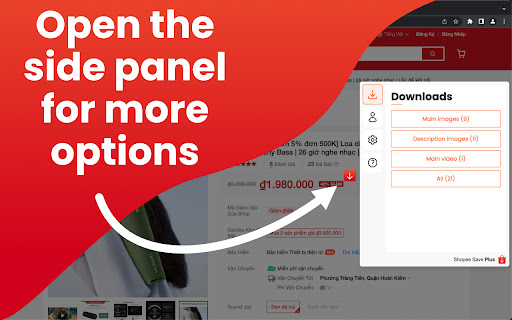


Easily save images and videos from Shopee with just a few clicks. No more wasting time manually downloading and organizing product images and videos - our extension does it all for you. This extension is perfect for anyone looking to streamline their dropshipping business. With the ability to quickly and easily save product images and videos, you can focus on growing your business and making more sales. So why wait? Install the Shopee Save Image & Video Downloader Chrome Extension today and start saving time and growing your business! You will be able to get product images in one click with the best quality possible! 1. Install the extension by clicking the “Add to chrome” button. 2. Open a Shopee product page. 3. Click on the download buttons. If you have any questions, or suggestions to improve the app, please let us know at support@mxnpro.ovh! The extension is NOT affiliated with or endorsed by Shopee.com

Shopee Images & Videos Downloader
Download product images and videos from any Shopee listing with a single click. No coding needed, fast download. Stop wasting hours manually saving images and videos! Our enhanced tool empowers you to: ✅ One-click to get images and videos from any Shopee product page ✅ Bulk saving of images in seconds - no more saving one by one ✅ Preserve Original Quality - Get images exactly as displayed (No compressed files) ✅ 100% Private - Zero servers involved, Shopee-compliant ✅ Install now and streamline your image-scraping process! Perfect For: 🛒 Sellers creating cross-platform listings 📊 Marketing teams designing print/web campaigns 📦 Suppliers building visual product databases 🔍 Researchers analyzing packaging trends Download and bulk save product images and videos can be done quickly with our tool, without any need for coding. Simply follow these steps: - Click "Add" to install the extension. - Open any product on Shopee.com. - Click the “download icon” on the top right of the product listings images. - All the product pics should be displayed on the popup window. You can save them one by one individually or as a bundled zip file. Is it free? Yes, it's free! You can access the basic features or upgrade to get more features. - All data is processed in your local computer, it is never passing through our web server, no one knows what you exported. - Shopee and all related marks are trademarks of Shopee.com, Inc. or its affiliates. This independent project was developed by ExtensionGod and has no relationship with Shopee Inc.

Lazada Save - Download Product Images & Video
Download Lazada Product Images & Videos. The most popular tool for Lazada! Save Lazada product images in one click! This extension allows you to easily save Lazada images and videos to your computer. You will be able to download product images in one click with the best quality possible! ----- GETTING STARTED ----- 1. Install the extension by clicking the "Add to chrome" button. 2. Open an Lazada product page. 3. Click on the download buttons next to the product images. ----- FEATURES ----- - Download main product images & video - Get the best quality image download ----- ADVANCED ----- - Watermark: Automatically adding watermark on image download. - Image Сompressor: Compress images with the best quality and compression. . . . If you have any questions, or suggestions to improve the app, please let us know at spcpapps@gmail.com!

AutoShopee Kit
Giải pháp cho nhà bán hàng Shopee Công cụ hỗ trơ bán hàng trên Shopee được phát triển bởi AutoShopee giải pháp cho nhà bán hàng. + Tạo FlashSale hàng loạt theo nhiều khung giờ + Sao chép từ Shopee => Lazada, Tiktok, Shopee + Tải Video, hình ảnh sản phẩm + Chặn các từ khoá cấm khi chat với khách hàng + Tạo nhanh Link tiếp thị liên kết (Shopee Affiliate Program) + Sao chép Video của sản phẩm khác => sản phẩm trên Shop của bạn + Tải đánh giá, hình ảnh, video sản phẩm

Tự động download tải ảnh video trên shopee
Hukata save là addon Tự động download tải ảnh trên shopee chỉ với 2 cú nhấp chuột addon hỗ trợ download các bức ảnh và video của sản phẩm bất kỳ trên shopee chỉ với 1 click. Ngoài ra còn có thêm các chức năng: - Chọn chất lượng ảnh. - Chèn logo vào ảnh tải về. - Chèn chữ vào ảnh tải về. - Cắt ảnh khi tải về. Hướng dẫn sử dụng chi tiết xem tại: https://hukata.vn/hoi-dap/huong-dan-cach-tai-anh-shopee-lazada-1688-hang-loat/
