
ghoikfcknkbbdfjeaaeoggoanmnkldip
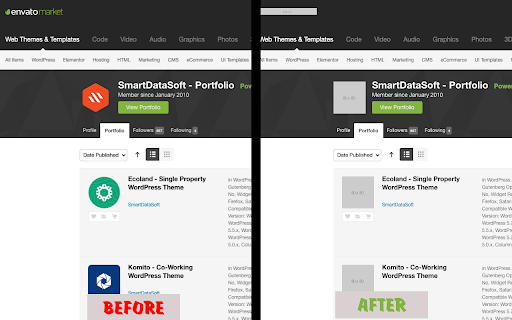
Replace Image With Placeholder images good for development and NSFW site research You can change all of the webpage image with placeholder image to enhance visibility and privacy while you are browsing.

Hide Images|Videos
Hides images/videos on websites. One-click to turn off the image display,You can set a whitelist for a website. This extension hides images and videos for less distractions. This chrome extension to hide all images and videos by default. Shows images again by clicking the "Add to Whitelist" button. Extension provides the following functions 1. Turn on the no-image mode with one click, and all websites will hide images and videos. 2. You can add the current website to the whitelist through the "Add to Whitelist" button, so that the webpage will display images normally without being affected. 3. You can manually set the whitelist on the settings page, add it by entering the website domain name, or delete the added website. 4. Use the shortcut keys Alt + H to quickly switch to no-image mode 5. If you have any questions or suggestions, you can send them to email and we will reply as soon as possible.

Hide or Blur Images
Hide or Blur all images with one click. Completely free and easy to use. - Can be easily toggled ON or OFF. - You can either choose to hide or blur the images. - Blur intensity can be adjusted. - Open source. Note: Developer of this extension has a strong arachnophobia.

Hide Images
Hide all images on the current website. Hide Images is a simple and efficient extension that lets you toggle the visibility of all images on any webpage instantly. Key Features: • Hide both regular images and background images with one click • Show images again just as easily • Works on any website • Lightweight and fast • No data collection or tracking • Perfect for: - Reducing distractions while reading - Saving data on limited connections - Improving page load times - Making text-heavy content more readable - Focusing on written content How to use: 1. Click the extension icon in your toolbar 2. A box with hide images button will be displayed. 2. Click on "Hide Images" and images will be hidden instantly 3. Click again to show images This extension is open source and respects your privacy - it doesn't collect any data or require any permissions beyond what's needed to function.

Image Blocker
An extension that simplifies browsing by letting you easily hide or show images with a single click. Image Blocker is a powerful Chrome extension designed to enhance your browsing experience by giving you control over the display of images on web pages, providing you with a cleaner and distraction-free browsing environment. 1. Works Everywhere: Whether you're browsing social media sites like Instagram, Twitter, Reddit, Facebook, watching videos on YouTube or reading a blog, Image Blocker seamlessly integrates with every web page. 2. Reduce Distractions: Say goodbye to distracting images with a simple click. Image Blocker lets you hide images effortlessly, allowing you to focus on what matters most. 3. Conserve Bandwidth: By blocking unnecessary images, Image Blocker helps conserve bandwidth, ensuring faster page loading times and smoother browsing sessions. 4. Protect Your Privacy: Maintain your privacy while browsing online. Image Blocker allows you to hide images that may contain sensitive content, giving you peace of mind as you explore the web. 5. Customized Experience: With Image Blocker, you can tailor your browsing experience to suit your preferences. Hide images by default or choose to reveal them as needed, creating a personalized and enjoyable online environment.
