
ghnkdbkeniegahdcjeeikjoaapakeomf
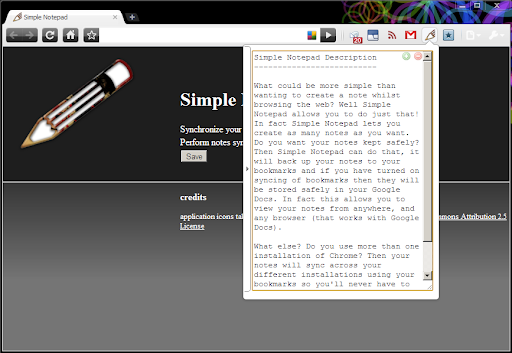


Make notes and sync them. What could be more simple? What could be more simple than wanting to create a note whilst browsing the web? Well Simple Notepad allows you to do just that! In fact Simple Notepad lets you create as many notes as you want. Do you use more than one installation of Chrome? Then your notes will sync across your different installations using your bookmarks so you'll never have to worry about keeping your notes in sync manually, or wonder what the note said on your other machine, it just happens! Ok so enough of the waffle here is a feature list: -- Create multiple notes -- Notes backed up to your Google bookmarks (this can be turned on/off in the Simple Notepad options) -- Notes synced across Chrome installations (requires Bookmark Syncing) -- Synchronizing on a schedule and manually force a synchronization. -- It will remember where you were editing the note and keep the cursor position and even the selection. -- Resize the note window to whatever size you like. -- Copy selected text to a note using a right click menu. -- Copy a link to a note using a right click menu -- Copy the page title and URL to a note using a right click menu -- Can choose between the classic Simple Notepad layout and an Opera Notes style layout

FuseBase Assistant - AI Chat and Agents
ChatGPT-like extension that answers questions and automate manual tasks. The FuseBase AI Agent is your intelligent assistant that lives in your browser and works across your tools. It’s designed to help you move faster, reduce manual work, and access the information you need — right when you need it. Unlike basic chatbots, this agent understands the screen you’re on, accesses your company’s real content, and provides guidance, notes, and workflow support in real time. 🖥️ Analyzes your current screen and delivers contextual help, tutorials, or SOPs 📂 Answers questions using your actual company docs, spreadsheets, and PDFs — not public data 📸 Captures and annotates screenshots, with tools to blur, highlight, and share quickly 📝 Takes notes automatically from meetings, calls, or written content you’re viewing 🎙️ Transcribes and summarizes video or audio files with clear action points Whether you're onboarding a new hire, supporting a customer, or just trying to find the right file, the FuseBase Agent brings the answers and support directly into your workflow — no need to switch tabs or tools. No hallucinations. No guesswork. Just smart help trained on your real work. 🌐 Works directly in your browser — no need to open a new tab 🎓 Use it for training, onboarding, support, sales, and more 🚀 Launch agents tied to specific roles, projects, or systems ⚡ Used daily by teams reducing manual work and increasing speed

Papercuts - Notes and Snippets
Save notes, snippets and memos in your browser. Easy to organize, copy, paste and sync between computers. No more need for paper by your computer, now you can store notes and text snippets inside your browser! Papercuts is a simple to use and versatile note keeping extension which can help you fill out forms more quickly. - Store unlimited, multiline notes and snippets with labels. - Add selected text to your notes from the context menu. - Paste into form fields from the popup, context menu or keyboard shortcuts. - Tabs to organize notes into multiple pages. - Customization options with adjustable width and color picker. - Instantly search for text across all of your notes. - Share notes between computers with Chrome sync. Papercuts is a free and safe extension to store notes inside Chrome, with no ads or tracking. See Options, Help after installing for tips on getting started.

Notepad Online
A simple online notepad that can sync between devices, edit notes as text and HTML, save notes to your computer and more. Notepad Online is a simple online notepad with support for rich text editing and multiple named notes. - Synced or local notes - Multiple named notes - Upload and download notes from your computer (as HTML or plain text) - Edit notes as HTML (rich text) or plain text - View HTML notes in any browsers and plain text notes all any text editor - Dark mode - Editing toolbar (text decoration, text alignment, lists, indention, text and background color, links, horizontal lines, and more!) - Auto save - Popup mode and full page mode - Unlimited note size (for local notes) - Compressed synced notes (for higher capacity)

Swifty Sticky Note
Swifty Sticky Note is a fast, secure, and straightforward extension designed for taking notes while browsing the web. It's all about speed and simplicity! Your data is stored exclusively on your browser's local storage, ensuring privacy and security. Side note: to enable or disable spell checker. Right-click on the sticky note --> Spellcheck --> Check the spelling for text fields.
