
ghnjojhkdncaipbfchceeefgkkdpaelk
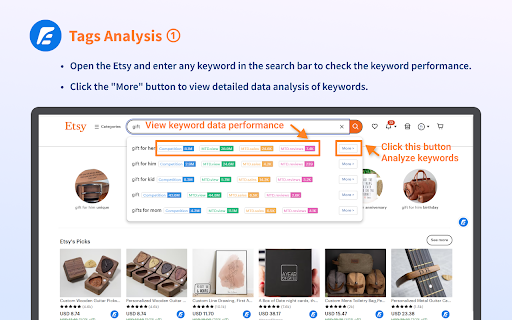
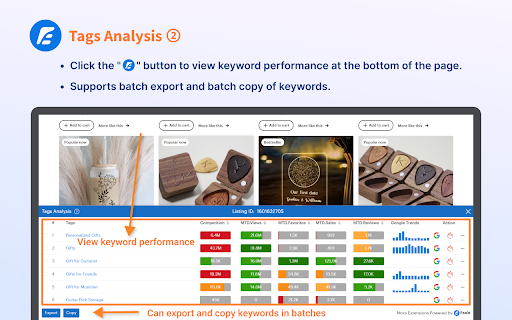
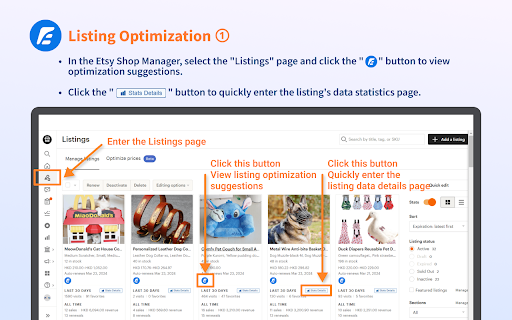

An Etsy SEO tool helps you boost shop sales through Listing optimization. Esale Plugin can assist you in analyzing the traffic performance of your Etsy shop products, optimizing listings and keywords to increase product exposure, and ultimately enhancing your shop's revenue. It supports viewing data metrics for tags, including competitiveness, monthly sales, conversion rates, and more. 😊 Keyword Analysis Features: ● Perform keyword searches on the homepage to display official Etsy-suggested keyword performance data. Show metrics such as views, sales, reviews, competitiveness, and more for selected keywords. Clicking "More" allows you to access detailed keyword analysis. 📈 ● Conduct keyword searches on the Etsy homepage and click the right-floating button to reveal a bottom popup feature page. This page allows you to explore associated keywords, along with their performance data such as views, sales, favorites, reviews, competitiveness, Google Trends, and more. 🚀 ● Analyze the keywords used by your products and shop, uncover competitive keywords, and optimize product tags. 🧐 ● Support batch export of keyword data and CSV download. 📊 Listing Analysis Features: ● Analyze your listing titles, descriptions, and tags to ensure they comply with official recommendations and provide optimization suggestions. ✨ ● AI-generated titles and descriptions with a single click, eliminating the need for complex options. Click the button to generate and sync them directly to Etsy. 🤖 ● Automatically identify tags used in your listings and display tag data, including competitiveness, monthly sales, conversion rates. Utilize this data to select more suitable tags, improving exposure and traffic. 🏷️ ● Provide a quick entry to view individual listing data statistics, eliminating the need to switch pages repeatedly and enhancing your operational efficiency. 🚀 Attention! Esale offers detailed product conversion analysis services for sellers, providing insights into shop revenue funnel issues. It is an all-in-one optimization service designed to streamline your business operations and boost your earnings! 🌟 For more free Etsy sale enhancement tools, please visit https://esale.io. 🛍️

EverBee - Find Best Selling Products on Etsy
Boost your Etsy sales by revealing best selling products. Improve your Etsy store SEO with high-demand, low-competition keywords. Ready to launch a successful Etsy shop or enhance your current one? Discover why top Etsy sellers trust EverBee to boost their shop traffic and sales. ⚡ EverBee Chrome Extension: Quickly uncover and capitalize on the best-selling items on Etsy. Launch products that sell and boost your Etsy revenue. Transform your Etsy business with EverBee, the industry's top-rated research and analytics tool for Etsy sellers, trusted by over 600,000 entrepreneurs and Top Etsy Sellers. KEY FEATURES 🚀 Find the best selling products with Product Research. Craft what sells! 🧐 Spy on competitors with detailed revenue analytics. Create your high-revenue Etsy products. 🔍 Discover tags of trending products and uncover high-demand, low-competition keywords searched by real shoppers. Elevate your Etsy SEO and visibility. 📊 Connect with your Etsy shop for tailored insights to refine your strategy and boost your sales metrics. ✉️ Email Marketing Build For Etsy Sellers: Grow your subscribers and drive Etsy sales on autopilot! 🚀 Product Analytics 🚀 - Monthly Sales & Revenue - Monthly Views & Sales Conversion Rate - Favorites - Reviews - Tag Analyzer - And much more 📊 My Etsy 📊 - Gross Revenue Trend - Average Order Value - Lifetime Value - Repeat Rate - Average Conversion Rate - And much more ✉️ EverBee Email ✉️ - 1-click Etsy integration - Customizable subscription page - Automated marketing campaigns - Beautiful Email templates EVERYTHING YOU NEED AND MORE With just one click, EverBee Chrome Extension provides critical data to thrive on Etsy. Focus on creating best-sellers and growing your business sustainably. TRUSTED BY THE BEST EverBee has helped over 600,000 entrepreneurs and top Etsy sellers generate millions in revenue on Etsy. INTEGRATED WITH ETSY EverBee is connected directly to Etsy with the purpose of getting sellers the most up-to-date and valuable information. EverBee's proprietary algorithm gives you data that you could not get manually -- in seconds. USER-FRIENDLY EverBee is designed by Etsy Sellers for Etsy Sellers. We designed this extension to be very easy to use—even for non-techies. Get started for Free today! Learn more about growing your Etsy shop at [www.everbee.io](http://www.everbee.io/) Join our vibrant Facebook community for free: https://www.facebook.com/groups/everbeemembers

Etsy™ Reviews Extractor
Introducing AI(ChatGPT) Review Analysis and Download Tool for Etsy Sellers! Etsy Reviews Extractor supports one-click extraction of Etsy product reviews and downloading them to Excel/CSV for free. # Features ✓ Download reviews from Etsy product listings, including images ✓ Support exporting reviews for listings and shops ✓ Support sorting by "Suggested" and "Most recent" ✓ Support exporting variants ✓ Export as XLSX or CSV files ✓ Sort by Rating, Number of stars, Helpful count, Review date, etc. in the preview interface # Data Privacy All the data you process is stored exclusively on your local computer and never passes through our servers. # Statement Etsy is a trademark of Etsy Inc. Etsy Reviews Extractor | Images is not affiliated with, endorsed, sponsored, or otherwise related to Etsy, Inc. or any of its affiliates or subsidiaries.

Etsy Customer Service Helper with ChatGPT
Provide canned responses by ChatGPT when you message with customers in Etsy Etsy Customer Service Helper with ChatGPT is a Chrome extension to help Etsy seller message with customers smoothly. It a free tool like Crisp magicRply or Drift GPT. Simply select the customer's question, then Etsy Customer Service Helper with ChatGPT will feedback the reply advice that given by GPT-3.5 Chatbot. 🚀 Feature ● Provide canned responses or reply template by ChatGPT base on the question of customers. ● Simply select the question content. ● Edit feedback from OpenAI in Etsy Customer Service Helper with ChatGPT to reply nicely to customers ● Copy content by one click. ● Multiple output languages. 🚀 Who is Etsy Customer Service Helper with ChatGPT for Etsy Customer Service Helper with ChatGPT is made for Etsy seller, customer service staff or someone need reply customer's question to solve their problem. 🚀 How to use it ➡️ Make sure you have a ChatGPT account ➡️ Simply select any online content by your mouse ➡️ Right Click your mouse to open menu and select " Etsy Customer Service Helper with ChatGPT " to open the extension window ➡️ Choose what languages you need, and click "Ask for template" ➡️ The canned responses will displayed in the extension window in a minute.

Easy Exporter - Etsy™ order exporter
Easy Exporter helps you export your Etsy order easily. Easy Exporter is an Etsy order exporter for sellers. Etsy orders can be exported to XLSX files that comply with the ERP & logistics platform import format, helping Etsy sellers improve the efficiency of importing data into the ERP & logistics platform. Easy Exporter supports exporting Etsy orders into an import format compatible with other ERP tools. In addition to exporting finished product orders, the order exporter also supports the export of user-customized product orders, improving the order processing efficiency of customized sellers. ✨Feature✨ ‒ Support single batch export of 20/35/50 order data ‒ Directly adapt to the ERP tool of the "Dianxiaomi" ‒ Directly adapt to the ERP tool of the "Mabang" ‒ Directly adapt to "EBO" standard template ‒ Directly adapt to "YunExpress" standard template ‒ Directly adapt to "4PX" standard template 👉👉How To Use: 1. On the order page, use the filter of Etsy to filter out the orders that need to be exported 2. Click the icon of Easy Exporter to open the extension window 3. Select the order data to be exported and click the export button 4. Complete the setting template selection in the pop-up window, and click OK to export 5. Wait for the order data export to complete
