
ghlblfakaklgkdmfejdlffbmpcaidoci

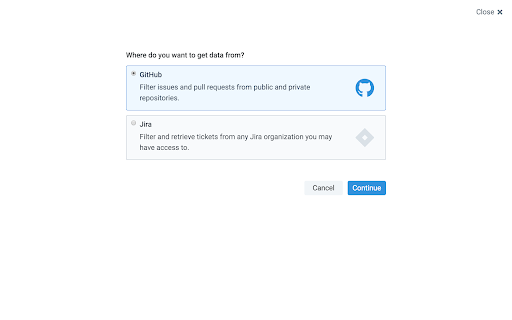
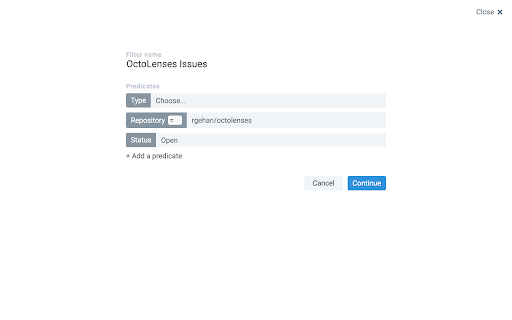
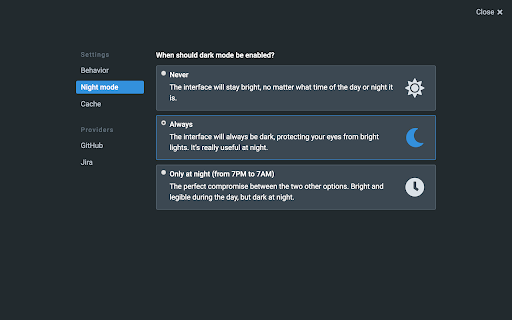
Watch your repos and discover awesome things directly from your New Tab page. As a developer, you shouldn't have to worry about filtering issues or pull requests manually and instead focus on what is fundamental: your code. This extension allows you to create very precise filters than will nicely lay out all the information you need in order to be as productive as possible. It features: - Creating filters for GitHub (both issues and pull requests) - Creating filters for Jira (so that you can better correlate your PRs with your issues, if you're using Jira) - Notifications when there are new items in one of your filters A dark theme was added, so that it doesn't hurt your eyes at night.

GitHub Code Folding
Code folding - the ability to selectively hide and display sections of a code - is an invaluable feature in many text editors and IDEs. Now, developers can utilize that same style code-folding while poring over source code on the web in GitHub. Works for any type of indentation, spaces or tabs. v0.1.0 - remove jQuery dependency - use event page instead of permanent background

Octohint
IntelliSense hint for GitHub With Octohint installed, when you view code at GitHub (For example this demo), you'll get features as follows: - Mouse Hover: Show information of current token - Left Click: Show all references of current token - [⌘] + Click: Go to definition of current token (For Windows and Linux user, use [Ctrl] instead) Octohint is a pure client thing. All code analysis are performed at your browser, which means your code and actions log like click, mousemove will never be sent to any server.

Enhanced GitHub
Display repo size, size of each file, download link and option to copy file contents Extension that provides useful features on top of GitHub Website. 1. Displays repo size. 2. Displays each file size in every active branch (not applicable for folder / symlink) 3. Show download link for each individual file (not applicable for folder / symlink) 4. Copy file's contents directly to Clipboard (just won't work for markdown files) 5. Download file 7. Coming soon...please suggest by opening an issue on https://github.com/softvar/enhanced-github/issues Enhanced GitHub Chrome Extension doesn't collect/share/care about your data at all. Asks for GitHub Access Token only for private repos and if Rate Limiting is your concern. 1. "*://*.github.com/*" - for running on github.com domain. 2. storage - for storing GitHub access token on your local system. GitHub Access token is required for private repos and for handling API rate-limiting issues. 3. webRequest - to support GitHub being a single-page-application now. 4. webNavigation - to support GitHub being a single-page-application now. Read the detailed blog to support SPA and for requesting permissions #3 and #4 - https://medium.com/@softvar/making-chrome-extension-smart-by-supporting-spa-websites-1f76593637e8 * Note: From v1.0.0 onwards - Click on download icon/button while pressing Alt / Cmd(for Mac)/ Ctrl(for Windows) because GitHub has stopped downloading of files directly. * From v3.0.0 onwards, this extension wants webRequest permission so that it can properly handle SPA behavior of GitHub website. * From v4.0.0 onwards, it support GitHub New Design. Please check the detailed CHANGELOG - https://github.com/softvar/enhanced-github/blob/master/CHANGELOG.md OPEN-SOURCED and LICENSE: For more updates, please stay tuned! For any queries/issues - open an issue on https://github.com/softvar/enhanced-github/issues For any query, drop me an email at varun2902@gmail.com

Ultra Button
A button for everything. You can now access most of chrome features in one Ultra Button. Functions Including: Bookmarks, Extensions, Downloads, History and Tabs. Mouse Middle Button Behaviors Bookmarks: Open bookmark in background Extensions: Remove extension Downloads: Remove download record History: Open history in background Tabs: Close tab or window ~~~~~~~~~~~~~~~~~~~~~~~~~~~~~~~~~ The icons in this extension were downloaded from Noun Project. https://thenounproject.com/ v 0.9.0 add download notification You can enable it in the options v 0.4.1 add session control You can now restore closed tab or windows
