
ghkmgjpkmimhfkfbmghkekjfcflbnbjn

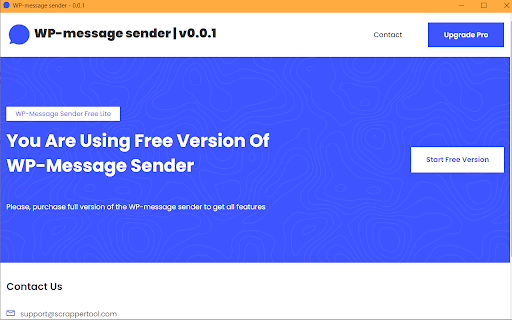
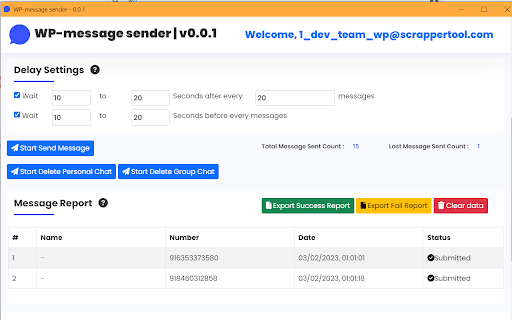
WP message sender to send bulk and personalized WhatsApp messages, attachments, and chats without saving numbers easily. WP Message Sender is a Chrome extension designed to help users send WhatsApp messages to single or multiple recipients without saving phone numbers. It works directly with WhatsApp Web and allows users to send personal messages, personalized messages, and bulk messages efficiently. This tool is built for businesses, marketers, sales teams, and individuals who regularly communicate on WhatsApp and need a faster way to send messages without manual effort. WP Message Sender simplifies WhatsApp communication while keeping the workflow easy and flexible. • Send WhatsApp messages to a single person • Send bulk WhatsApp messages to multiple users • Send messages without saving phone numbers • Send personalized WhatsApp messages with custom fields • Send images, documents, videos, and other attachments • Delete personal WhatsApp chats • Delete WhatsApp group chats All actions are performed through WhatsApp Web in the user’s own browser. Send Personal and Bulk WhatsApp Messages WP Message Sender supports both individual and bulk messaging. Users can: • Send a message to one WhatsApp contact instantly • Send the same message to multiple recipients in bulk • Use bulk messaging for promotions, updates, or notifications This makes the extension useful as a WhatsApp bulk message sender for everyday communication and outreach. The extension allows users to send personalized WhatsApp messages by using custom values such as name or number. This feature is helpful for: • Customer communication • Sales follow-ups • Marketing campaigns • Personalized notifications Personalized messaging helps improve engagement and response rates. The extension also provides chat management options. Easy to Use and No Technical Setup Required WP Message Sender is designed for simplicity. • No programming or technical knowledge required • Works directly with WhatsApp Web • Simple interface and quick actions • Start sending messages in a few clicks Users can begin using the tool immediately after installation. Privacy and Responsible Usage • Works only with WhatsApp Web in the user’s browser • Does not bypass WhatsApp security or private systems • All actions are performed locally • No user data is collected, stored, or shared User privacy and responsible usage are always respected. For any questions or issues related to the WP Message Sender extension, contact: info.scrappertool@gmail.com This Chrome extension is not endorsed, affiliated with, authorized, sponsored, or certified by WhatsApp Inc. It is an independent tool designed to work with WhatsApp Web for message sending and chat management.

Privacy Extension for WhatsApp web
Privacy extension for WhatsApp web. Hides messages, media, profile pics until hover. Control privacy settings and protect your data. WhatsApp Privacy Extension 🔒 | Privacy WhatsApp | Privacy Extension for WhatsApp Web Stay fully protected with the best Privacy Extension for WhatsApp Web! Whether you're screen sharing, working in a public place, or simply want extra security, the WhatsApp Privacy Extension gives you total control over your WhatsApp privacy — hiding sensitive chats, names, images, and more with customizable blur options. 🔑 Core Features: ✅ Toggle All Privacy Features Instantly • Blur all supported elements on WhatsApp Web with one click. • Instantly activate complete privacy WhatsApp settings without manual selection. • Ideal for meetings, recordings, public use, or streamers. ✅ Adjustable Blur Intensity • Control how strong the blur effect appears with a simple slider. • From light to heavy blur — customize your WhatsApp privacy experience to your needs. ✅ Blur Messages • Hide message texts inside chats to keep your conversations private. • Messages remain hidden until you choose to unblur them manually. ✅ Blur Last Message Preview • Prevent chat previews from leaking recent conversations in your chat list view. • Great for professional screen sharing and content creators. ✅ Blur User and Group Names • Conceal contact names and group titles from prying eyes. • Stay anonymous while sharing your WhatsApp Web screen. ✅ Blur Profile Pictures • Automatically hide all profile images across WhatsApp Web. • Safeguard personal photos and identity during public work or live sessions. ✅ Blur Images and Videos • Blur all media content like images, GIFs, and videos by default. • Keep media private until you decide to reveal them. ✅ Blur Entire WhatsApp Interface • Instantly blur the entire WhatsApp Web — chats, sidebars, and headers. • Perfect for emergency privacy control during unexpected moments. ✅ Blur Media Gallery 🖼️ • Blur the entire Media Gallery section on WhatsApp Web. • Prevent exposure of all shared images, videos, and documents stored in chats. • Ideal for professionals and privacy-conscious users who often share screens or record tutorials. Why Choose WhatsApp Privacy Extension? ✔️ Full privacy WhatsApp solution for web users. ✔️ One-click total screen privacy for instant protection. ✔️ Easily customizable blur strength and settings. ✔️ Designed for professionals, streamers, students, and anyone valuing online privacy. ✔️ Lightweight, fast, and effortless to use. Disclaimer: This extension is an independent tool and is not affiliated with, endorsed, or sponsored by WhatsApp™ or Meta Platforms, Inc. Usage must comply with WhatsApp’s terms and conditions. If you're looking for a secure, flexible, and easy-to-use Privacy Extension for WhatsApp Web, WhatsApp Privacy Extension is your perfect choice! Keep your chats, contacts, and media safe and private — always.

WA Audio to Text | WPPME.COM
Transcribe WhatsApp voice messages to text easily – save time with fast, accurate, and automatic transcription. 🎧✏️ Convert WhatsApp Voice Messages to Text – Simple and Practical. Struggling with long voice messages you don’t have time to listen to? This extension helps you instantly transcribe WhatsApp Web audio messages into text, making your conversations more accessible and manageable. [ Key Features ] - 🎙️ Auto Transcription: Automatically turn voice messages into text the moment they arrive. - 🖱️ Click-to-Transcribe: Want control? Convert specific messages into text with a simple click. - 🌍 Language Support: Easily handle voice messages in multiple languages for global communication. - ✔️ Reliable Accuracy: Uses advanced technology to ensure clear and dependable transcriptions. - 🔗 Built-In Functionality: Runs smoothly within WhatsApp Web – no extra tools or downloads needed. [ Who Is It For? ] - 💼 Office Workers: Quietly check voice messages during meetings or work without causing distractions. - 📖 Learners: Turn voice notes into text for easier organization and studying. - 🚀 Busy Individuals: Stay on top of your WhatsApp conversations while juggling other tasks. - 🌐 Inclusive Users: Perfect for those who need accessible communication, including individuals with hearing challenges. [ Use Cases ] - 🔊 Noisy Environments: Struggling to hear a voice message? Convert it to text for clarity. - 🤐 Silent Spaces: Read voice messages discreetly without playing audio aloud. - 🗃️ Easy Archiving: Save transcriptions to keep important messages organized and accessible. - 🌏 Learning Languages: Use transcribed messages to practice and enhance your language skills. This tool is independent and not affiliated with WhatsApp LLC. The tool complies with legal standards and respects all applicable terms of service.

WA Download — WhatsApp Chat Backup & Contacts Export
Back up WhatsApp chats and export contacts quickly, securely, and locally with WA Download. Easy, private, and reliable. Back up chats and export contacts on WhatsApp Web with a simple, privacy‑minded workflow. Keep your data portable for CRM, migration, and record‑keeping—without clutter or extra steps. Key features - Export contacts from Groups or your Chats list - Back up chats by conversation, group, or date range - Granular selection with a quick preview before exporting - Processing runs locally in your browser; you control your data - Clear onboarding and multi‑language support Export formats - vCard (.vcf): Import to iOS and Android devices - CSV: Import to Google Contacts and many CRMs - Excel (.xlsx): Organize, filter, and analyze in spreadsheets Backup formats - HTML: View chat history directly in the browser - CSV: Transfer or share selected chat content - Excel (.xlsx): Structure conversations for reporting - JSON: Build custom workflows or integrations How it works 1) Open WhatsApp Web and sign in 2) Click the extension icon 3) Choose “Contacts Export” or “Chat Backup” 4) Set the scope, preview, and start export Privacy & security - All processing happens locally in your browser—no external servers - You choose exactly what to export and can delete generated files anytime - Minimal permissions; used only to enable the described features Compatibility - Works with Chrome and Chromium‑based browsers - Requires WhatsApp Web to be open and logged in Support - Contact us via the Chrome Web Store “Support” tab Legal - WhatsApp is a trademark of WhatsApp Inc., registered in the U.S. and other countries. This extension is an independent project and is not affiliated with WhatsApp or WhatsApp Inc.

Contact Saver For WA & Download Group Phone Numbers | WPPME.COM
Download WhatsApp group phone numbers and extract, save, and export WhatsApp contacts from chats and labeled contacts to files. Our WhatsApp Contact Manager provides an efficient way to extract and save contacts from various sources, such as your added contacts, chats, groups, labeled conversations, and even by country. This tool ensures flexibility and reliability for managing and backing up your contacts. 🔺Extract contacts from multiple sources, including chat lists, groups, labeled contacts, and country-based filtering. 🔺Export contacts in multiple formats, such as CSV, Excel, JSON, and VCard, giving you the freedom to choose the format that best fits your needs. 🔺Save contacts directly to your device or have them emailed to you for convenience. 🔺Manage both saved and unsaved contacts, ensuring you never lose important information. 🔺Intuitive interface designed for quick and easy extraction of contact details, even for large datasets. 🔺Save time by effortlessly extracting contact details from various WhatsApp data sources. 🔺Organize your contacts efficiently, whether they are saved or unsaved. 🔺Keep a secure backup of all your important contacts, making it easy to transfer data when changing devices or in case of data loss. 🔺Simplify integration with your CRM or other systems through the flexible export options. Our tool is designed to provide a streamlined experience for managing contacts, without compromising on security or compliance. Whether you need to extract contacts from your groups, chat lists, or labeled conversations, Contact Manager offers the flexibility and control you need to keep your contacts organized and backed up. WhatsApp Contact Manager is an independent tool not affiliated with WhatsApp LLC. The tool complies with legal standards and respects all applicable terms of service.
