
ghkcpcihdonjljjddkmjccibagkjohpi
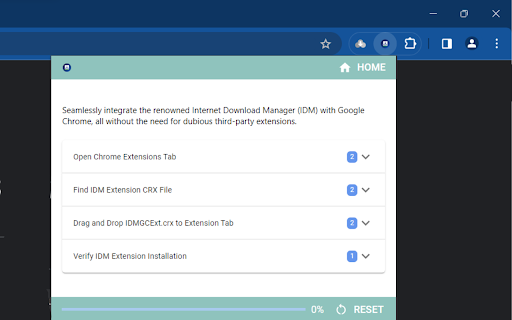
Effective solution to seamlessly integrate Internet Download Manager (IDM) with Google Chrome manually Already Download & Install IDM (Internet Download Manager) on PC but IDM Download Panel does not Pop-up than you need to Integration IDM Extension to your Browser. And in this process this extension will help you to Install the Internet Download Manager Extension in your favorite browser. Because there are so many FAKE IDM Integration Module available on the web. And if you mistakenly add any of them in your browser then you can face problems. So, IDM Integration Module (IDM Extension) will tell you the working, latest and simple ways to Integrate IDM (Internet Download Manager) Extension with Different Browsers.

IDM - URL shortener and QR code generator
URL shortener to create short links and generate QR code with custom domain, reporting, analytics, team collaboration and API access IDM - A URL shortening tool to create short links to enhance the user experience, link sharing, and enabling efficient tracking of link performance. 🎯 Features - Easily shorten any link - Set link expiration date - Add UTM parameters - See click reports and all your links history in extension - Automatically copies URL to clipboard - Automatically create a short link by clicking the extension button in the browser header - Good alternative of Bitly, Rebrandly, TinyUrl, short.io and many more link shortener services - Shareable QR code 📈 Analytics - Short link analytics with click reports, traffic source, country, referral etc. to analyze the effectiveness of your links, giving you valuable insights into your marketing campaigns. 📱QR Codes - Free QR code generator to creating QR codes for each link to redirect on mobile scan. ** December, 28 2023 - Added sign in with Google - Added reports feature to track short link click IP, country, city etc.

Integration Module Download Manager
Integration Module for Download manager chrome extension. Integration Module for Download manager chrome extension. Internet Download Manager For Chrome Installation and Integration: Install IDM browser extensions for your preferred browsers. This is the first step to enabling IDM’s advanced download management features within your browser environment. Enable or disable IDM integration for specific browsers or websites as per your requirement. This flexibility allows you to customize your download management preferences. How do you download the internet download manager for Chrome extension? Launch the Google Chrome web browser on your device. Open the Chrome Web Store. Find “Integration Module Download Manager” by typing it into the search box. The extension’s “Add to Chrome” button should be clicked. Click “Add extension” in the pop-up box to confirm the installation. The IDM symbol will show up on the Chrome toolbar after installation. You can get IDM and set it up. Download Internet Download Manager Desktop Extract this downloaded ZIP file into a local directory. Right-click run as administrator on “install.bat“. Wait for the script to display the successful message.

Online Download Manager
Easily manage and accelerate your downloads up to 5 times! Online Download Manager will enable you to download all types of files without any hassle at the maximum speed. Download Accelerator is an application that enables you to download large files with multi-threaded method. You can easily download any url on the web and save files on your PC or right on your Google Drive without saving it on your side. How to use internet download manager for chrome - select image, voice, video - click right then click download with ODM - click start download - Our software will split your download into multiple files All the features are available right in your browser! This software is 100% free and does not require you to pay.

Download Manager for Chrome
Free Download Manager Premium integration with Chrome browser Free Download Manager Premium for Chrome is an extension to manage your Internet downloads for Chrome. Our main features are: ✔ Access your download list at any time from the Chrome toolbar ✔ Effortlessly search through your recent downloads. ✔ Instantly see the status of your downloads. ✔ Pause and resume downloads easily ✔ Show speed of the downloads ✔ Clear downloads from your history ✔ Remove downloads from your history with ease ✔ Open files directly from the download list. ✔ Open folder which contains the file ✔ Quickly navigate to the original download page If you encounter any issues please reach out to us at info@runapps.org instead of leaving a negative rating. Your feedback is valuable for our continuous improvement.
