
ghhjbcnlpebjnkgpamndcijlcknaknfl
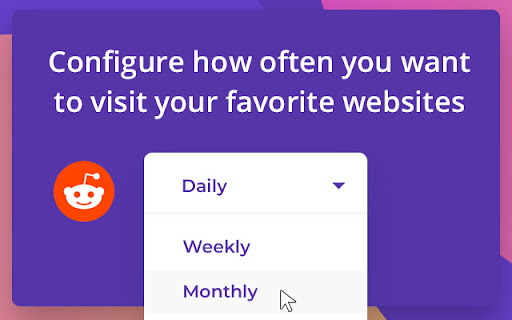
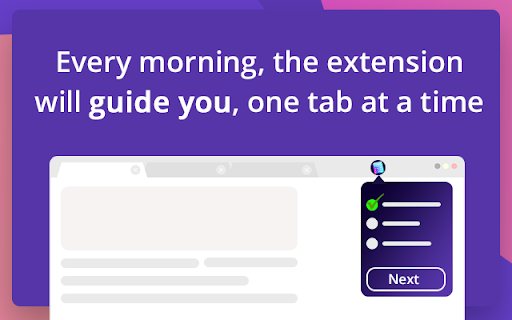
Optimize your morning productivity by automatizing the websites you visit daily. No bookmarks, just a streamlined browsing process. Kickstart your day with the ultimate productivity-boosting Chrome extension designed to optimize and automate your daily web schedule. Ideal for individuals who thrive on structure, this extension supports you by managing your recurring bookmarks. Whether you commence your day by reading the news, staying connected through social media, or exploring new shopping deals, "My Browsing Routine" helps you streamline these tasks, conserving your mental bandwidth for other essential pursuits. ➡️ Personalized Online Morning Schedule: Create your daily list of websites to visit in your preferred order. The extension will systematically open each tab as you've arranged, guiding you smoothly one site at a time. ➡️ Customizable Website Visit Intervals: Some sites don't require a daily visit—maybe weekly or monthly checks are more suitable. You can designate custom visit intervals for each website on your list. Be it every day, every third day, or every second Tuesday of the month, you're in complete control. ➡️ Automated Walkthrough: The extension initiatively launches at the scheduled time, opening tabs in your determined order, allowing you to concentrate on the content rather than recalling the sequence. Alerts and reminders are also included. This is an entirely serverless extension – there's no backend server, and no data collection. Enjoy your browsing privacy! This is an early Beta version. New features will be added within the next few weeks including: - Ability to store notes on each website and access them during each visit - Ability to summarize the recent changes via ChatGPT

Tweeks - Customize Any Website
Personalize sites you use every day with Tweeks. Make the web work your way. The Tweeks extension lets you customize the web with “tweeks”, small scripts that modify specific sites. You can install popular modifications from the community or create your own by describing the change in plain language. Example modifications: - Remove YouTube Shorts from the feed and sidebar, hide recommendations - Hide AI Overview and sponsored results from Google search - Add a personalization panel to control the content you see on X (Twitter) - Add a price history tracker to verify deal prices on Amazon Create your own: 1) Open a site 2) Describe the change, e.g. - make this site dark mode - remove the sidebar - add a download button to this table 3) Tweeks generates and installs the modification; refresh to apply Control & trust: - Toggle Tweeks on/off anytime - Update a Tweek with follow‑up requests until it is just right - See and edit the full script code at any time Share & discover: - Install shared Tweeks from the community library - Share a Tweek with a link or add it to your public profile How it works: - Tweeks run locally in your browser and apply only on the sites you choose - Create a tweek in plain English (AI-assisted), then review/edit the code before enabling - Power users: import existing userscripts (e.g. from Tampermonkey / Greasemonkey) *Not affiliated with YouTube, Google, X, or Amazon

Intentional - Block Distracting Websites
Block distracting websites and set schedules to stay focused. Take control of your browsing habits and boost your productivity. Save 10 hours weekly by eliminating digital distractions. According to the GWI study, the typical working-age internet user now spends more than 2 hours per day using social platforms*. Intentional helps you reclaim your focus and break free from mindless scrolling on social media (YouTube, Instagram, TikTok), and other distracting websites. - One-Click Website Blocking: Instantly block any distracting website - Focus Lock: add a 10-minute pause before bypassing blocks - Deep Clean for YouTube: remove recommendations, Shorts, comments, and other distracting sections without blocking the whole site - Focus Schedules: Set specific times when sites are accessible 🎯 Perfect For: - Professionals seeking deep work without digital interruptions - People with ADHD who need extra focus support - Digital minimalists practicing intentional technology use - Students needing distraction-free study environments - Unlimited website blocking - Unlimited focus schedules - Deep Clean for YouTube - Focus Lock delayed unlocks - Priority support Help support the development of the extension by upgrading to Pro! 1. Install the extension 2. Select websites to block or create a schedule 3. Enjoy distraction-free browsing and increased productivity Our Story: Created by a software engineer who struggled with digital distractions while building a startup. After trying every available solution and finding them lacking, Intentional was born. Compared to Alternatives: Our app is similar to Cold Turkey, Freedom, or StayFocusd, but it combines simplicity with powerful customization. More effective than basic ad blockers or YouTube distraction removers like DF Tube (Distraction Free for YouTube™), Unhook, or Social Focus App. Your browsing data and blocked-site settings stay on your device. We do not sell your personal information. Intentional uses minimal permissions and may collect limited product analytics and diagnostics to improve reliability and understand feature usage. Affiliate disclosure: Intentional may show optional affiliate recommendations on blocked pages. We may earn a commission if you click and sign up, at no extra cost to you. We do not auto-open affiliate links or modify third-party pages. We read every message! Share your thoughts: By using this extension, you agree to our Terms of Service and Privacy Policy. Intentional is not created by, affiliated with, or supported by Google LLC, Meta Platforms, Inc., or ByteDance Ltd.

DayTicks - Organize your daily tasks
Organize your daily tasks. Right in your browser. No sign-up required! DayTicks is your daily task extension, designed to keep you organized and efficient. Seamlessly track your tasks, monitor your time, and get insightful daily summaries—all from a sleek and intuitive dashboard. No account needed 👍 🆕 What’s New (v2.7): - ⏱️ Added timer display directly in the popup. - ⚙️ Minor improvements. - ⏲️ Efficient Task Management: Easily add, edit, delete, and toggle tasks between complete and incomplete. - ⏳ Accurate Time Tracking: Start and stop timers for each task to track the time spent. Hover over the time display to reset the timer. - 🏷️ Tags Filtering: Filter and organize tasks by tags for better management. - 🏷️ Suggested Tags: Get suggestions for previously used tags when adding new tasks. - 🕰️ Task Reminders: Set custom reminder intervals (e.g., 15, 30, 45, or 60 minutes) for tasks to stay on track. Notifications will alert you at the selected intervals while the timer is active. - ⏹️ Stop Timer on Reminder: Optionally stop the task timer automatically when a reminder notification is triggered. Activate this feature by clicking the watch icon in front of the reminder dropdown. - 🚫 Report Generation Control: Ensure accurate reporting by preventing report generation while a timer is running. - 📊 Daily Summaries: View a summary of the total time spent on tasks for the day. - 🚀 Generate Reports: Create reports of your tasks, including total tasks, completed tasks, and time spent. Reports now include a **visual chart** showing task completion (e.g., completed vs. incomplete tasks). - 🔽 Download Report: Download a detailed PDF report of your daily tasks. - 🗑️ Clear All Tasks: Remove all tasks from the dashboard quickly and securely with a confirmation step. - ⌨️ Quick Dashboard Access: You can quickly open the DayTicks dashboard from anywhere in Chrome by pressing the keyboard shortcut (`Ctrl+Shift+Y` on Windows, `Command+Shift+Y` on Mac). To customize this shortcut, visit `chrome://extensions/shortcuts`. DayTicks is designed to help you stay on top of your tasks and make the most of your time. Perfect for professionals, students, and anyone looking to enhance their productivity. Support & Feedback: For any questions or feedback, please contact me.

Stay Focused: Block websites & stay productive!
Boost your productivity by blocking distracting websites, keywords or set daily usage limits. Stay Focused: The Ultimate Website Blocker for Chrome Are you losing hours of productivity to distracting websites? You're not alone. Studies show that the average person spends over two hours daily on non-work-related websites during work hours. Stay Focused is the powerful website blocker designed to help you regain control over your time by blocking websites and keywords that distract you. Website Blocker: Take control of your productivity by blocking websites that interrupt your workflow. Stay Focused empowers you to limit access to time-wasting sites with just a few clicks. Keyword Blocking: Block keywords on Chrome to prevent yourself from accessing distracting content, helping you maintain focus on important tasks. Daily Usage Limits: Set daily time limits for specific websites to ensure you spend no more than your designated time on them. This feature helps you cultivate healthier browsing habits. Customizable Settings: Tailor the extension to your needs by creating custom block lists and schedules, ensuring that you stay focused when it matters most. Cross-Platform Support: Stay Focused isn't just limited to Chrome. Enjoy the same level of productivity across all your devices with our Android and iOS apps. Why Choose Stay Focused? With internet distractions at an all-time high, staying focused has never been more challenging. Studies suggest that productivity can drop by up to 40% when multitasking or switching between tasks frequently. By using Stay Focused, you can significantly reduce time spent on distracting websites and improve your productivity. Join thousands of users who have taken back control of their time and productivity with Stay Focused. Whether you're a student trying to focus on studies, a professional aiming to meet deadlines, or anyone who wants to make the most out of their day, Stay Focused is the ultimate website blocker for you. Download Stay Focused today and transform the way you work with this effective Chrome extension!
