
ghgecjpngbcgilomnmakjpflpommdbmm


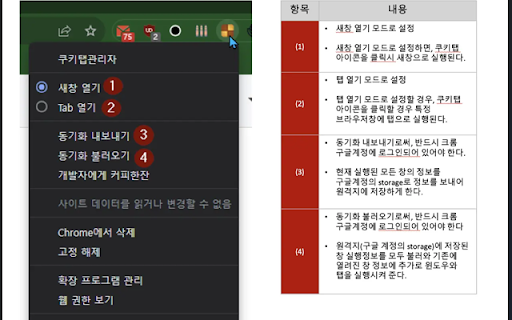
수십개의 브라우저의 탭을 하나의 인터넷 창에서 손쉽게 관리할 수 있습니다. 수십개의 크롬 탭을 하나의 브라우저 창에서 손쉽게 관리할 수 있습니다. https://youtu.be/vyNPuz5u-bk * 실행된 크롬 창과 탭을 앱에서 실시간 관리할 수 있습니다. * 쿠키탭을 통해 원격으로 크롬 창과 탭을 백업하거나 복구할 수 있습니다. (원격지 동기화) * 앱을 통해 크롬 창 또는 탭을 닫거나 검색할 수 있습니다. * 자신의 방문이력을 검색하여 새탭을 띄울 수 있습니다. * 열려진 크롬탭을 드래그앤 드랍으로 다른 브라우저로 이동하거나 탭의 순서를 변경할 수 있습니다. * 크롬 창 또는 탭의 타이틀을 변경할 수 있습니다. * 보고 있지 않은 크롬 탭을 discard하여 메모리를 절약할 수 있습니다. 향후 다음과 같은 기능을 추가할 계획입니다. * 여러 탭을 선택하여 하나의 그룹으로 묶을 수 있도록 합니다. * 자신이 설정된 단어를 기반으로 자동으로 탭을 분류합니다. * 분류된 탭그룹을 북마크로 저장할 수 있습니다. .. 그외 기타 등등 기능 == 0.4.10 업데이트 내용 (2023.09.13) == * 동기화 복구 오류 수정 * 동기화 원격저장소 초기화이후 저장 == 0.4.7 업데이트 내용 (2023.09.11) == * 동기화 성공/실패여부를 확장앱 아이콘 뱃지로 표시 * 복구시 페이지로딩 discard 옵션 추가.(성능향상) == 0.4.5 업데이트 내용 (2023.09.10) == * 동기화시 윈도우 창까지 모두 동기화할 수 있도록 기능 보완 * 탭열기 기능 수정. == 0.4.0 업데이트 내용 (2023.09.09) == * 윈도우로 열기, 탭으로 열기 선택기능 추가 * 실행된 윈도우 및 창 동기화 기능 추가. == 0.3.0 업데이트 내용 (2023.09.07)== * 즐겨찾기(북마크) 검색과 방문이력 검색을 통한 새탭 띄우기 기능 추가 * 권한 추가(북마크) == 0.2.16 업데이트 내용 == * 새탭띄우기시 URL 패턴분석을 통해 구글검색할 것인지 아니면 해당 URL으로 띄울 것인지 자동결정. == 0.2.15 업데이트 내용 == * url 검색기능 추가 == 0.2.14 업데이트 내용 == * css 수정 * 창이동 버그수정 == 0.2.10 업데이트 내용 == * 디자인변경 * 브라우저 새창 띄우기 기능 추가 == 0.2.7 업데이트 내용 == * 탭 새창 띄우기 - 구글 검색창 - 로컬 히스토리 검색어 제시 기능 == 0.2.5 업데이트 사항 == * 크롬윈도창별 discard 기능추가 - 크롬 메모리 절약기능 == 0.2.3 업데이트 사항 == * 윈도우 실시간 반영 오류수정 * navbar 디자인 수정 (향후 discard 버튼 추가 예정) == 0.2.2 업데이트 사항 == * 윈도우 새창 열기 오류 수정 == 0.2.1 업데이트 사항 == * 다중선택 오류 수정 == 0.2.0 업데이트 사항 == * 다중선택 기능 추가 - 다른 윈도우(브라우저)로 드래그앤드랍이 가능해졌습니다. - 단, 여러 윈도우의 각 탭을 다중 선택은 지원되지 않습니다. * 오류에 대한 버그 수정 - 타이틀 수정 오류.

Auth Autofill
A browser extension that autofills identity verification services in South Korea Auth Autofill A browser extension that autofills identity verification services in South Korea Name, mobile phone number, presence or absence of foreigners, current carrier, date of birth, preferred authentication method (SMS authentication, carrier app authentication, etc.) A browser extension program that helps you use it conveniently by selecting one of the following or by entering the SMS verification code after entering only CAPTCHA as it is automatically completed as a basic profile.

rhwp - HWP Document Viewer & Editor
Open and edit HWP/HWPX files directly in your browser. No installation, no ads, free. rhwp is a free and open-source extension that lets you open, edit, and print HWP/HWPX documents directly in your browser. No separate software installation required. Auto-open HWP/HWPX files in the viewer when downloading from the web Document editing: text input/modification, table editing, formatting Printing: Ctrl+P for print preview, save as PDF or send to printer Save edited documents as HWP files Open files via drag & drop Auto-detect HWP links on web pages and display an icon badge Document info preview card on mouse hover Right-click menu: "Open with rhwp" All processing happens in the browser via WebAssembly (WASM) Files are never sent to any external server No ads, no tracking, no sign-up required We do not collect any personal information This update bundles rhwp core v0.7.15 and hardens the browser extension document-fetch path. [Security Hardening] • Added sender validation for HWP/HWPX document fetch requests handled by the service worker • Blocks localhost, loopback, private-network, link-local, and internal-host URLs • Revalidates the final URL after redirects with the same policy • Uses credentials: "omit" for extension-side fetches • Keeps automatically extracted thumbnail data out of the page DOM • No new permissions • No new external network endpoints [rhwp core v0.7.15] • Improved wrapping and paragraph-indent handling for equation TAC-only lines • Improved caret movement after forced line breaks and in endnote areas • Fixed HWPX picture serialization for flip/rotation and isEmbeded output • Preserved HWPX diagonal cell-border slash/backSlash type values • Preserved zero-length HWPX field ordering [Known Limitations] • Direct save back to the original HWPX format remains limited as a beta feature • Complex HWPX roundtrip visual fidelity will continue to improve in later releases

ChatPage - YouTube Summary | ChatGPT, Claude, Gemini Support
🚀 Summarize any YouTube video in 3 seconds for free. Perfect 5-star service chosen by thousands! Supports all premium AI models ⭐ Perfect 5-Star Rating from Real Users Thousands trust ChatPage with consistently perfect reviews. Join verified users who save hours daily with our proven YouTube summarizer. 🤖 Every Premium AI Model Supported Missing your favorite AI? Not here! We support EVERY major model: ChatGPT Family: GPT-5, GPT-5 Instant, GPT-5 Thinking, GPT-5 Pro, GPT-4o Premium AIs: Claude, Gemini, DeepSeek, Perplexity, Grok No AI left behind - complete coverage guaranteed ✅ Completely Free, No Limits No signup, no payments, no ads - ever Unlimited videos, unlimited length, unlimited usage 3x faster and more stable in v2.9.5 ⚡ Advanced Analysis Beyond Basic Summary Include comments to understand viewer reactions Timestamp navigation for precise video jumping Custom prompt templates for personalized insights Support for regular videos, Shorts, and playlists Install now and turn YouTube into your personal knowledge base!

NDIC - 누렁이 영어사전 (Noorung Dictionary)
영어 단어의 뜻과 예문을 쉽게 찾을 수 있습니다. [4.5.5 업데이트: 2026.04.13] - 아이콘을 눌렀을때 팝업으로 열기 기능이 추가되었습니다. - 팝업으로 열기 혹은 사이드패널로 열기는 설정에서 선택 가능합니다. - 설정 페이지 스크롤 버그가 수정되었습니다. [4.5.4 업데이트: 2025.08.13] - Ctrl+Shift+E 로 사이드패널을 열 수 있음 (Mac : CMD+Shift+E) - 추후 지원 사항 - 사이드패널이 열릴때 인풋에 포커스 주는 기능은 아직 브라우저에서 지원되지 않습니다. - 브라우저 레벨에서 API가 추가되면 바로 업데이트 할 예정입니다. [4.5 업데이트: 2025.07.26] - 검색된 단어를 사이드패널에서 볼 수 있도록 변경 - 로고 및 익스텐션 이름 수정 - 피드백 남기러 가기 수정 - 버그 제보나 개선 의견은 아래 링크에서 해주세요! https://slashpage.com/ndic [4.4 업데이트: 2022.07.24] - 주요 버그 수정 - 변형된 단어 제안 기능 추가 [4.2 업데이트: 2022.05.08] - 사전 보조키 및 위치 설정 추가 - 다크 테마 지원 [이렇게 사용하세요] - 검색할 단어를 더블클릭하거나 드래그하면 단어 위에 사전이 나타납니다! - 주소창 옆의 익스텐션 버튼을 눌러서 검색하실 수도 있어요. - 사이드패널이 열려 있으면 더블클릭/드래그 시 사이드패널에 결과가 나타나요. - 설정 메뉴에서 가장 쓰기 편한 방법을 찾아보세요. 고맙습니다.
