
ghdnfbmfflgelndafnlgabneckbmfpla


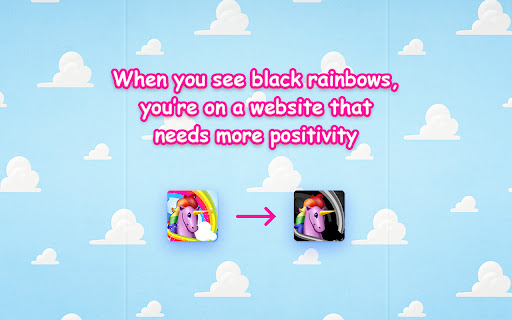

Add sparkly unicorns and rainbows to websites. Sparkle up your life with the amazing power of unicorn and rainbow happiness! Cornify welcomes you to a life of extreme unicorn love. Press the button to get infinite (it's true) unicorns and rainbows, right in your browser. It's incredible! Fill your life with unicorns and rainbows. If you ever need a break, press the rainbow cupcake button that appears in the top right corner of the page. It will attract the unicorns and herd them to away so you can use your website again. You can also create your own unicorns and spread them. They are called Younicorns, and you can summon your own personal ones at https://www.cornify.com/younicorns. Pick your favorite alicorn (unicorn horn), colors, mane, face expressions and so much more. Since 2009, Cornify has spread over 400 million unicorns and rainbows across the Internet. It's a highly rated, useful tool for web design and web development, as well as the preservation and protection of the most magical species of animal in existence. Technology, creativity and mystery have been combined to form a synergy that will enhance your life forever. And now for some lovely notes about permissions and data, for your enjoyment: This extensions only asks for permissions it needs to add unicorns and rainbows to websites. Those are access to tabs and websites (to add the images) and to storage (for remembering how many unicorns you have summoned into this world). Cornify does not want or care about any of your personal data. We just want to sparkle up the world and spread happiness with this wonderful Internet technology.

BattleTabs
Multiplayer Battles in your New Tab 💣 Battle your friends! Battles with viking ships in your browser new tab with your friends and other players. Collect new ships and build up your own fleet with special attacks to bring to battle! Note: you can turn off the new tab mode in the settings if you want to keep your default new tab page. ⛵️ Features: - Bite-sized gameplay, perfect for the Few Seconds you have to take a break in-between tasks - Intense multiplayer action with unique ships and special abilities - Build your own fleets with ships you've collected - Play multiple matches at the same time - Shows your Topsites and your Most visited websites on the new tab page, and shows a search bar on the new tab page for easy access - To support the development on the game, we may show advertisements in the product. We will make sure they don't detract from the experience of the game! 💡 Latest updates: https://battletabs.io/news

TinySketch
Create and save drawings at the click of a button. TinySketch is a simple to use free extension that allows you to create and save quick and fun drawings while using Chrome! NEW FEATURES in Version 3: - Undo / Redo Buttons! About time right? - Dark mode! If your browser uses dark mode SketchPad updates accordingly. - Most recent used pen size and color are saved! Other Features: Touchscreen support, pen & eraser resizing, auto-saved drawings, bucket fill tool, eyedropper tool, and larger color palette!

Cute Cursors - Custom Cursor for Chrome™
Funny custom cursors for Chrome™. Replace the default mouse cursor with a custom one from collections of cool and cute cursors. The custom cursor Chrome extension is an application that enables users to personalize their web browsing experience by changing the default mouse pointer to a custom mouse cursor. This extension is designed to be used in conjunction with the Google Chrome web browser, and it can be installed with just a few clicks. The custom cursor Chrome extension offers a wide variety of options for users to choose from, including different styles, colors, and sizes of cursors. Users can select a pre-designed cursor from the extension's library or create their own custom cursor using the extension's built-in editor. Once installed, the custom cursor Chrome extension works seamlessly with any website that the user visits. The new cursor will replace the default mouse pointer on every page, allowing the user to enjoy a more personalized and visually appealing browsing experience. One of the main benefits of using a custom cursor Chrome extension is that it can help to reduce eye strain and make it easier for users to navigate web pages. By selecting a cursor that stands out from the page's background, users can quickly locate their mouse pointer and avoid getting lost in a sea of text and images. Another advantage of using a custom cursor Chrome extension is that it can add a fun and creative element to web browsing. With the ability to customize the cursor's appearance, users can express their personality and style in a new way. This can be especially appealing for younger users who enjoy customizing their devices and applications. Overall, a custom cursor Chrome extension is a simple yet effective way to enhance the web browsing experience. By offering a wide range of customization options and improving visibility, this extension can help users navigate the web more easily and enjoyably. Customize your experience of using the Chrome browser with cool free mouse cursors. All custom cursors are in vector format, which guarantees you perfect display quality on any screen and in any cursor size. In the extension popup, you can easily change the size of the cursor, add it to your favorites or completely remove it from the list, it's very simple and convenient. - Comics cursors - Anime cursors - Kawaii cursors - Video games cursors - and much more coming! Navigate with a pink arrow today and with lipstick tomorrow. Be always fashion creative, even if you are in the office or in the classroom. Only you may know how pretty and nice can be usual working on the laptop. Such a wonderful rose mouse pointer for surfing the web. No matter how old you are, in school or the office, life should be filled with joy and fun. And bright custom cursor themes are just a few that we can give you. One more useful feature is that you'll never lose the mouse cursor on the web page because the brightly designed pointer will always be in front of you. The mouse pointer is changed during the navigating and sleeping modes. It has a cute hover state as well as in-the-point doing. Note. Please note that according to Google's rules, extensions cannot work on Chrome Web Store pages and internal pages of the Chrome browser, such as the home page, settings, downloads, etc. Also, the extension cannot customize the cursor on the browser navigation bar, such as tabs buttons, URL bar, toolbar, etc. Use our custom cursor extension - to make yourself even happier!

Cenafy
And his name is John Cena Have you ever wondered who the champ is? This chrome extension makes it so that there's a 1/100 chance that on each new page load, it displays the john cena video after the user has interacted with the page. Once the video finishes, the document goes back to how it was prior to learning who the champ is.
