
ggopndlojiiidkhpagipcjgdinefpoeb

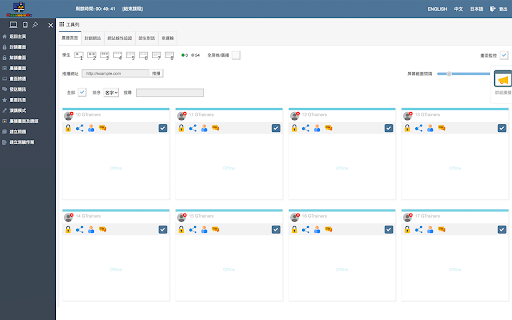


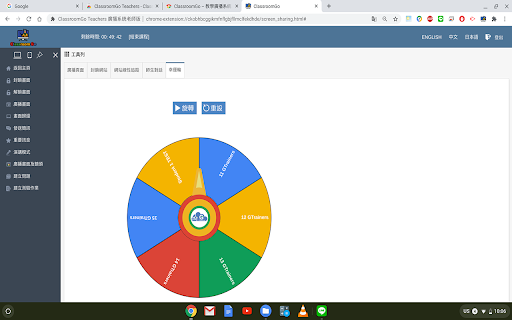
1. 教師主控端支援Chrome OS、Mac、以及Windows系統,學生受控端支援已登入之Chromebook。 2. 可載入教師Google Classroom 開課資訊及上課學生清單,並可由教師主控端一覽上線學生受控端之螢幕畫面。 3.… 1. 教師主控端支援Chrome OS、Mac、以及Windows系統,學生受控端支援已登入之Chromebook。 2. 可載入教師Google Classroom 開課資訊及上課學生清單,並可由教師主控端一覽上線學生受控端之螢幕畫面。 3. 允許主控端將畫面投放至受控端之Chromebook,或者指派特定受控端之Chromebook畫面並投放至其餘受控端之畫面。 4. 允許主控端對選定之受控端Chromebook進行畫面封鎖、歸還畫面,以及選擇全屏或分頁推播超連結。 5. 允許主控端檢視受控端Chromebook上線時所開啟之Chrome瀏覽器分頁,並可逕行由主控端封鎖或關閉不適宜之分頁。 6. 允許主控端指定最多四個受控端同步對其他受控端之機器進行畫面廣播。 7. 允許老師加入欲封鎖之網址或白名單以進行考試模式,並於課堂中隨時查閱學生的網站瀏覽歷程。 8. 允許老師與學生一對一使用語音或文字發問問題或討論。 9. 允許老師課程結束後,匯出指定日期該節課的學生出席狀況。 10. 允許藉由幸運輪功能,可讓老師更公平的抽出應答的學生。 11. 允許老師廣播簡訊或以全屏出現之重要訊息傳至學生之Chromebook。 12. 允許老師廣播鏡頭影像至學生螢幕畫面。 13. 允許老師發佈題目及功課至Google 教室並幫學生自動打開教室。 14. 允許老師發佈含照片短影之測驗題(是非、選擇或簡答),另外支援圖片手寫模式繳交答案。學生提交答案會自動回傳並儲存至老師雲端硬碟。 15. 允許老師發佈搶答題並推播至學生載具,另外搶答題有兩種模式:限第一位回答或是全班階可回答。學生提交答案及次序會自動儲存至老師雲端硬碟 16. 教學廣播百寶箱之錄影鏡頭功能,可錄影之外也可自動儲存於老師之雲端硬碟。 17. 教學廣播百寶箱之畫筆功能,可讓老師教學時直接手寫筆記並框選重點給學生。 18. 教學廣播百寶箱之計時器功能,可運用在老師進行時間限制的教學活動。 19. 教學廣播百寶箱之短網址功能也可包含歷史紀錄及點擊率。 20. 教學廣播百寶箱之遠端支援功能,支援端可無需安裝任何外掛,即可遠端查看另一端之畫面並協助排除問題。 21. 教學廣播介面同時支援中、英、日文三種語言。 22. 教學廣播支援跨網段使用。 23. 支援ChatGPT自動產生題庫。

Classroom View Pro
Classroom View Pro Extension Use the Classroom View Pro as a classroom management tool to monitor activity of all students Chromebooks. - You have complete view over what students are doing on their Chromebooks. - This application provides you with a live picture of the students Chromebook screens. - You can block internet on Chromebooks. - You can present your computer screen on Chromebooks. - You can lock Chromebooks. - You can send a message to Chromebooks. - The student Chromebook screens are represented in the table with a customizable number of rows as thumbnails.

Mirror Mode for Google Meet™
Mirror Mode for Google Meet this is mirror for all videos in your meeting Our FREE Mirror Mode for Google Meet™ allow you quickly enable/disable Mirror Mode for all videos in your meeting Use it from the sidebar right in the meeting window or from extension's popup! ✔ Mirror Videos Mirrors the video from other participants in the Google Meet call

Gemini EDU Prompt Assistant (TW)
備註:此擴充會需要使用Google AI Studio API設定,請自行至Google AI Studio取得 --- Gemini Prompt Assistant for Education This Chrome extension serves as an assistant specifically designed to help educators and students leverage Gemini more effectively in an educational setting. It streamlines the process of crafting and managing prompts with the following features: 1️⃣ Prompt Templates: Allows users to instantly populate the prompt field with a single click of a button. 2️⃣ Manual Prompt Storage: Users can navigate to a "Custom" section within the extension to manually add, edit, and save their own frequently used prompts. 3️⃣ AI-Powered Prompt Optimization (PARTS Principles): When adding a new custom prompt, users can utilize a built-in AI function to analyze and refine it. 4️⃣ 'Gems' Instruction Optimization (Markdown Syntax): This feature (also available when adding new prompts) uses AI to specifically optimize instructions intended for "Gems" (custom versions of Gemini). Important Note (備註) Requires Google AI Studio API Key: Please be aware that this extension requires an API key from Google AI Studio to function. You must go to the Google AI Studio website to obtain your own personal API key and configure it within the extension's settings.

iboss Classroom Management
The iboss platform enhances Google Classroom by adding more tools to help you manage student learning activities remotely, from any location. Whether you are in a brick-and-mortar classroom or teaching from a remote location, iboss Classroom Management empowers instructors with the tools to ensure students are focused on their assignments. The iboss platform natively integrates with Google Classroom to take full advantage of its capabilities. This integration enables you to visually monitor the screens for all of the students in any of your classrooms and manage student’s browsing activities, ensuring that they are focused and engaged on your lesson.
