
ggonogpephoeedoopcdnhnfdlaoeiben

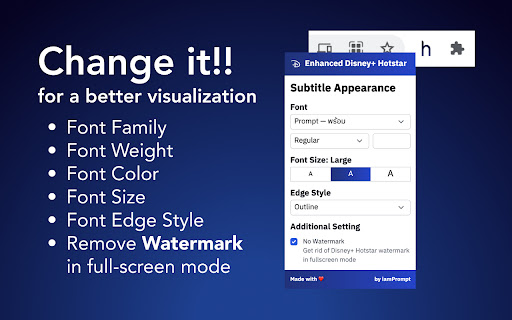
Enhancing Disney+ Hotstar features for a better watching experiences Updated in version 0.5.1 The extension is now support apps.disneyplus.com and new version of hotstar.com (If there are any problem, leave the message in support tab.) This extension will help enhancing your Disney+ Hotstar watching experiences. As in the early release, this extension will ONLY apply to the video page in subtitle element. - Transparent subtitle background for a better visualization - Remove watermark in full screen mode - Change Subtitle Font - Change Subtitle Font Size This extension will only be applied to the hotstar.com domain.

Netflix SubStyler : customize subtitles
Extension to customize captions and subtitles on Netflix. Change text size, font, color and add background. Wake up your inner artist and express your creativity by customizing Netflix subtitle style. Even though you usually don’t use movie captions, you may consider starting after checking out all the settings this extension has to offer. Now you’re able to: - Choose custom text color, - Adjust text size, - Add text outline and choose its color, - Add text background, choose its color and adjust the opacity - Choose font family Feeling artistic? Here’s another bonus: all the colors can be chosen either from a built-in color picker or by entering RGB value, creating almost endless style possibilities. Take the subtitle customization to the next level with Netflix SubStyler and let your imagination run wild!! Too many options? Worry not! Check out some basic settings, such as text size and background. All you need to do is add Netflix SubStyler extension to your browser, manage available options in the control panel and adjust subtitles to your own preferences. It’s as simple as that! Disclaimer : Netflix is a trademark of Netflix, Inc. This website & extension hold no association or affiliation with Netflix or any third-party companies.

Custom Progress Bar for YouTube™
Change Youtube™ progress bar to custom from fun collection. Make your Youtube™ player awesome! Transform your YouTube watching experience with Custom Progress Bar for YouTube. This fun and innovative Chrome extension allow you to replace the standard progress bar on YouTube with a wide range of custom options. With our collection of colorful and animated progress bars, you can add a touch of personality and excitement to your favorite videos. Custom Progress Bar for YouTube gives you a selection of 30 🍭 colorful progress bars inside the extension and about 1000 custom progress bars 🤩 are available on our website for you to download and enjoy. - Customization Galore: Choose from a vast selection of custom progress bars from our library. Whether you're into cute, funny, gaming, or meme-themed progress bars, we have something for everyone. With new additions regularly, there's always something fresh to explore. - Fun Animations and Colors: Make your YouTube player come alive with engaging animations and vibrant colors. From adorable bongo cats to popular memes and iconic characters, our custom progress bars will bring a smile to your face as you watch your favorite videos. - Easy Installation: Installing Custom Progress Bar for YouTube is quick and hassle-free. Simply add the extension to your Chrome browser, and you're ready to customize your YouTube progress bar with a few clicks. - Seamless Integration: Once installed, our custom progress bars will automatically appear on all YouTube videos and websites with embedded YouTube players. Enjoy a consistent and personalized viewing experience across platforms. - Regular Updates: We're committed to keeping our collection of custom progress bars fresh and exciting. Our team adds new designs regularly, ensuring you have a vast array of options to choose from. - User-Friendly Interface: Customizing your progress bar is a breeze with our intuitive and user-friendly interface. Easily navigate through different themes and animations, preview them in real-time, and apply your favorite choice with a single click. Use an awesome custom YouTube player and make your days more colorful!

Netflix - higher quality [QVI]
Forces 1080p playback for Netflix. The maximum resolution Netflix plays on Chrome is 720p. This extension forces the resolution of netflix video to 1080p so you can have a High Definition experience. Latest update brings higher video quality enhancements to several popular streaming platforms. Your favorite content now looks better across more platforms – automatically. No setup needed – just play and enjoy. All you need to do is to install the extension and enjoy your favorite shows at best quality! This extension is part of the Quality Viewership Initiative, a collaborative effort to enhance the understanding of audience engagement. It collects anonymous, aggregated viewing insights to support creators and studios in improving the quality of their content. You can stop sharing your information at any time by switching the toggle on the options page. Disclaimer: All product and company names are trademarks or registered trademarks of their respective holders. This website & extensions hold no association or affiliation with them or any third-party companies.

Ultrawidify
Removes black bars on ultrawide videos and offers advanced options to fix aspect ratio. Removes unnecessary black bars from the videos. Youtube and Twitch are officially supported by default. You can enable it for other sites as well, but support for other sites is not guaranteed. 1️⃣ Automatic aspect ratio detection (not supported on websites that utilize DRM. You may want to turn this option off when on battery power or when experiencing performance issues) 2️⃣ Crop to aspect ratio 3️⃣ Stretch video 4️⃣ Zoom video to aspect ratio
