
ggnhhghmkebhcinhhelmadgghnbddlij


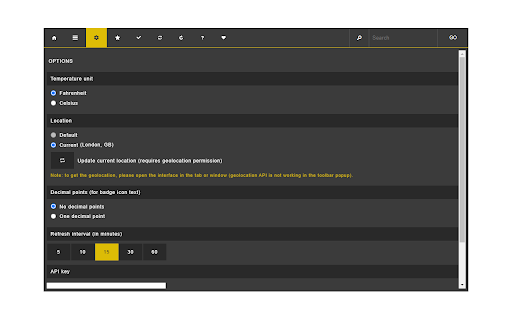
Get current weather, including the daily and hourly forecasts for any desired location, plus badge text notification. Weather Forecast is an extension that lets you easily get the current weather for any desired location. Upon adding it to the browser, it shows you the weather for the default city (London, GB). You can update the current city from the options page (requires geolocation permission). There is also a searchbar at the top toolbar to search for a new city. Once a city is found, please click on the - GO - button to search for the specific city. If you want the current city as the default location, please click on the - Set as default - button in the top toolbar. To add a city to the favorites list, please click on the - Add to favorites button. All the favorites items appear in the favorites tab. In the settings tab, there are several settings to adjust, including temperature unit, decimal point for badge icon text and etc. Note: this addon uses the free weather API from the - openweathermap.org - website which requires an API key. Each free key only allows up to 60 requests per minute. Therefore, before using the app please navigate to (https://home.openweathermap.org/users/sign_up) website, and signup to get a free API key for your addon. Then, add it to the setting page (bottom section). Once a new API key is added, you can start using the app. To read the privacy policy regarding the weather API, please read this page (https://openweather.co.uk/privacy-policy) on the openweathermap.org website. If you have a feature request or found a bug to report, please fill the bug report form on the addon's homepage (https://mybrowseraddon.com/weather-forecast.html).

Weather
Weather Extension can be used to see the temperature, humidity, wind speed, sun rise and set time and many more For users to track weather description and also can manage multiple cities in their watchlist to track weather data.

Weather extension
The best way to see the Weather Forecast right in your browser of all over the world. Easier than looking outside! This browser weather extension is a software program that adds weather information to your web browser. It allows you to view current temperature, forecast, and other weather-related data for your location directly on your browser's toolbar or as a pop-up window. It's easy to install and use, and works with major browsers such as Chrome, Firefox, and Safari. This extension is a convenient way to stay informed about the weather while you're browsing the web.

What's the Weather?
Check the weather on the fly from a chrome extension! Thanks for checking out "What's the Weather?" A new chrome extension making checking the weather simple and fast! Searching a cities name brings up the temperature, humidity, and wind speed as well as displaying the weather conditions via a picture. As of v1.5, you are now able to change the measurement unit between Imperial and Metric. This chrome extension is also completely open source, allowing for users to make changes they wish to implement on our official GitHub repository found here: https://github.com/DylanDevelops/weather-chrome-extension Enjoy the extension and please leave any feedback on our official GitHub repository's issues page!

Weather Forecast
Provides local and long-range weather forecasts using Weather Underground Weather Forecast is a comprehensive weather forecasting extension for your browser. It is powered by Weather Underground: "www.wunderground.com" Key Features: 1. Multiple locations support. 2. Shows the current weather temperature in the toolbar icon. 3. Shows 10-Day Weather Forecast in three different formats. 4. Shows a Radar map of the selected location, plus a lot more useful information. 5. Has global coverage. For bug reports please use: https://github.com/alexis-jaksone/forecast-plus/issues For FAQs visit: http://add0n.com/forecast-plus.html Change Log: 0.3.0 1. We are now using alarms and idle APIs and hence there is no running background process anymore. This makes this extension super light! 2. UI is revamped! 0.4.1 1. Fixes interface is not loading on the popup
