
ggjjgcdhnigahiokgcknccnkcddgjknf
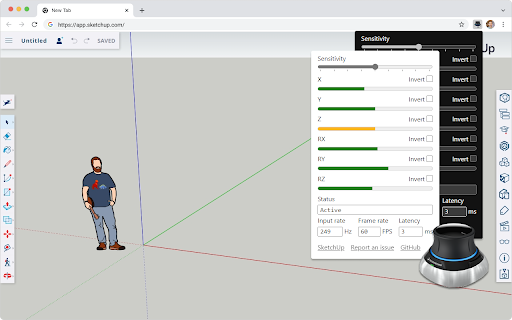

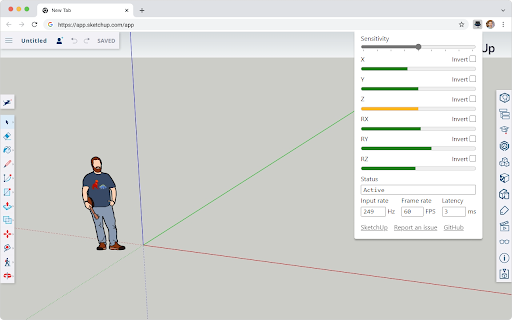
Use your SpaceMouse inside the SketchUp Web app This extension brings your 3DConnexion SpaceMouse to the SketchUp Web app. Once installed, it auto-activates and gives you 5 degrees of freedom for direct manipulation. You can also customize the overall sensitivity and invert individual axis. This project is free and open source. You can learn more about the project, report a bug, or suggest an idea on GitHub: https://github.com/chuanqisun/spacemouse-anywhere **Disclaimer** This project is not endorsed by Trimble or 3Dconnexion, though I'm happy to collaborate with both companies to improve the user experience.

SpaceMouse in TinkerCAD
Use SpaceMouse/SpaceNavigator/Gamepad in TinkerCAD. This script is unofficial and endorsed neither by Autodesk nor 3DConnexion. This script provides support for SpaceMouse / SpaceNavigator / generic joystick / generic gamepad in TinkerCAD. This script is unofficial and not endorsed by Autodesk or 3DConnexion. Does not work on Macs, as Chrome on the Mac doesn't recognize the SpaceMouse as a gamepad. Please contact me if your device is not recognized. I may be able to do something about it.

3D Warehouse Finder
A Chrome extension that allows SketchUp subscribers to right click on any image and search for it as a 3D model inside of Trimble SketchUp 3D Warehouse.

Keepser® Plugin
For auto login and autofill to websites. Compatible with Keepser® NFC cards. This extension only works with the KEEPSER® app available for free on Google Play. You must also have at least one NFC KEEPSER® device. It is a highly secure card that works for life contactless via a phone with NFC technology. It makes it possible to secure end-to-end from the device the use of encrypted sensitive data contained in the device called "Keeps" via a computer web browser. It works with any desktop or laptop using a Chromium-compatible web browser and other operating systems. Computers and NFC phones paired with devices should only be on the same local network. The latter is also encrypted by the solution. The device is also a "Cold Wallet". It allows its user to securely manage and share, from the device, the private keys and public addresses of cryptocurrencies, as well as recovery phrases for private keys, BIP39 standard, "Seed Phrases". Advantageously, it performs autofill and automatic connection on any computer and / or laptop present in the same local network. They just need to be paired with at least one phone. Thus, the user can connect a guest user, for example, without the latter physically needing to own a device. It leaves no digital trace in computers. In fact, a computer can have multiple users with their own devices. Everything is outsourced to the device, which fits in your pocket. PORTABILITY OF GREEN TECHNOLOGIES FOR SECURITY AND CYBERSECURITY It does not collect or store any personal data. Its use is completely anonymized. You will not be asked for any information about yourself and/or the Device. It can work without being connected to a cloud server or the internet. DATA SOVEREIGNTY Only you can access your data. Neither we nor anyone else can access the secrets you store encrypted in the device. For more information, visit www.keepser.io or email us at info@keepser.com.

DWG FastView - CAD Viewer&Editor
Easily view 2D/3D drawings and DWG to PDF Converter. Easily view and share CAD 2D drawings and 3D models on your browser without installing any software. DWG FastView For Web is a powerful tool that has multiple useful functions and fully compatible with AutoCAD. If you want to quickly view and edit for your drawings in your browser, then the extension is just the ideal tool for you. ★ Features ★ 1. Easily browse 2D/3D CAD files online; 2. Support export to PDF, BMP, JPG and PNG, and share it to anyone freely; 3. Support manage layers and print your drawings online; 4. Measure Distance, Coordinates,Angles and Arc; 5. Draw Line, Arrow, Revcloud, Ellipse,Text and Sketch; 6. Supports multiple languages, includ English, French, German, Spanish, Portuguese, Italian, Turkish, Japanese, etc; 7. DWG FastView Cloud: Cross platform application - DWG FastView for Web, for Mobile, for Windows. ★ Support ★ Please contact us for support at: support.mc@gstarcad.net
