
gghfjjdlbhdkfhfpmnmcnhdfjpgifofc

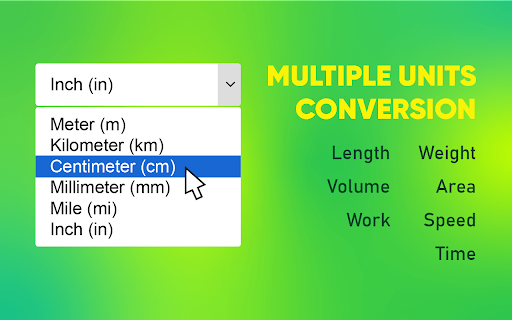


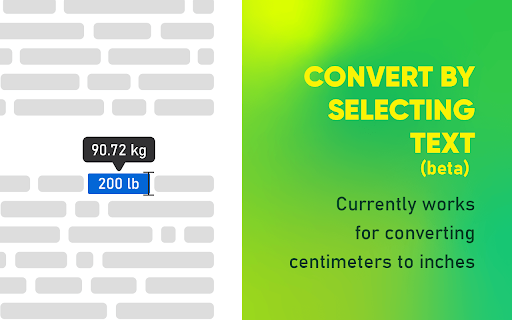
Convert cm to inches, inches to cm, and beyond! Also convert weight, volume, area, work, speed and time. No internet needed! 🌟 Presenting cm to inches (centimeters to inches) conversion calculator. This functional tool designed to provide effortless conversion of length units and other popular units in real-time. 1️⃣ Real-Time Conversion: Our extension simplifies the manual task of conversion by providing an fast function. This extension can help you convert centimeters to inches or inches to centimeters. 2️⃣ Wide Range of Conversion: It converts various units like weight, volume, area, speed, and time, not just length. As such, it becomes a handy tool for students, teachers, engineers, carpenters, and many other professions alike. 3️⃣ Accurate Output: Accuracy is vital when converting units, and this extension ensures the reliability of results through its precise computation algorithms. 4️⃣ User-Friendly Interface: Navigating through cm to inches is straightforward. Whether you need to convert 'cm to inch' or 'inch to cm', the process remains intuitive and efficient. 5️⃣ Quick Conversion Buttons: allow you to convert between centimeters and inches. You can do this with just a single click and save you time and effort. 6️⃣ Need inches to cm converter while reading a web page? Use Text Selection Conversion for quick and easy conversion. No problem. When you select the text, the system will display the converted values. 📚 Scenario 1: A student is reading a school paper with centimeters, but they know inches better. Simply highlight the text and convert 'cm to inches'. 💼 Scenario 2: An engineer is dealing with inch notations that they need to convert into centimeters for better understanding. Use our extension to easily convert 'feet and inches to cm'. 💻 Scenario 3: A carpenter is planning a project, and they have a design that has measurements in both cm and inches. Instead of manually calculating, they can use the extension to navigate between 'cm to inches' and 'inches to cm'. 🖼️ Scenario 4: If you're reading a recipe with metric measurements, quickly convert milliliters to ounces or kilograms to pounds. ⏱️ Cm to inches Chrome extension aims to provide a seamless conversion of units measurable in daily life. By minimizing the effort in unit conversions, it leaves you with more time to focus on your tasks. Make your Chrome browser a smarter place with our extension. ✅ Benefits of the Extension: 📝 Simplifies Tasks; in various fields of work and study, such as converting measurements or time units. It helps engineers convert cm to ft and inches, and assists students in converting minutes to hours. 📈 Improves Workflow: By offering a real-time conversion on your Chrome browser, the extension significantly improves workflow efficiency. It eliminates the need for manual conversions or toggling between different applications or websites. 📖 Enhances Learning: cm to inches extension helps students learn by converting inches to centimeters or kg to lbs. It allows them to apply their knowledge practically. 👥 Compared to other similar tools, cm to inches offers different conversion options and has a user-friendly interface. It stands out as a handy converter for length, volume, weight, and area, among other things. 📌 Frequently Asked Questions: ❓ How do I install? 💡 To install the unit converter extension, just click on the "Add to Chrome" button. Add it to your browser and start using it. ❓ How to convert from centimeters to inches? 💡 Install and open our extension, select ‘Length’ in ‘Category’ field. Enter the number of centimeters, and the system will instantly convert it to inches. ❓ How accurately does the extension convert between different units? 💡 Our unit converter extension provides highly accurate conversions based on globally accepted standards ❓ Can I convert between all types of units? 💡 The extension currently supports conversions for length, weight, volume, area, work, speed, and time. We welcome requests for other units ❓ Does the unit converter require access to my personal data? 💡 This extension does not require access to your personal data, ensuring your privacy ❓ Can I use the unit converter offline? 💡 Yes, the unit converter extension can function offline, providing conversions without an internet connection ❓ Do I need to sign up or create an account to use it? 💡 There's no need to sign up or create an account to use our extension, providing you with instant access ❓ If I encounter a problem while using the unit converter, is there a customer support available? 💡 If you have any problem, feel free to contact us directly via email or leave a ticket in the Chrome Web Store. We're here to help ❓ And finally, what is the equivalent of cm to inche? 🙂 💡 One centimeter is equal to 0.3937 inches. You can calculate this by dividing 1 by 2.54, as there are 2.54 cm in an inch. 🧮 Knowing how to convert inches to cm is clear with cm to inches tool. Tools aid in slimming down human errors and make leasing or buying land a smooth task. 👨💻 Cm to inches extension is handy for converting measurements for school or construction projects, with many useful features. The website offers a reliable and efficient way to convert units online. It guarantees accuracy, speed, and a great user experience. 🥇 This extension makes unit conversions easier, improving productivity in your browser. Try cm to inches extension now and see how a button can simplify unit conversion.

Length Converter - Free Unit Converter
Convert lengths easily with our free unit converter. Quick, accurate, and user-friendly for all your measurement needs! Length Converter - Free Unit Converter is a practical tool for converting measurement units directly in your browser. Instead of searching for conversions on different websites, you can instantly switch between units and see the results in one place. The extension works as a simple length converter designed for quick calculations. Enter a value, choose the starting unit, and the tool immediately shows the equivalent values in multiple units. Supported Units The extension includes commonly used units such as meter, kilometer, centimeter, millimeter, micrometer, nanometer, mile, yard, foot, inch and light year. Because of this, it can also be used as a flexible measurement converter for both everyday use and technical work. For example, you can quickly: ✓ convert meters to feet ✓ convert km to miles ✓ convert cm to inches ✓ convert inches to cm ✓ convert yards to meters ✓ convert feet to meters ✓ convert miles to km It also works well for smaller unit conversions such as a mm to cm converter, or when switching between larger units like a convert meters to kilometers calculation. Key Features ✓ Instant Conversion Results: Enter a number and the extension instantly calculates equivalent values across supported units. ✓ Multiple Unit Display: Results appear in a list so you can compare different measurements at the same time. ✓ Quick Copy Option: Each converted value can be copied with one click, which is useful when working with documents, reports or calculations. ✓ Practical Use Cases: This extension can be useful when working with measurements in everyday situations. For example, it can help when checking distances, converting product sizes, or quickly comparing different length units while working on a project. How to Use 1. Install the extension from the Chrome Web Store. 2. Enter a value in the Length Value field. 3. Choose the starting unit from the From Unit menu. 4. The extension automatically calculates and displays the converted values.

Metric Unit Converter
Metric Unit Converter provides an easy-to-use metric conversion tool via a widget on your toolbar. Metric Unit Converter offers a wide selection of unit conversion categories, making it easy to convert various types of measurements in one place. Convert Fahrenheit to Celsius, feet to meters, miles to kilometers, and more, using this versatile tool and get instant results. How to use Metric Unit Converter: - Click the puzzle icon on your browser toolbar to access the widget - Select a category for unit conversion (eg. Length) - Enter a value into an input box (eg. ‘5’ in the mile input box) - Get precise conversion results across multiple metric units Want to share feedback? Please fill out this form and help us improve the product for you: https://metricunitconverter.com/public/contactus_cc.html You can uninstall this product at any time. Please follow the instructions here: https://metricunitconverter.com/public/uninstall_cc.html By clicking the button above, I consent to install this Chrome™ extension and abide by its Terms of Service and Privacy Policy. Chrome is a trademark of Google LLC. Use of it here does not imply any affiliation with or endorsement by Google LLC.

Unit Converter
Unlock the power of effortless unit conversion with the Unit Converter Chrome extension! Seamlessly convert units across Length, Volume, Weight, Temperature, Time, Percentage, and Number categories right from your browser. - Versatile Unit Support: Easily convert between different units within categories such as meters, feet, liters, gallons, kilograms, pounds, Celsius, Fahrenheit, seconds, minutes, hours, and more. - Intuitive Interface: Streamlined design for a user-friendly experience. Access the converter with just a click, and enjoy a straightforward interface for quick and precise unit conversions. - Comprehensive Categories: Covering a wide range of everyday units, including Length for measurements, Volume for liquids and solids, Weight for mass calculations, Temperature for weather or cooking, Time for all your temporal and chronological needs, Percentage for quick ratios, and Number for basic numeric base conversions. - Real-time Results: Witness instant and accurate unit conversions as you type, making your workflow more efficient and eliminating the need for manual calculations. - Customizable Settings: Tailor the extension to fit your preferences. Adjust decimal precision and choose your preferred units for quick access to your most frequently used conversions. - Time-Saving: Boost your productivity by eliminating the need to search for unit conversion websites. Convert units directly in your Chrome browser. - All-in-One Solution: No need to install multiple extensions for different unit categories. Unit Converter has you covered with its comprehensive range. - Offline Access: Once installed, enjoy unit conversions even when you're offline. Perfect for when you're on the go or in areas with limited internet connectivity. Added a new Settings panel for default unit preferences Minor performance improvements and UI tweaks Upgrade your browsing experience with the Unit Converter Chrome extension and say goodbye to unit conversion headaches. Install now and simplify your daily calculations effortlessly!

汇率转换
此插件为跨境卖家设计,用于显示跨境平台前端页面上商品价格对应的人民币价格。同时也提供手动输入数字转换货币的功能,货币种类共有163个 这是一个为跨境卖家设计的,用于显示平台前端商品价格对应的人民币价值 同时提供163种货币间的自由转换 代码开源托管于Github 更新记录请查看网站 -3.8.1.0 2026年4月20日 修复walmart页面价格转换不正确的问题 -3.8.0.0 2025年9月30日 POP页面支持输入公式计算,例如输入125*36-100,新增POP页面主题:赛博霓虹 - 3.7.3.1. 2025年1月12日 修复TEMU价格转换 - 3.7.3.0. 2024年11月27日 增加Yandex页面价格转换。 - 3.7.2.0 2024年10月14日 修复amazon页面上的价格转换bug -3.7.1.0 2024年8月22日 增加跨境平台walmart的支持,如有问题可以反馈,感谢。 -3.7.0.0. 2024年8月21日 增加100货币量的转换显示,设置中可以关闭 - 3.6.5.0 2024年7月14日 修复ozon页面价格转换不显示的问题 -3.6.4.0 2024年5月31日 增加wildberries和coupang的页面价格转换 -3.6.3.0 2024年5月9日 跨境平台页面价格转换支持选择货币(意为不仅支持人民币,还可以选择其他货币,目前测试站点:美客多) -3.6.2.0 2024年4月23日 修复Temu页面价格造上的问题。POP页面可以设置千分位. - 3.6.0.0 2024年4月2日 增加韩国Kream站点的价格转换支持。POP页面可以记忆,而且可以识别粘贴时的千分位(,或空格) -3.5.5.0 2024年3月23日 增加美客多各站点的价格转换 -3.5.4.0. 2024年3月15日 增加Vinted站点的页面价格转换。 -3.5.3.0 2024年3月11日 增加Ozon站点的价换转换支持.支持切换各种货币.由于站点的特殊性,如果要整个页面翻译成中文,请先等价格显示后再翻译. -3.5.1.1 2024年1月20日,POP页面主题增加以前的"原*经典" -3.5.0.0. 2024年1月11日 POP页面可以设置主题与布局。27种主流货币,按中国银行实时汇率。 - 3.4.5.1. 2023年12月19日 优化汇率请求频率 - 3.4.2.0. 2023年12月11日 汇率请求的频率改为15分钟一次,减轻服务器压力。 - 3.3.1.0 2023年11月21日 重构设置页面,pop汇率转换可以自定义小数位数,跨境平台显示人民币价格可以自定义颜色. - 3.2.0.4 2023年11月07日 主界面优化,整体用wxt改造 - 3.1.1.2 2023年10月18日 增加亚马逊 印度 站的页面价格转换 - 3.1.1.0 2023年9月26日 增加wowmajp 的价格转换支持.同样需要手动授权开启。 -3.1.0.0 2023年5月15日 所有站点的价格转换,需要手动开启.(如后续有更新或问题,请再次手动开启一次)。为了保持最小的请求权限. -3.0.5.0 2023年5月3日 增加TEMU站的支持,需要手动点击开启权限. 取消Aliexpress的支持,因为Aliexpress要登陆才可以看到价格。 3.0.4.0 2023年4月30日 增加韩国Gmarket站的支持,需要手动点击开启权限. 3.0.3.0 2022年11月9日 主界面增加反馈按钮,可以及时反馈异常。POP页面去掉下面的小字1USD=xxx类,使界面更简洁. 3.0.2.2 2022年4月15日 减少不必要的权限,增加安全性。 3.0.2.1 2022年4月15日 插件更新或浏览器更新时,保存之前自由转换的币货种类,不重置 3.0.1.8 2021年12月11日 修复lazada详情页主价格不显示人民币的问题 3.0.1.4 2021年11月26日 增加日本趣天站的支持qoo10 3.0.0.1 2021年8月28日 升级chrome扩展版本到V3,支持离线使用。background切换到Server Worker 2.9.1.0 2021年9月24日 修复chrome94版本下 POP页面不能打开的问题 2.9.0.3 2021年8月17日 修复amazon法国站大金额显示价格错误的问题 2.9.0.1 2021年7月21日 完全重构aliexpress页面价格转换,适应多站点,多语言,多货币 2.8.6.0 2021年7月18日 amazon增法国 加拿大 西班牙 意大利 站点的前面页面价换转换。 2.8.5.0 2021年7月16日 增加shopee巴西,墨西哥,哥伦比亚,智利的支持,增加捐助二维码(:>), 2.8.4.0 2021年3月16日 修复shopee页面规则。改为在线获取,以后页面改变,不必发布新版本,直接后台更新。GoodBOy 2021年3月5日 修复lazada详情页面sku变动后价格不变的问题(redMart页面价格转换未成功,下版修复) ----自由转换界面可以手动拖动排序
