
gfpdcgnkjghlbcobnpiliohohkhbdhpl
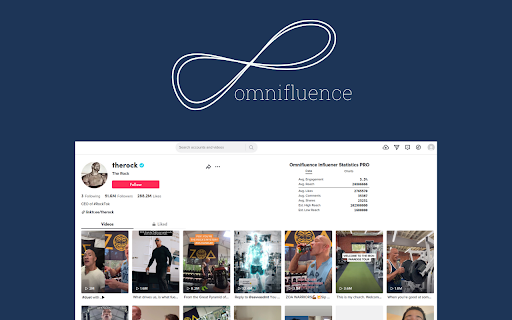
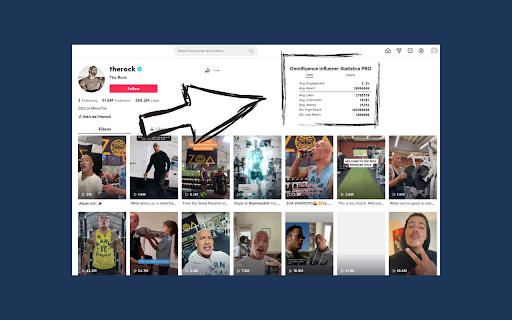

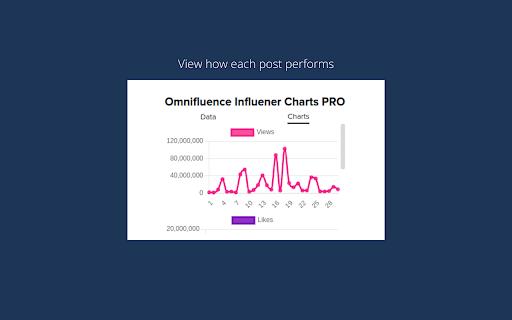
Analyse engagement rate of any influencer right in your browser. Influencer Data & Engagement Rate Extension for social media. Omnifluence is a freemium Chrome extension that helps you quickly evaluate influencer performance by showing useful stats directly on profile pages. With the free version, you can view: • Average engagement rate • Average reach • Average likes • Average comments • Average shares With PRO, you get everything in the free version plus visual charts for: • Views by post • Likes by post • Comments by post These extra metrics help you see whether an influencer performs consistently, instead of having one viral post skew the averages. 1. Log in and make sure the extension is active. 2. Visit any supported creator profile in Chrome. 3. Click the Omnifluence icon to view stats instantly. 1. Save Influencers – Bookmark creators you want to track and export their data. 2. Cross-platform integration – Track creators across multiple platforms in one place. Feedback & Support We are always happy to hear your thoughts and suggestions. Don’t hesitate to reach out to us.

WAVE Evaluation Tool
Evaluate web accessibility within your browser. WAVE is a web accessibility evaluation tool developed by WebAIM.org. It provides visual feedback about the accessibility of your web content by injecting icons and indicators into your page. No automated tool can tell you if your page is accessible, but WAVE facilitates human evaluation and educates about accessibility issues. All analysis is done entirely within the Chrome browser allowing secure valuation of intranet, local, password protected, and other sensitive web pages. To run a WAVE report, simply click on the WAVE icon to the right of your browser address bar, or select "WAVE this page" from the context menu. WAVE errors align with WCAG 2.2 failures. The WAVE interface facilitates human evaluation of many other aspects of accessibility and Web Content Accessibility Guidelines, ADA, and Section 508 compliance. Version 3.3.1.0 (May 2026) - Various bug fixes and performance enhancements. Update AIM score to align with 2026 WebAIM Million. Version 3.3.0.4 (December 2025) - Bug fix for scripting exception with some pages with small text. Minor interface improvements. Version 3.3.0.3 (November 2025) provides performance, interface, and testing improvements. Improved support for ARIA headings and prefers-reduced-motion user settings. Version 3.3.0.0 (October 2025) adds numerous new features, enhancements, and bug fixes. Resetting the extension no longer refreshes the page, thus supporting better testing of dynamic content. The Summary and Details panel are now combined. The AIM Score is presented. Viewing the Order, Structure, or Contrast tabs now filters to only relevant page icons. The WAVE sidebar can now be collapsed out of view. Version 3.2.7.2 (September 2024) fixes a bug that disallowed checking of local files and suppresses errors in some cases where role="presentation" is present. Version 3.2.7.0 (August 2024) adds compatibility with Manifest v3. Inputs with aria-disabled=true are no longer considered for contrast checking. Version 3.2.6.0 (August 2024) adds support for contrast checking when foreground alpha/opacity is defined. The Contrast sidebar tools are updated to support foreground alpha. Also numerous minor bug fixes and improvements. Version 3.2.5.3 (February 2024) fixes numerous minor bugs and adds testing refinements. Some hidden inputs are no longer incorrectly flagged as not labeled. Version 3.2.4.4 (October 2023) fixes a few minor bugs with testing hidden content and with the sidebar contrast tools. Version 3.2.3.9 (June 2023) removes the warning message on UserWay pages due to them removing code that changes page content when the WAVE extension is activated. Version 3.2.3.8 (June 2023) includes numerous accessibility test enhancements, several minor bug fixes, and simplification of the contrast checking tools. Users are informed that WAVE results may be manipulated on pages that utilize UserWay or accessiBe overlays. Version 3.2.3 (March 2023) includes several minor bug fixes. A previous update to test for contrast errors in hidden elements has been reverted. While this was useful for finding contrast errors in drop-down menus, tab panels, dialog windows, etc., identification of errors in hidden elements caused user confusion and, in some rare cases, false positives. Version 3.2 (December 2022) includes over 100 bug fixes and performance enhancements. The extension no longer utilizes jQuery, resulting in faster testing and better compatibility with a variety of pages. A new Navigation Order panel is available that shows the navigation order, element roles, and accessible names (what is read by a screen reader) for all navigable elements. Version 3.1.6 (October 2021) includes numerous bug fixes and test rule enhancements for better testing contrast (filters, background images, and other complex color definitions are better handled), document language (IANA-defined language values are now tested), empty links and buttons (better ARIA support for accessible name computations), broken ARIA references, etc., etc. Performance and accessibility has been improved. Version 3.1.3 (November 2020) includes performance enhancements and fixes several minor bugs, including fixes for multiple alerts for some pseudo-lists and disabled controls being incorrectly flagged for contrast failures. Version 3.1.2 (October 2020) fixes several minor bugs, including with the Structure tab sometimes incorrectly showing no structure, and improves performance and accessibility testing reliability. Version 3.1 (September 2020) includes new accessibility tests (region, figure, possible list, select element missing label, and image with title), improved contrast checking, expanded lang attribute value checking, and numerous other bug fixes and improvements. Version 3.0.9 (July 2020) includes numerous bug fixes, improved accessibility, and improved color contrast checking including fewer false positives and expanded contrast checking for form inputs.

Majestic Backlink Analyzer
Majestic backlink analysis straight into your browser. Over 60,000 installations. Get instant link counts and see who is linking to the page you are browsing without having to go to a separate link analysis tool. FREE backlink count data with much more detail for Majestic.com account holders. This backlink checker from Majestic gives you a really fast way to see the strength of any page based on its backlink information. Because Majestic crawls the whole web, it does not have to rely on a third party for the data. You can immediately see the Trust Flow, Citation Flow and Visibility Flow for any web page directly on the URL bar and you can see summary information about the number of domains and URLs linking to this page. Topical Trust Flow is now integrated into the tool. This now shows you the topic (or category) of each backlink. Information provided free includes: Link Profile charts, link counts at the URL, subdomain and root level and three Flow Metric scores from 0-100 for pages you visit (speed limits apply). Majestic subscribers can very easily link their account to the extension and can then see more detail about links to the page your browser is on. including: *Backlink Detail*: A list of the 10 strongest backlinks to the page (with a link to more), including the URL, anchor text, Citation Flow, Trust Flow, Visibility Flow and the dates first and last seen. The primary Topical Trust Flow is also embedded. *Anchor Text Detail*: A list of the 10 strongest anchor texts (with a link to more) used in links to the URL, including the link counts and domain counts linking with this text and the relative Citation Flow and Trust Flow associated with these links. The primary Topical Trust Flow is also embedded. *Tools*: You can easily delve deeper into URLs by using many of Majestic's backlink analysis tools directly from the extension. *Add to Bucket*: If you are interested in reviewing the URL later, you can press the "Add to Bucket" button to add the URL straight into your Majestic account for later backlink analysis. Who wrote this Analyzer and How? Majestic is one of the UK's fastest growing tech companies, ranked 18th in 2014 in the Deloitte fast 50 list. Unlike many tools that rely on scraping third party data, Majestic is one of the largest web crawlers on the planet, collecting data directly from the web. It even has its own search engine. This independence has made Majestic's Trust Flow metric one of the most reliable and consistent ways to evaluate pages on the internet at scale the score, which is a log score between 0 and 100, gives a valuable insight. More recently, Majestic has launched and integrated Topical Trust Flow into into the Chrome extension, giving more precise analysis of a URL's power and influence. Majestic does not track your crawling behavior at all in this plugin and it will not slow down your browsing. Until you click on the extension, it remains idle and passes no data at all. At that point it simply looks up the data we have already indexed regarding the URL you are currently visiting. Majestic's full privacy policy is described at https://majestic.com/company/privacy-policy

HyperIntelligence
Surface relevant information directly in your web browser. Surface relevant information directly in your web browser. With HyperIntelligence, organizations can inject Zero-Click Intelligence about customers, products, people, and more directly onto words within every website and web application. Built by Strategy, a worldwide leader in enterprise analytics and mobility, the extension surfaces information from 200+ enterprise data sources and injects real-time, contextual insights directly into a user's browser-based workflows. HyperIntelligence automatically scans every webpage and underlines relevant keywords. Hover over a highlighted word to see insights in real-time. Cards elegantly present predefined KPIs associated with that word—sourced securely from Strategy. - Make decisions instantly by incorporating thresholds onto your cards - Combine information from multiple systems - Use cards as a launchpad for cross-application workflows - Collaborate with others by sharing cards - Search for individual cards using the search bar within the extension - Block individual websites at the user level or create organization-wide lists of allowed websites *This extension may enable interaction with third party websites and applications. Strategy is not affiliated with these third-party websites and applications.

HypeStat Analyzer
Check any website's traffic and technology used quick and easy with one click. - Daily unique visitor and Monthly visits count - Traffic sources, traffic history - Average visit duration, bounce rate, pages per visit - Technologies used on website - Link to detailed report on hypestat.com
