
gfmjaemghnjokjhafjiiijhllkkfcjpk

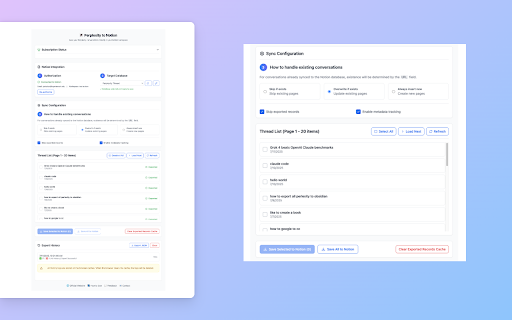

Bulk Export all your PerlexityAI conversations to Notion with one click Perplexity to Notion – Batch Export is a simple yet powerful Chrome extension that lets you effortlessly export, back up, and download your PerplexityAI conversations and computer task threads. With one click, you can bulk export your chat history and task data to Notion, or save it as clean Markdown files for offline storage, research archives, or integration into your personal knowledge base. ✨ Key Features • 📦 Bulk Export: Export all PerplexityAI chats in one operation—no more copy & paste. • 📥 Download as Markdown: Keep your conversations well-formatted for Notion, offline backup, or Obsidian import. • 🔄 One-Click Sync: Automatically sync PerplexityAI history into Notion to build your second brain. • 🖥️ Computer Task Export: Export PerplexityAI computer task threads to Notion and Markdown, including task outputs for structured archiving. • 🏢 Spaces Support: Export entire PerplexityAI Spaces threads for research, collaboration, and team knowledge sharing. • 📄 Perplexity Document Export: Export embedded Perplexity document files along with the main answer. Document content can be saved into Notion child pages and kept in the correct position inside the conversation. • ⏱️ Scheduled Auto Sync: Set a schedule once and the extension will sync at regular intervals—ideal for hands-off backups or ongoing Perplexity workflows. • ⚙️ Customizable Export: Choose whether to include Sources and Related Questions sections in your exported conversations for more flexible content management. • 🔒 Privacy First: All data is processed locally in your browser, ensuring secure and private backups. 💡 Use Cases • Researchers: Archive AI-assisted discussions as structured, searchable notes. • Students & self-learners: Save study Q&As and explanations into Notion or Markdown for easy review. • Knowledge workers: Organize Perplexity content into your productivity workflow with offline sync. • Power users: Preserve long-form computer task threads and task outputs in Notion for reuse, auditing, and documentation. • Teams: Back up Spaces discussions to Notion for collaboration and project documentation. • Heavy document workflows: Capture Perplexity answers that include attached document-style outputs, SOP drafts, or long Markdown files without losing structure. • Automated workflows: Pair Perplexity automations with scheduled sync so new answers are captured in Notion without manual intervention. Take full control of your PerplexityAI conversations—whether you need to bulk export, sync with Notion, save offline, or migrate into Markdown, everything is done securely with one click. 🔄 Change Log 📅 2026-05-25: Added support for exporting Perplexity embedded document files to Notion. Attached document content can now be saved as child pages at the matching position in the conversation, and Notion export is more reliable for complex nested Markdown content. 📅 2026-05-19: Added support for exporting PerplexityAI computer task thread data to Notion and Markdown, including single-page export and bulk export workflows. 📅 2026-02-02: Fixed minor issues raised by users and optimized user experience. 📅 2025-12-04: Fixed the issue where some users could still only export 5 pieces of data after activation. 📅 2025-12-09: Fixed the issue where some Perplexity content could not be saved successfully due to some invalid link problems. 📅 2025-12-08: Improved connection guidance when Perplexity.ai is unreachable (both single and bulk save), fixed exporting all threads for a chosen Perplexity space, and added bulk export support for selecting multiple Perplexity.ai spaces at once. 📅 2025-11-12: Fixed the issue where some Perplexity content could not be saved successfully under certain circumstances. 📅 2025-11-02: Added customizable export options to include or exclude Sources and Related Questions sections. 📅 2025-09-26: Added support for exporting and syncing thread data from PerplexityAI Spaces to Notion. 📅 2025-09-25: Fixed the issue where part of the Perplexity list data was missing during syncing.

Save my Chatbot - AI Conversation Exporter
🚀 Download your ChatGPT, Claude, Perplexity and Phind conversations into markdown files! This extension allows you to export chats from popular AI assistants into formatted markdown files. 💡 Main Features: - Export from ChatGPT, Claude, Perplexity and Phind - Clean and structured markdown formatting - Informative file header (date, URL, etc.) - Configure your exports (custom filename, output) 🎯 Ideal for: - Keeping AI exchanges offline - Integrating into note-taking tools - Easily sharing or post-processing 📢 Help & Feedback: Access options, guide, and support through the extension's right-click menu.

Perplexity to NotebookLM
Import Perplexity conversations to NotebookLM with one click Transform your research workflow with seamless integration between Perplexity and Google NotebookLM. This powerful Chrome extension allows you to export entire conversations with a single click while preserving all sources and references. 🚀 Key Features: • One-Click Export - Instantly send Perplexity conversations to NotebookLM • Smart Organization - Choose between creating new notebooks or adding to existing ones • Source Preservation - All links and references are automatically maintained • Audio Generation - Create professional podcast-style summaries with custom prompts • Duplicate Prevention - Smart mapping prevents re-importing the same conversations • Multi-language Support - Full English and Chinese interface support

Perplexity to Airtable - Batch Export
Bulk export all your PerplexityAI conversations to Airtable with one click Perplexity to Airtable – Batch Export is a simple yet powerful Chrome extension that lets you effortlessly export, back up, and download all your PerplexityAI conversations. With one click, you can bulk export your entire chat history to Airtable research archives, or integration into your personal knowledge base. ✨ Key Features • 📦 Bulk Export: Export all PerplexityAI chats in one operation—no more copy & paste. • 📥 Download as Markdown: Keep your conversations well-formatted for Airtable, offline backup, or Obsidian import. • 🔄 One-Click Sync: Automatically sync PerplexityAI history into Airtable to build your second brain. • 🏢 Spaces Support: Export entire PerplexityAI Spaces threads for research, collaboration, and team knowledge sharing. • ⚙️ Customizable Export: Choose whether to include Sources and Related Questions sections in your exported conversations for more flexible content management. • 🔒 Privacy First: All data is processed locally in your browser, ensuring secure and private backups. 💡 Use Cases • Researchers: Archive AI-assisted discussions as structured, searchable notes. • Students & self-learners: Save study Q&As and explanations into Airtable or Markdown for easy review. • Knowledge workers: Organize Perplexity content into your productivity workflow with offline sync. • Teams: Back up Spaces discussions to Airtable for collaboration and project documentation. Take full control of your PerplexityAI conversations—whether you need to bulk export, sync with Airtable, save offline, or migrate into Markdown, everything is done securely with one click.

Grok to Notion
Batch Save Grok conversations to Notion with one click. Export Grok conversations Grok4 to Notion - Save AI Conversations with One Click Transform your Grok4 Chat experience by seamlessly saving and exporting valuable conversations to Notion. This powerful Chrome extension provides efficient batch saving and seamless integration between AI interactions and your knowledge management system. 🌟 Key Features: • One-Click Export: Instantly save any Grok4 conversation to your Notion database • Batch Sync & Import: Efficiently backup and export multiple conversations at once • Flexible Sync Options: Skip, Overwrite, or Create new pages for existing conversations • Real-time Progress: Monitor sync status with detailed success/failure tracking • Smart Extraction: Automatically captures titles, content, and timestamps • Fast & Efficient: Quick batch processing for multiple chats • Seamless Integration: Direct sync between Grok4 and Notion 💡 Perfect for: • Knowledge Workers: Build your personal knowledge base from AI conversations • Teams: Share and collaborate on AI-generated insights • Content Creators: Archive and organize AI-assisted content • Researchers: Maintain a searchable database of AI interactions • Project Managers: Store and manage AI conversations efficiently • Anyone looking to organize their Grok4 chat history ⚡️ Why Choose Grok4 to Notion: • Clean, intuitive interface for easy conversation management • Seamless Notion integration and synchronization • Reliable sync performance with automated backup • Regular updates and maintenance • Professional technical support • One-click conversation export tool • Efficient batch processing capabilities • Smart conversation organization system Never lose valuable AI conversations again. Start organizing and managing your Grok4 chats in Notion today! Whether you need to export a single conversation or batch save multiple chats, our extension provides the perfect solution for storing and organizing your AI interactions in Notion. The ultimate tool for Grok4 conversation export, management, and organization in Notion. Experience the fastest and most efficient way to save your AI conversations! ChangeLog: 2026-02-03: Fixed minor issues and optimized the experience 2026-01-07: Fixed Grok api timeout bug. 2026-01-06: Fixed API endpoint changes that caused save failures. Fixed Grok render custom tag parsing issues for citations. 2025-11-17: Fixed the issue with pagination processing of data during batch export to ensure all data can be retrieved.
