
gfmggljgbbmapipjniklonbdagmhgkgo
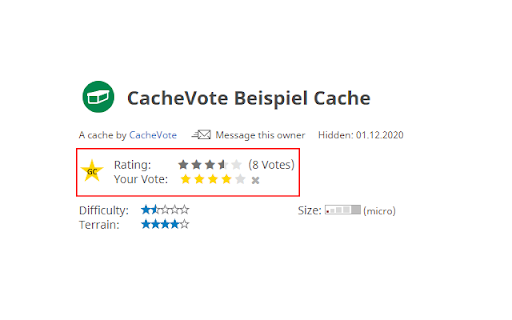
An extension for Geocaching.com which allows you to rate geocaches and shows the ratings of other users. (Replacement for gcVote) CacheVote is an extension for Geocaching.com. It adds new controls to Geocaching.com that let you rate geocaches directly on the website and shows you the average rating of other users. Everyone who has installed the extension can see the average ratings, but only registered users can rate themselves. More information and instructions can be found at https://cachevote.org CacheVote is the successor of gcVote.

Freemap.sk for Geocaching
Adds Freemap Outdoor and Ortofotomozaika SR map layers to www.geocaching.com and adds link to open cache on www.freemap.sk. Maps on www.geocaching.com don't provide much details for outdoor activities. This extension adds Freemap Outdoor and Ortofotomozaika SR map layers to following maps: It also adds link to open www.freemap.sk with highlighted position of the cache.

GeocachingUtils
Geocaching Utils is an open source extension that adds features to the geocaching.com website. Features: - Show friend logs in the sidebar on the right. When you hover over an entry, the log text pops up - Hints can be decrypted automatically without clicking on "Decrypt" - Automatically count the words while you are writing your logs. This can be very useful if you are a project-gc badge hunter and aiming for the "The Author" badge. - Everything in this feature list can be configured and enabled/disabled in the settings of this extension. You can access the settings by clicking on the extension icon in the top right corner of your browser. This extension is an open source project. Feel free to report bugs and contribute to the code here: https://github.com/leobut/geocachingUtils

Google Search Maps Button
Adds back the Maps button to Google search pages and makes the search result map images clickable again for seamless navigation. The "Google Search Maps Button" Chrome extension brings the Google Maps button back to the Google Search navigation bar for users in Europe. If you've found the Google Maps button gone or missing from your search experience, this extension is designed to address exactly that. What it Does: This extension ensures you can access Google Maps with just one click from the Google Search page. It also makes map images clickable within search results, significantly improving your navigation experience. Why it's Needed: In response to the Digital Markets Act (DMA), which is aimed at fostering fair competition and innovation, the Google Maps shortcut was removed for European users. This tool effectively restores that lost convenience. Privacy and Security: Operating without saving any user data, the extension ensures your privacy and security are protected. For anyone who's noticed the Google Maps button gone from the Google Search navigation bar in Europe, this extension provides a straightforward and effective solution, seamlessly reintegrating this essential feature into your browsing routine. Troubleshooting steps if the extension is not working: 1. Check Plugin Status: Make sure that the plugin is enabled in your Chrome browser. 2. Verify Site Access: Open the details for this plugin under "My Extensions" and ensure that "Site Access" is enabled. NB! For Opera users: Go to the Manage Extension section and tick the „Allow access to search page results” option. Otherwise the plugin wont work. If you'd like to say thanks, you can do so via PayPal at henripp94@gmail.com. I'm truly grateful for any support, though it's absolutely not necessary or expected.

Geocache Solved
Solve the geocache coordinates directly on the geocache page with a single click! Using the solvedjigidi website you can resolve mystery, letterbox and wherigo and update gps coordinates in one click. On the geocache page, at the top of the right-hand column, a puzzle icon is added. Click on it, and if the coordinates are known they will be updated, otherwise you'll know that it's not available, so perhaps come back later to check again.
