
gflcogcigloiniobpagephgaldchpclf
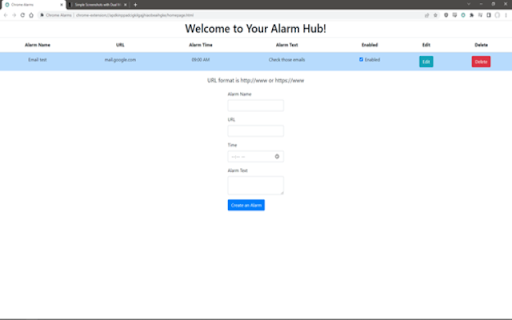

Set alarms that will open specified URL's at desired times. The URL will be opened in a new tab along with an optional notification. An alarm clock for your browser. If you struggle to remember to check your emails regularly, if you want to schedule a task for yourself that you don't have time for right now, this is for you. I designed this as someone who has ADHD, and have struggled with remembering to do tasks that I put aside even when I had time. This is a very simple extension that will allow you to create alarms that open tabs to any website you want at whatever time you want.

Alarm, Timer and Stopwatch
A powerful alarm extension that supports multiple timers and stopwatches with five to ten-minute snooze. All in one extension to manage your schedules. You can define multiple alarms, use the stopwatch with as many "lap"s as required, or simply use the timer with pause and resume support. This extension uses the built-in API to set alarms hence the extension works even if the UI is hidden or your browser gets restarted. This extension offers alarm sound snoozing which snoozes the alarm sound 3 times with a 5-minute delay. The extension displays a high-priority desktop notification when either an alarm or a timer is fired, also it plays two different sounds to get the user-attention. As of version 0.1.3, the user can snooze each notification with a 5 to 10-minute delay. As of version 0.1.4, you can export and import your preferences

Page Load Alarm
Plays a notification with sound on page load. Works when any tab in a window finishes loading. A simple extension that notifies you when a webpage finishes loading. This extension saves your time by allowing you to do other things while a slow page is loading. Plays a notification with sound when any page finishes loading. Click the extension icon to toggle whether sounds should be played. Free and open source.

Web Alarm
Get a silent alarm from the website when sound is not allowed. The notification will appear at the exact time. # Silent and Quiet. A Web Alarm Just for You. This Chrome extension quietly displays a notification overlay on the Chrome screen at the time set by the user. There is no sound, but the message is clearly delivered at the scheduled time. You can easily add, edit, and delete alarms without complicated installation or setup. # Main Features - Add, edit, and delete alarms - Prevents duplicate alarms if the day and time are the same when adding or editing - Clicking the screen when an alarm is displayed closes the alarm - One-time alarm feature # Bug Reports and Feature Requests Please contact codivingmoon@gmail.com. I will review and consider fixes and additions. # Version History ## 1.0 - Add, edit, and delete alarms - Prevents duplicate alarms if the day and time are the same when adding or editing - Clicking the screen when an alarm is displayed closes the alarm ## 1.1 - Overall UI improvements - Added one-time alarm feature - Modified to work on all URLs - Added 12-hour and 24-hour format settings - Fixed incorrect words - Added filtering for all alarms, regular alarms, and one-time alarms ## 1.4 - Adjusted the size of the side panel toggle icon - Preserved the last-used state for side panel mode and popup mode - Enabled toggling between side panel and popup modes

Smart Alarm Clock & Timer – Snooze, Sync & Themes
Set alarms & timers with snooze, repeat, and synced dark/light themes in popup and fullscreen. Meet Smart Alarm Clock & Timer — the fast, reliable way to manage alarms and timers in Chrome. Why it’s great • Snooze & Stop controls on alarms and timers • Popup ↔ Fullscreen sync so settings match in both views • Dark/Light themes with corner radius & color controls • Repeat timers & custom sounds (Test button included) • Lightweight and privacy friendly (no personal data collection) What you can do • Start a 10 minute timer with one click • Set a single or repeating alarm (with Snooze) • Switch themes instantly; tweak corner radius to your taste • Keep everything in sync between popup and fullscreen Privacy • Uses Chrome storage only to remember preferences. • No selling of data; no unrelated tracking; no external accounts. • Perfect for focus sprints, cooking timers, calendar reminders, and daily routines. • Updated manifest.json to remove the tabs permission. The extension no longer requests unnecessary permissions and only uses storage
