
gffdaclpojapedcokjpabadmbfjhiaei
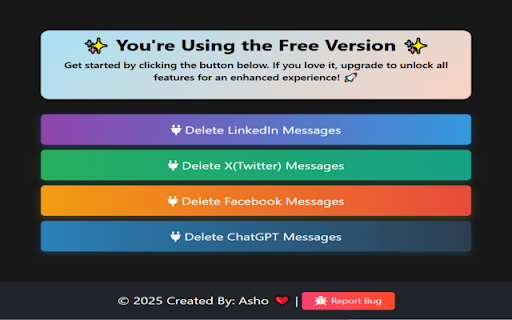
Quickly delete messages on X, 🔗 Linkedin, 🤖 ChatGPT, & more. 🧼 Clean up chats with one click. Advantages ⏱️ Time-Saving: Delete or archive messages in bulk with just one click. 🧭 User-Friendly: Intuitive and easy-to-navigate interface ensures a seamless experience. 🔄 Versatile: Works across multiple platforms — X (Twitter), LinkedIn, ChatGPT & more. 🛑 Full Control: Pause or stop the deletion process anytime for added flexibility. 🧹 Clutter-Free: Keep your messaging apps clean, organized, and stress-free. 🚀 How It Works 🧩 Install the Extension: Get it from the Chrome Web Store and add it to your browser. 🖱️ Click the Icon: Find the extension icon in your browser toolbar and click it. 💬 Select Your Platform: Choose from a list of supported platforms (X, LinkedIn, ChatGPT & more). 🟢 Start the Process: Click the action button to begin deleting or archiving messages — the interface will guide you step by step. ⛔ Stop Anytime: Need to pause? Just click the stop button at the bottom popup to halt the process anytime. ⚠️ Note: This extension is not affiliated with or endorsed by X (Twitter), LinkedIn, ChatGPT, or any other messaging platforms.

YouTube Summary with ChatGPT & Claude
Summarize YouTube videos, web articles, and PDFs to save time, powered by ChatGPT, Claude, Mistral AI, and Gemini. YouTube Summary with ChatGPT & Claude is a free Chrome Extension that lets you quickly summarize YouTube videos, web articles, and PDF you're consuming. Use this extension to save time and learn more quicker. YouTube videos, web articles, and PDF summarization functions are powered by ChatGPT (OpenAI), Claude (Anthropic), Mistral AI and Google Gemini. ## What are the benefits of using YouTube Summary with ChatGPT & Claude? The main benefits are saving time, increasing productivity, and improving learning. YouTube Summary with ChatGPT & Claude reduces the need to watch long videos when you're just looking for the main points. The summaries let you absorb information quickly so you can spend time on other tasks. ## How do I use YouTube Summary with ChatGPT & Claude? Using YouTube Summary is easy. After installing the browser extension, simply open a YouTube video you'd like to summarize. Click the YouTube Summary icon in your browser toolbar, and it will generate a summary and provide an option to access the video transcript if available. You will see a summary of the video with or without timestamps. You can click on the timestamps to jump to the corresponding part of the video. You can also click the "Copy Transcript" button to copy the transcript of the YouTube video to your clipboard. ## Can I customize the length of the YouTube video summaries? Yes, you can customize the length of the video summaries generated by YouTube Summary. Adjust the settings within the extension to tailor the summaries to your preferred level of detail. Also, you can customize the prompt to use to summarize the content. ## Is YouTube Summary with ChatGPT & Claude suitable for educational purposes? Yes, YouTube Summary with ChatGPT & Claude is a valuable tool for educational purposes. It provides concise summaries and transcripts that can aid in research, studying, and learning from YouTube videos. ## Can YouTube Summary with ChatGPT & Claude handle videos in languages other than English? Yes, YouTube Summary is capable of summarizing videos in multiple languages, making it a valuable tool for international users. You can also choose what language you want the transcript to be in. Fore more details, please visit the website: https://glasp.co/youtube-summary

Delete Linkedin Messages 2026
🧹 Effortlessly bulk 🗑️ delete and 🗂️ archive all your LinkedIn messages in just one click! 🚀 Streamline Your LinkedIn Messaging with Ease! Is your LinkedIn inbox overflowing? 📩 Our powerful “Delete All Messages & Archive on LinkedIn 2026” extension helps you declutter and organize your messages effortlessly—all in just a few clicks! ✅ 🔥 Key Features: ✅ One-Click Cleanup – Instantly delete or archive all LinkedIn messages. ✅ Full Control – Start or stop the deletion process anytime. ⏸️ ✅ Real-Time Tracking – Monitor the deletion progress live in the extension popup. 📊 ✅ Free Version Limit – Delete up to 5 messages for free before upgrading. 🎉 💡 Why Choose Our Extension? Designed with an intuitive interface, this tool ensures a smooth and efficient experience. Whether you're decluttering your inbox or starting fresh, this is the ultimate solution to keep your LinkedIn messages organized. ⚙️ How It Works: 1️⃣ Add the extension from the Chrome Web Store. 2️⃣ The extension operates in English 🌍. 3️⃣ Click the extension icon. 4️⃣ Press "Go to LinkedIn Page" if LinkedIn isn’t open. 🔗 5️⃣ Choose: Delete All Messages 🗑️ or Archive Messages 📥 – you can also Stop anytime! Say goodbye to inbox clutter and hello to a cleaner, more organized LinkedIn experience! 🎯 Download "Delete All Messages on LinkedIn 2026" now and take control of your inbox today! 🔹 Note: This extension is not officially authorized by LinkedIn.

DeclutterGPT - Bulk Delete & Archive Chats
Easily bulk select, delete, and archive ChatGPT conversations. Declutter your ChatGPT history in just a few clicks! Tired of scrolling through endless ChatGPT conversations just to delete or archive them one by one? DeclutterGPT is the ultimate Chrome extension designed to make your ChatGPT experience faster and more efficient. 🔥 Why DeclutterGPT? Save Time – Delete or archive multiple conversations in seconds instead of clicking each one manually. Stay Organized – Keep your chat history clean and clutter-free. User-Friendly – Simple, intuitive interface with easy selection checkboxes. ⚡ Key Features ✅ Bulk Delete – Select and delete multiple chats with one click. ✅ Bulk Archive – Move chats to archive without deleting them permanently. ✅ Preview Chats – Review your chats before deleting or archiving them. ✅ Infinite Scrolling Support – Works seamlessly with large chat lists. ✅ Progress Bar & Count – Real-time updates on your bulk actions. 🔧 How It Works 1️⃣ Open ChatGPT and click on the DeclutterGPT extension. 2️⃣ Click “Add Checkboxes” to enable selection next to each chat. 3️⃣ Select the chats you want to delete or archive. 4️⃣ Click “Bulk Delete” or “Bulk Archive” and watch the magic happen! 💡 Who is DeclutterGPT for? ✅ ChatGPT power users with hundreds of chats. ✅ Productivity-focused users who want a clean chat history. ✅ Developers & researchers managing frequent AI interactions.

ChatGPT Copy
Copy ChatGPT conversations or prompts to the clipboard with a right-click. Simple, fast, and secure. - Copy All: Instantly copy the entire chat, including both prompts and responses. - Copy Prompts Only: Extract just your input messages for quick reference. - Fast 2-Click Copy: Use the right-click context menu for seamless copying. - Markdown Plain Text Format: Simple, readable text - 100% Private & Secure: No file access, no remote calls—just clipboard copying. - Works with OpenAI ChatGPT: Supports URLs starting with https://chatgpt.com. Save and organize your ChatGPT conversations effortlessly—fast, safe, and hassle-free! 🚀
