
gegjfbjeegekghinonacfhkfhmjanakd
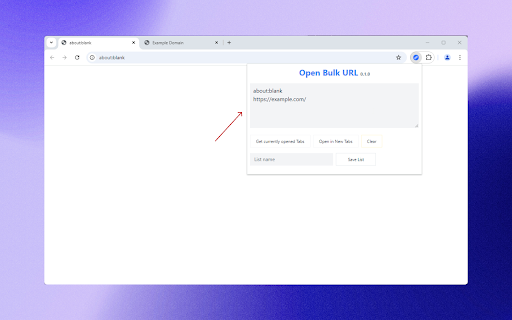
Open Bulk Url is a browser extension that allows you to open multiple URLs in new tabs. Helpful when you have a list of URLs that you want to open in new tabs. Save different lists according to your workflow and open them in new tabs. - Open multiple URLs in new tabs - Save and load lists of URLs - Clear storage - Easy to save your favorite list of urls and open them in new tabs - `tabs`: This permission is required to get the URLs of the tabs that are currently open. - `storage`: This permission is required to save and load the lists of URLs.

Open Multiple URLs
Takes a list of web pages in plain-text format and opens them all in new tabs. How to: Paste the list into the text area (one website address per line), select your options and click "Open URLs". Permissions: - "Storage" permission in order to save settings and user input. - "TabGroup" permission in order to open URLs in new and existing tab groups. - "Search" permission in order to open standard search for input that is not a URL.

Multiple URL Opener
Open multiple URLs in new tabs. Best bulker URL opener chrome extension Chrome extension to open multiple urls with single click. A useful and easy to use extension which allows to open a list of links in single a click. - Opens multiple URLs in one click - Ability to preserve input links - Load URLs in random or reverse order - Open the link when tab is selected This extension collects no user data. "Read your browsing history": This permission allows the extension to create tabs. It also allows the extension to get the URL's and preserve the input for the next time.

Open Multiple URLs
Extension opens a list of URLs. Bulk URL Opener extension. "Open Multiple URLs" extension takes a list of web pages in plain-text format and opens them all in new tabs. Paste the list into the text area (one website address per line), click [Open] or [ Open in Incognito]. You can load URLs from .txt file. You can download your URLs as .txt file. Can create folder with urls as bookmarks. Permissions: - "Storage" permission in order to save user input; - "Tabs" permission in order to get all opened URLs; - "Downloads" permission in order allow you to download URLs as .txt.

Bulk URL Opener Plus
Bulk URL Opener Plus Extension just lets you open multiple URLs at once (in new tabs or windows) A simple and easy to use extension which allows the user to open a list of URL's in 1-click. Bulk URL Opener Plus Extension just lets you open multiple URLs at once (in new tabs or windows). [FEATURES] - Open each URL in new tab/window - Allows users to manage lists of URLs easily - Delay on opening the next link - Auto close when opened - Focus opened tabs - Skip duplicate links . . . If you have any questions regarding privacy protection when using the service, please contact us by email at [spcpapps@gmail.com]
