
gefigbpfdiocbmhhoacopikjjagcaofa

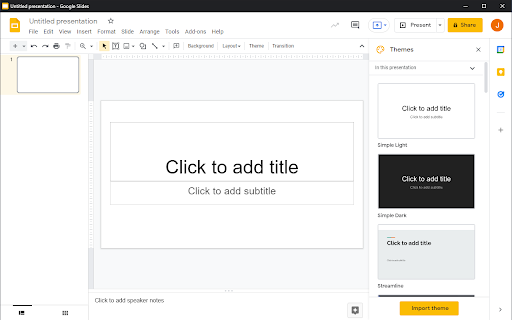
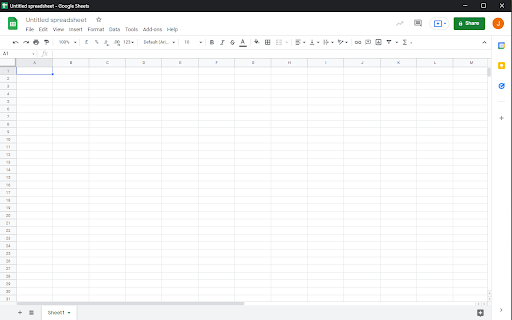
Open Google Docs, Sheets and Slides docs in separated and dedicated window automatically, without an address bar or browser buttons. This extension automatically opens your different documents from the Google Document suite in a dedicated window, as if you were using dedicated software. You have more space to work because the other browser components don't appear. It also gives you direct access to your various documents being edited in the taskbar of your operating system.

Google Drive Mini
Create and manage Google Drive files. This extension helps you manage Google Drive files, create docs, spreadsheets, or forms. All actions are performed locally in your browser, ensuring no data is sent to third-party servers. When you click the extension icon, it opens your Google Drive in a pop-up window. From there, you can rename, download, delete, and transfer files. The interface is similar to Google Drive, intuitive, and user-friendly, without unnecessary features. For managing Google Drive , you can: • Create new files • Rename files • Download or delete files • Search for specific files • Browse different Google Drive sections like a Shared With You or Starred. Google Drive is a cloud service of Google Inc., registered in the U.S. and other countries. This is an independent project developed by the community and has no relationship to Google Drive or Google Inc. in any way.

Focus for Google Docs
Focus for Google Docs helps you enter the writing flow by decluttering Google Docs and adding a pomodoro timer. -------How to use------- Click the Focus icon in the bottom-right of the Google Doc to enter focus or start a pomodoro session. Clicking the extension icon opens a popup to modify the settings. -------Privacy Policy------- Focus for Google Docs never collects any of your data. It is completely transparent. You can view the open-source code here: https://github.com/JoelGrayson/Focus-for-Google-Docs

Distraction Free Mode — Google Docs & Slides
The distraction free mode (▣) for Google Docs and Google Slides hides all controls and buttons and lets you focus on creation. FOCUS ON THE WRITING The distraction free mode for Google Docs and Google Slides hides all controls and buttons and lets you focus on writing and creating. Now with a full screen mode. Tip: Check out the Google Docs and Google Slides keyboard shortcuts for the things you do the most and you never have to switch back again. RELEASE NOTES v.2.2.0 - 2023 Distraction Free Mode has been updated to work with the latest version of Google Docs! THEMES FOR EVERY SITUATION Pick the style that suits you, whether it's the dark mode suitable for late night prose, sepia for caffeine-fueled poems, or the clean gray default gray theme. More are planned for the future. NOTES This extension requires access to change how Google Docs and Google Slides works, but your documents are safe. The code for this extension can be found on the website: http://flowapps.co/distractionfree PRIVACY POLICY Please read the privacy policy here: http://flowapps.co/distractionfree/privacypolicy.html

Pointer: AI agent for Google Docs
Cowork with AI in Google Docs, powered by Claude. Native Suggestions—accept or reject edits with explanations, like a collaborator. Elevate your document editing experience within Google Docs with Pointer, the premier AI agent designed to optimize your workflow and enhance the quality of your writing. As a dedicated power user of Google Docs, you understand the necessity of maintaining a high level of efficiency while ensuring that your documents are clear, concise, and professionally formatted. Pointer offers a transformative solution by integrating directly into Google Docs to provide real-time editing suggestions, all while preserving your document’s original formatting. This state-of-the-art AI agent is designed to become an indispensable tool in your productivity arsenal, saving you valuable time and improving the quality of your content. WHY CHOOSE POINTER FOR GOOGLE DOCS Pointer stands out as your in-document AI agent, developed to carry out intelligent editing tasks that fundamentally change your writing journey. Unlike other tools, Pointer works within Google Docs itself, removing the need for external applications that often disrupt workflow. Forget about manual adjustments and errors after transferring texts from services like Chat GPT. With Pointer, enjoy seamless, intelligent adaptations based on your cues, presenting recommendations and modifications that honor and enhance your document’s existing style and format. From applying strikethroughs and inserting text boxes to learning how to double space in Google Docs, Pointer does it all efficiently, improving both your document’s appearance and functionality. Our AI agent preserves the layout and style of your documents, freeing you to focus on creating compelling content without being bogged down by formatting concerns. This ensures that every document—whether it’s a Google Docs resume template, a professional cover letter, or a detailed report—retains a high standard of polish and readiness for both personal and professional engagements. With Pointer, harness the power of intelligent editing: our smart suggestions are designed to appear five times faster than conventional methods, ensuring uninterrupted flow and rapid editing turnaround. FEATURES AND BENEFITS - Real-Time Editing and Suggestions: Pointer integrates smoothly into Google Docs, offering instant editing capabilities without the need to switch between tabs or applications. - Preservation of Document Formatting: Pointer ensures that changes enhance your documents while maintaining the established formatting, saving you from repetitive corrections. - Advanced Document Tools: Fully-featured support includes handling complex document needs such as strikethrough, hanging indent, and adding page numbers—all within Google Docs. - Comprehensive Template Support: Enhance a variety of document types, including resumes and cover letters, using Google Docs templates effortlessly. - Dark Mode Compatibility: Enjoy a comfortable editing experience regardless of your display settings with full support for Google Docs dark mode functionality. - Offline Editing Capabilities: Although you need an internet connection to make AI suggestions, you can review them, approve or reject, fully offline, with automatic syncing once you’re back online. - Voice Typing Integration: Merge the power of Google Docs voice typing with Pointer’s smart editing features for an intuitive speech-to-text experience. - Business Document Management: Efficiently handle the editing of Google Docs templates, contracts templates, invoice templates, and other business-focused documents. - No Word Count Limitations: Make a simple headline change, or ask it to completely revamp your document with 20+ suggested changes with a single request, the choice is yours. - Tailored Editing Preferences: Customize how Pointer interacts with your document to suit your personal editing style and specific project requirements. Pointer is not only changing the way you work in Google Docs but is also paving the way for future integration with other Google Workspace products. Our vision includes extending Pointer’s intuitive AI capabilities to Google Sheets and Google Slides, providing seamless data processing, automated formula management, slide design, and content suggestions. This planned expansion means Pointer will soon support the full suite of Google Workspace applications, thus becoming an even more integral part of your everyday productivity and collaboration efforts. GETTING STARTED WITH POINTER Installation is straightforward—install Pointer from the Chrome Web Store and start transforming your Google Docs experience instantly. Join the growing community of professionals and power users who have boosted their productivity with AI-enhanced document management offered exclusively by Pointer. By choosing Pointer, you’re not just enhancing your current Google Docs experience; you’re also future-proofing your workflow for upcoming Google Workspace innovations. From crafting resumes, cover letters or long contracts to managing complex spreadsheets and captivating presentations in the future, Pointer is poised to be your primary ally in achieving professional success. Download Pointer today and unlock a new era of AI-enhanced document editing. Embrace the transformation and prepare for a future where your workflow is more streamlined, efficient, and effective with Pointer, the smart AI agent developed for Google Workspace perfectionists like you.
