
gecjodebhcegkhkmajpdcomimngnhlik


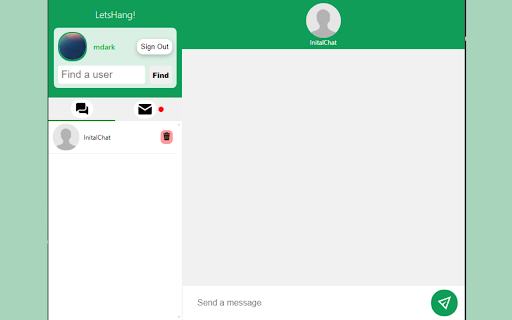

Message with others through your favorite browser! Introducing LetsHang!: Your Passport to Fun and Connection! Transform your browsing experience into a lively social hub with this Google extension. Chat, share, and laugh with friends old and new, right from your browser. Say goodbye to dull solo browsing and hello to endless possibilities for connection. Let's Hang is not just an extension, it's your digital hangout spot! Coming Soon - Real time notifications - Group chats - Search for a chat v1.2.3 / v1.2.4 - Notification • Added notifications within the app • Still working on notifications outside the app • Updated searching feature to include both upper and lower cases v1.2.1 - Finding Users • Added new way of adding users. • Removed find button, and added a simple way to find and search for users to add v1.2 And Lower - Lets Hang App

MiniChat - Chat with friends easily.
Turn your browser into an instant messaging platform and communicate with your friends quickly and easily! Transform your browser into a dynamic instant messaging platform, enabling you to effortlessly connect with your friends and enhance your online communication experience. With our innovative chat extension, you can create chats with friends and seamlessly chat while browsing other web pages, making multitasking a breeze. Personalization is at your fingertips with the ability to choose your own profile photo color, allowing you to express yourself uniquely in each conversation. Our chat interface boasts a beautiful UI and a thoughtfully designed user experience, making your chats not only functional but visually appealing. Say goodbye to the complexity of traditional messaging apps; our platform is intuitively designed, ensuring that it's incredibly easy to use. Elevate your online interactions and stay connected effortlessly with the power of MiniChat!

Multi Chat-Chat Anywhere, Anytime
Activate this extension to chat without difficulty on all your favored social networks in a single windowy Make your conversation easy with the presence of Multi Chat. Install this Multi Chat Chrome extension to run all your social media messenger interfaces from Facebook, WhatsApp, Instagram, and others in one window. Bye-Bye tabs switch and greet a cool chat session. Quick, minimal size, and very simple, Multi Chat consolidates all your messages without the page getting loaded. Be connected, receive updates, and message seamlessly and instantly all in one platform. Key Features of this Chrome Extension Unified Chat Window: Connect to all your favorite social media conversations from one convenient, single window. Cross-Platform Compatibility: Compatible with such networks as Facebook, Instagram, Twitter, and WhatsApp. Lightweight & Fast: The extension is seamless and does not slow down your browser. Real-Time Notifications: Here, you receive instant message alerts from all the platforms at one central location. Step 1: Install the Extension Open google chrome, move over to the chrome web store and search for Multi Chat. After that, an “Add to Chrome” button will appear and, as the name suggests, click it to add the extension to your Chrome browser. Step 2: Open the Extension Once installed, you will see the Multi Chat icon with the letter ‘m’ in your browser toolbar at the bottom of the page. Step 3: It is now possible to Sign in to Your Social Accounts. Open the social network – or social networks of your choice: Facebook or WhatsApp, for instance, or Instagram. Click on the extension icon to open the interface, where you can chat while continuing with your other tasks. With the Multi Chat feature, you can chat with all your contacts across various social networks through a single window. See real-time notifications for all your chats and reply right from the notification area of the browser extension. Who Is It Useful For? If you are a person who enjoys being in touch with your friends or families using several Inter-Net sites, then Multi Chat will suit your needs. It links all your socials all in one, so you don’t miss out on any notification. People talk in work folders, but now it is convenient to manage several working discussions. With Multi Chat you can also jump freely from one platform to another so that you will not waste much of your time being in charge of business communication. Contrary to having several windows or several tabs open, Multi Chat gives a unique place for every conversation so as to make the interlocution easier. Multi Chat means less need to switch between apps or multiple windows within the browser, so it saves time and lets you concentrate on the subject matter. Say goodbye to missed notifications – Multi Chat keeps you updated with notifications from your connected platforms in Realtime. Yes, of course, Multi Chat is freeware which means you can download the application without any money spent and start using it without any fees. Multi Chat allows communication in channels including Facebook, Instagram, WhatsApp, Twitter, and many others. No, Multi Chat does not take up space on your computer and therefore your browser will not slow down.

Internet Friends
Bump into other people when browsing the internet. When on the same webpage with another user, you will see each other's cursors and chat messages. To chat, use the 'Open Chat' key combo in the Internet Friends settings ('Ctrl + Shift + Enter' by default). Type your message and press Enter to send the chat message. Click on the background of the webpage to close the chat input. If you change the key combo to a combination without Ctrl, Shift or Alt, the background of the webpage must be selected before using the key combo.

Chat Overlay
Overlays a chat onto the page, allowing users to pick a name and room code and chat with their friends on a server they provide. Overlays a chat onto the page, allowing users to pick a display name and room code and chat with their friends on a server they provide. Example code for such a server can be found at https://github.com/jonwillbc/chat-overlay-server
