
gebfnckohjlbgblkkpebgjfdfpoiklol
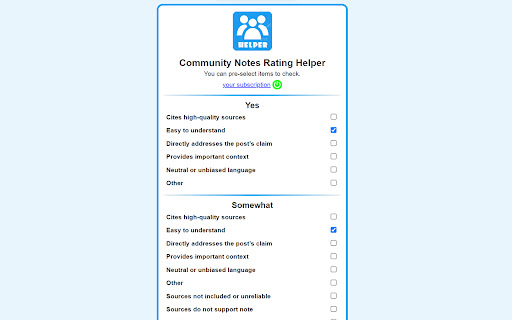
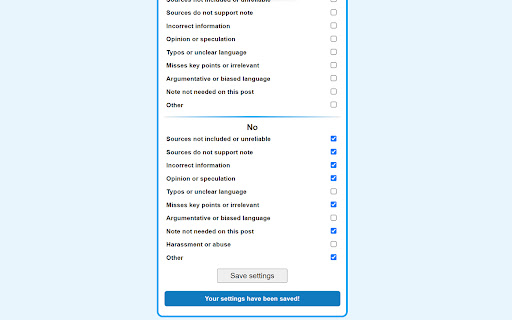
This extension helps you easily rate it. [X Twitter Community Notes Rating Helper: Semi-Automatic Rating Tool] This chrome extension helps you easily rate X's community notes. On the options screen, paid users can pre-select which ones to check. * When X Twitter updates the layout of their website, this extension may temporarily stop working. * It'll take about 3 days to 2 weeks for this extension to catch up, after the author recognized it. * X Twitter updates do not occur in all countries at the same time and there is a lag of several days.

Anti FeR toolkit
Adds features and extensions for the bushtarion web game (formerly Canola toolkit formerly Antisback's bushtarion toolkit) This adds some functionality to the Canola toolkit, which it is forked from. Fixes the regex for Company name matching (no more oddities with names that include '@', '~', or '^'), adds information about who someone has attacked, includes stealth mobs in the activity chart, and maybe more! 1.2.22 Changes: Defaults for options set to "on" 1.2.21 Changes: Additional options for the military page and supply depot 1.2.18 Changes: Includes an options page, navigate by right-clicking the icon and selecting "Options" 1.2.13 Changes: Displays development information for technologies unlocked for a given dev/construction Shows troop count on a hack Shows a horribly formatted estimate on the flak needed to land on a target given the visible units Display information about what you are 30% and 70% of in the score breakdown overlay Show gov defense in spy report incoming (but doesn't account for when it recalls) 1.2.12 Changes: Fixes seed/income calculation Adds a button to hack from the search page in a new tab Spy report incoming/outgoing is now sorted by ETA Spy report incoming/outgoing displays original mob ETA Adds an input so that dynamic AR calculation can be done from the spy report 1.2.11 Changes: Attacks on an HQ don't show a huge number for ETA Stealth mobs sent now default to ETA 5 sent New "Plant Max" feature calculates how many seeds you are able to plant given how many gards you have home. Updates grass seed bonus in Spring 1.2.10 Changes: Fixes single person mobs not showing up on spy reports Fixes HQ incoming/outgoing not showing HQ outgoing mobs stay in the outgoing screen "until recalled", which I don't know when it is recalled so take the info as an alert more than a reality Alerts if the user does not have enough harvesters to cover the max needed (in total, not at home) 1.2.9 Changes: Reverting mob notes and loving on Alci 1.2.8 Changes: Makes mob notes on alliance incoming screen more interesting for some :) 1.2.7 Changes: Fixes score evaluation for players with public ID's Fixes military mob calculations for "all" Income calculator now reasonably accounts for exponential seed loss and nighttime seed penalty Search results include a "Total" row for acres and score 1.2.6 Changes: Fixed spy report when spying a member of your own alliance Finished searching by Public Name Added full Hack output to console debugger when hacking from Alliance incoming page Added troop cost calculation on Military page 1.2.5 Changes: Fixes score calc for insurance that is "claimable early" Alliance incoming "Defend" and "Retaliate" links are now buttons Added "Hack" button on alliance incoming to make a best guess at route and fill out incoming notes Added "Recall" button on alliance incoming to recall from alliance page 1.2.4 Changes: Add Land Fat percentage to search results Fix Alliance page incomings when AHQ! is targeted Add Unit Stats quick link in side panel Add ID list generation with search results (in console debugger output) Add "Has Attacked" information on news page 1.2.3 Changes: Alerting when the user has uncultivated acres Maintenance page additionally displays the seeds you can grow with troops home Alliance page has quick links to setup defensive or offensive mobs from the incoming screen

Kloser
Close all tabs and open default tab Simple extension for closing all tabs in active window and opening New Tab Page or your selected page. You can edit settings of this extension, such as you can choose preferred tab which will be opened after using the extension and you can set will be extension close pinned tabs. Use the shortcut: Ctrl + Q

OpenText Core SCA Select Extension
Open Source Select will help developers find and use the right open source and reduce friction between organisations and developers Open Source Select helps you find and use policy compliant and great open-source for any development project. The OpenText Core SCA Select Extension is a free plugin created with developers in mind, enabling you to check the health metrics and license information of an open source project at a glance. If you need more granular data, the extension can lead you to Open Source Select for more detailed information. The three types of metrics you can examine are: Community - How healthy the community around a project is. Popularity - Is it used by many? Is the usage declining? Security - How well does the maintainers apply security best practices. The extension now supports Start Left Policies. This lets you immediately see if the open source you are browsing is compliant with your company’s open source policy, without the need to import and scan code with Software Composition Analysis tools and common source code repositories and package registries such as GitHub, pypi, npmjs, nuget and many others are supported.

Uzera
Empower users with Uzera. Integrate tours and demos seamlessly. Design interactive tours, record engaging DemoX. Uzera: Elevate User Experience with Product Tours and DemoX 🚀 Welcome to Uzera, the ultimate Chrome extension designed to revolutionize user engagement on your website or application. With two powerful features – Product Tours 🎯 and DemoX 🎬 – Uzera empowers you to provide an immersive and user-friendly experience for your audience. 1. Product Tours 🌐: Easily create interactive product tours that guide users through the essential features of your website or application. The intuitive design interface allows you to define step-by-step instructions, ensuring users grasp the full potential of your product. 2. DemoX - Video Guides 📹: Take user guidance to the next level with DemoX. Record step-by-step actions within your website or application, transforming them into captivating video guides. Share these DemoX videos to enhance user understanding and streamline the onboarding process. - Product Tours: - Design Engaging Steps 🎨: Craft visually appealing and informative steps for your product tour. Customize each step to showcase specific features or actions. - Seamless Integration 🚀: Integrate product tours effortlessly into your website or application, enhancing user onboarding and feature discovery. - DemoX - Video Guides: - Effortless Recording 🎥: Capture user interactions and workflows within your website or application effortlessly. - Shareable Video Guides 🌐: Generate shareable DemoX videos to provide users with a dynamic visual guide for using your product. - Enhanced User Engagement 🤝: Keep users engaged and informed with interactive product tours and video guides that cater to different learning preferences. - Simplified Onboarding 🛤️: Streamline the onboarding process for new users by providing them with comprehensive product tours and step-by-step video guides. - Versatility 💼: Whether you're a developer, marketer, or product manager, Uzera Toolbox is a versatile tool that adapts to your needs, enhancing user engagement across the board. 1. Install the Uzera Chrome extension. 2. Access the intuitive design interface for Product Tours or start recording with DemoX. 3. Elevate your user engagement and provide an unparalleled experience for your audience. Transform user engagement today with Uzera – Your Gateway to Intuitive Product Tours and Dynamic DemoX Video Guides! 🚀
