
geapngamganlffaniampjmgmhpbebckp
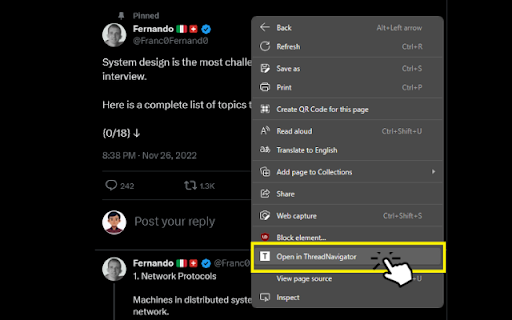
Open Twitter (X) Tweet or Thread in easy to read format and to save as PDF. View tweets or threads in threadnavigator.com so that it is easy-to-read, can be saved as PDF or to your Notion. - Unroll X (Twitter) thread for easy reading. - Save tweet as PDF for Free (on website). - Save X threads to your Notion (on website). - Tweet Screenshot (on website). - Install the extension. - Go to twitter.com, open the tweet or thread you want to save. - Right click anywhere and select "open in ThreadNavigator" - Select "Save as PDF" or "Save to Notion". - Contact us at contact@threadnavigator.com or pencilprogrammer@gmail.com for help or feedback.

Twitter Thread collector
Base Level Extension

Twitter/X thread Reader
Unroll Twitter X thread to readable articles with one click Transform lengthy Twitter threads into beautifully formatted articles with just one click. Say goodbye to endless scrolling and hello to a clean reading experience. - Instant Conversion - Convert any Twitter thread into a clean article format - Maintains original content, links, and media - Preserves thread order and context 📱 Clean Reading Experience - Distraction-free article view - Perfect for saving threads to read later 🛠️ Advanced Features: - Auto-detection of thread beginnings - Support for embedded media and links - Thread unroll preview before conversion - Bookmark favorite articles - Dark mode support Perfect for: - Readers who want to consume Twitter content more efficiently - Content creators saving Twitter discussions - Researchers archiving valuable Twitter threads - Anyone who prefers reading long-form content 💡 How to Use: 1. Click the extension icon and wait for the Twitter thread to load in our webiste Xunroll.com. 2. Wait for automatic thread detection and conversion 3. Read, save, or share your beautifully formatted article ✨ What Sets Us Apart: - Clean, minimalist design - Fast conversion speed - No account required - Privacy-focused - no data collection - Regular updates and improvements

Twitter thread reader
Chrome extension that makes reading twitter threads easier. This extension helps you read “long twitter threads” easily(similar to that of a blog or an article). It hides all the unnecessary content and shows only the relevant content in a thread, thereby enhancing your reading experience. Just click "View Thread in Reader mode" button to turn the twitter thread into a delightful reading experience. Extension is privacy friendly, no data is collected and all compute happens on your device.

Keep Twitter scroll position
Twitter annoyingly keeps losing your scroll position when browsing reply threads. This extension fixes that. UPDATE: Twitter/X has fixed this bug, and this extension is no longer needed (but maybe you'll like that this extension highlights the last-read reply tweet). When you're browsing the replies, and replies-to-replies, of a popular tweet, you may be surprised to see that hitting the back button from a 'replies-to-replies' thread puts you back at the start of the original reply thread, instead of at the position you last were. You now have to scroll down (sometimes a long way down) to continue your reading of the original tweet's replies. This extension fixes the user experience by auto-scrolling to your last position in the reply thread, and highlighting the tweet you last read. This extension is open-source. The source code is here: https://github.com/ackinc/keep-twitter-scroll-position.
