
gdofinplnbjbfmonlbhfieianhdigial
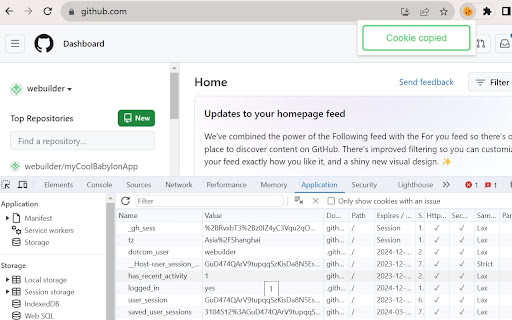

Web developer can use it copy all cookies from any website to localhost. How to use it ? Open any website, then click the "Copy cookies to localhost" extension, and click "Copy Cookies" button, you will see a message "Cookie copied". After this, you can open a localhost page, open chrome devtools, select "Application" tab. Under "Storage" - "Cookies" - "http://localhost:", you will find all cookies here.

Enable Copy Everywhere
Allow right-click for copying text from restricted web pages. Enable copy-paste on all the websites. Unlock the freedom to enable copy-paste on websites with the Enable Copy Everywhere Chrome extension in 2025! This powerful text copy unblocker Chrome tool empowers users to bypass copy restriction Chrome on popular websites, allowing seamless text copying, even from protected websites that have disabled the right-click function. Perfect for researchers, students, and anyone needing to capture content without limitations, this easy-to-use tool makes copying restricted text as simple as a single click. Bypass Restrictions: Effortlessly copy text from protected websites with disabled right-click or copy functions. One-Click Enable/Disable: Instantly turn the extension on or off with a single click from your toolbar. Simple and Free: A free copy-paste Chrome extension that is user-friendly and completely free to install and use. Cross-Browser Support: Available on Chrome and Edge for maximum compatibility. Install the "Enable Copy Everywhere" Chrome extension by clicking on "Add to Chrome." Activate the extension by selecting the icon in your Chrome toolbar. Allow copy-paste everywhere and enjoy unrestricted access to text across the web with Enable Copy Everywhere. This disable copy protection extension is the ultimate Chrome extension for copying restricted text, giving you the power to enable right-click on restricted websites and bypass copy restrictions Chrome effortlessly. 1. What does the Enable Copy Everywhere Chrome Extension do? The extension allows users to copy text from any website, even if the site has disabled right-clicking or copy functions. It's ideal for accessing content without restrictions. Yes, Enable Copy Everywhere is entirely free to download and use. The extension is designed to work on most websites with copy restrictions, though a few heavily protected sites may still block copy functions.

Cookie Exporter
Export all cookies from the current website to a text file. A simple and powerful tool to easily export cookies from the current website. Multiple Formats: Supports exporting to both JSON format (ideal for automation tools) and the classic Netscape format (text file). Flexible Actions: Allows you to either copy all cookies directly to your clipboard with a single click or download them as a .json or .txt file. Easy to Use: A clean and intuitive interface helps you get the cookies you need in seconds. This is an essential utility for developers, testers, or anyone who needs to quickly back up, transfer, or manage cookies.

Cookie Remover
Removes cookies for the current site Instructions: Click the cookie icon at the top right to remove cookies for the current site. A confirmation will then appear displaying how many cookies were removed. You should then refresh the page to see possible changes. Also clears localStorage and sessionStorage for the current site.

Copy URLs
Copy all open pages (title and/or address) to clipboard. Select what to export (all tabs or just the web-pages; all windows or current window only) and how to export it (choose between several formats -- simple url list, HTML, CSV etc.) You can define your own (custom) format to generate specific url list (for example -- JavaScript array or XLS table ready to be copy/pasted in Excel)
