
gdmicanijbiglolpggafeahdicefofbg
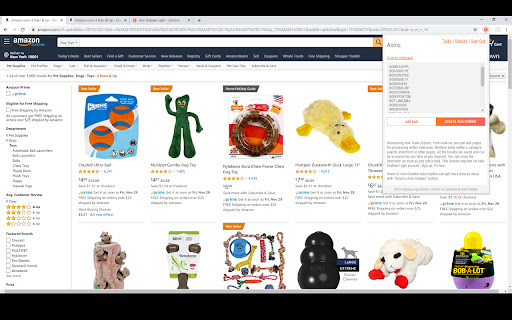


Asin Grabber Light is a tool based on the Asin Grabber web application by arkgroup.org. It allows to get Amazon Standard Identification Number information from any page you visit. It works for Amazon and other Amazon related websites. Just visit the page with the products and click on the extension icon to get all the ASINs available from that page.

Amazon Chat Tuesday API Extension
Amazon Chat Tuesday API - Product, Sales: Amazon Chat Tuesday API - Amazon Chat Tuesday Chrome Extension, integrated with the Chat Tuesday API, is an intuitive and powerful tool for extracting detailed product, price, sales rank, and review data from Amazon. With its seamless integration into Chat Tuesday’s generative AI platform, users can effortlessly organize and modify Amazon data to meet their unique requirements. The extension allows users to insert extracted data directly into Chat Tuesday, where the AI assists in arranging, analyzing, and customizing the data based on individual preferences. Whether you need tailored reports, dynamic reorganization of data, or insights for decision-making, this combined solution offers a streamlined approach to handling Amazon data with precision and ease. This extension is completely FREE, making web scraping and data downloading effortless and accessible. With our tool, you can extract valuable information with ease while ensuring your data security and privacy. All scraped data stays within your browser, guaranteeing complete control and protection of your information. *Using the Chrome browser, use our unique point-and-click feature to retrieve data from trusted sources. For the first time, you can scrape and organize data from many sources without download any learning programs. Download and use our web scraper for free. The difference between our extension and other Amazon scrapers is not only extracted the ASIN and Price. Comprehensive Data Retrieval and Integration with Chat Tuesday Generative AI - The extension retrieves almost all page data from Amazon, including pricing, shipping details, product specifications, sales rank, ASIN, product features, client reviews, and even services offered by consumers who purchased the item. - By selecting the Synchronized button, you can sync scraped product data—such as Product Title, Price, and Brand—with the Chat Tuesday Generative AI platform. Once the data is inserted, a new chat is generated containing the imported data. You can then interact with the AI to reorganize the data, ask questions, or gain insights, with the AI providing accurate and helpful guidance. - The Bulk URL functionality allows you to add up to 100 product URLs, including single product URLs, category URLs, or a mix of both, separated by commas. The data can be saved directly to an Excel spreadsheet for easy access and management. - In case the Data Scraper closes unexpectedly during a task, you can click the Restart button to quickly resume operations. Mandatory Step : Go to ChatTuesday.com to set up the free account and start the below steps in the same browser session. 2. Search for Products - Enter any keywords in the search bar, such as a brand name or product-specific keywords. - Use Amazon's filtering options to refine the search results as needed, then press Enter. 3. Activate the Chrome Extension - Once the search results are displayed, open the Chat Tuesday Chrome Extension. - A new tab will open, prompting you to either create a Chat Tuesday account or log in if you already have one. - After verifying your login details, the system will confirm your plan status as Active. Click Start, and the data will begin extracting in Excel format. 4. Sync Data with Chat Tuesday AI - After the desired data has been extracted, click the Sync button. The extracted data will be inserted into the Chat Tuesday Generative AI platform, creating a new chat. - You can now interact with the AI to ask questions, organize the data, or gain insights based on the data you’ve imported. 5. Add More Data with a Bot ID - If you want to insert additional extracted data into the same session, retrieve the UID from your Chat Tuesday profile (visible upon login) and use it to sync the new data. This product has the following advantages: 1. Competitor Analysis - Extract the entire product list, sales rank, and pricing information in Excel format. - Conduct in-depth competitor comparisons to refine your business strategies and stay ahead of the competition. 2. Get to Know Your Clients - Access customer feedback and reviews on specific products. - Gain valuable insights into client preferences to improve offerings and boost customer satisfaction. 3. Market Research - Identify the number of resellers and competitors offering the same products in your target market. - Understand market trends and saturation for more informed decision-making. 4. Unauthorized Sales Channel Monitoring - Detect merchants listing products below the reseller pricing by analyzing extracted data. - Identify potential parallel importers or imitation resellers to maintain control over your distribution channels. 5. Seamless Integration with Chat Tuesday Generative AI - Insert extracted Amazon data directly into Chat Tuesday AI to organize and analyze it effortlessly. - Generate tailored chats where you can ask the AI to arrange, customize, or provide insights based on the data. 6. Data Customization and Reporting - Utilize Chat Tuesday’s AI to create dynamic reports and reorganize data to meet your specific requirements. - Simplify workflows by automating tasks like data categorization, visualization, and detailed analysis. What data you can extract : - Product specification - Price - Seller price and details - ASIN - Sales rank - Product image - Customer review - Description Technical support : We welcome any comments or ideas to enhance the products. Please contact:

Asin Gadget
ASIN Gadget will check these items when on the Amazon product page: Product Restrictions, Hazardous Status, and Meltable status. ASIN Gadget is the multi-function tool you didn't know you needed to help you source for your FBA business. PRO Version- Everything above, PLUS...Keepa API integration, Search page display, One click export thousands of ASINS and storefront URL's, Source Site check for peace of mind (includes WhoIS, Trustpilot & Scam Adviser reviews), Merge multiple CSV's into one, Storefront Roulette, Google Blocklist to avoid sites you don't want to source from, RevROI credit card and airline miles checks.... plus EVERY future feature we add. Pro is an annual subscription & is priced lower than it should be! Free & Basic will work on .com .au .mx .uk .ae .de and .ca! PRO is not guaranteed to work outside of US & CA

Amzpecty
Amzpecty easily checks and tracks Amazon competitors' stock, quantity, inventory, prices, and variations. ABSOLUTELY NO OBLIGATION. AVAIL THE 15-DAY FREE TRIAL Amzpecty.com offers a limited free trial up to 5 queries without the need to register or subscribe. After 5 queries, Amzpecty also offers another absolutely no-obligation, 15-day free trial to those who subscribe. Payment method is not required for the 15-day free trial. Upgrade anytime and go unlimited with paid subscriptions. In just 1 click, we provide you all of Amazon sellers’ product quantity. See product’s: > Estimated total listed quantity (all sellers) > Number of offers (Sellers) > Available quantity of each offer > Price and estimated and total shipping cost > FBA indicator > Product condition > Highest sales rank > Search result of CSV file download > Filter result by FBA/MFN and/or condition > Quantity on merchant’s store front 1. Install FREE Amzpecty. 2. Go to "Amazon Product Page" or "Amazon Search Result Page" or "Seller Central Manage Inventory". 3. Click Amzpecty icon. 4. Browse the seller quantities and total. Amzpecty aims to boost every entrepreneur’s selling/buying journey and experience and empower thousands of newbies and flourishing sellers alike. For feature requests, comments, or suggestions, please send them to support@amzpecty.com. We will be delighted to hear them.

FBA calculator for Amazon Sellers : SellerApp
Is FBA the better choice for a product or FBM? Analyze profits with a single click . A trusted choice by 6-figure Amazon sellers. Researching and calculating the cost of goods sold, shipping fees, Amazon fees, and other expenses is crucial for your business. Understanding your true profit margins per unit ensures you make informed decisions, maximize profits, and scale your business successfully. A. Why use the SellerApp Amazon FBA Calculator? - The free Amazon FBA calculator provides multiple benefits for Amazon sellers, including: 1. Estimating all expenses upfront, including Amazon FBA fees, shipping charges, and seller fees. 2. Choosing products with lower fees to maximize profit margins. 3. Determining exactly how much you'll earn per sale, including total revenue and net profit. 4. Evaluating whether a product is worth selling by comparing expected revenue and costs. 5. Deciding between FBA and FBM based on estimated fees and profitability. Additionally, the FBA calculator extension gives you quick insights into: 1. Net profit 2. Net margin 3. Return on investment (ROI) B. How to use the SellerApp FBA Calculator? - If you're wondering how to use the FBA revenue calculator Amazon, follow these simple steps: 1. Install the SellerApp Amazon FBA Fee Calculator. 2. Visit Amazon.com and open the product listing you're interested in. 3. Launch the SellerApp FBA calculator for Amazon sellers. 4. Enter key cost factors, such as Cost of Goods Sold (COGS), shipping fees, fulfillment fees, and storage fees. The calculator will instantly generate your net profit, margin, and ROI, helping you make data-driven decisions. A. Is the FBA calculator free? - Yes! The SellerApp Amazon FBA calculator is 100% free to use. Just click the "Install" button to get started. B. Is the Amazon revenue calculator accurate? - The SellerApp FBA revenue calculator uses real-time data to provide highly accurate estimates. However, actual costs may vary due to Amazon’s dynamic pricing and fee structures. C. Is there any hidden cost for the Amazon seller fees calculator? - Absolutely not! The Amazon FBA fee calculator is completely free. D. How do I calculate the profit margin on Amazon FBA? - To calculate your profit margin, subtract all costs (COGS, fulfillment fees, and other expenses) from your total sales, then divide by the total sales price. Amazon determines FBA fees based on three key factors: product weight, size (dimensions), and category. You can learn more about the Amazon FBA price calculator and fee breakdown in our blog. Don't miss out on maximizing your profits! Use the SellerApp FBA Calculator today. For any questions, contact us at support@sellerapp.com.
