
gdkfehnloabjkmccddnjckpnlhcdcalh

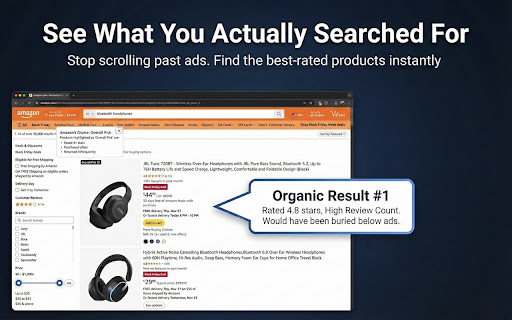


Block ads on Amazon to find the best-rated products, not the ones that paid to be seen. ✅ No more "Sponsored" results: Save money and heartache by finding the best products easily ✅ Lightweight: Runs silently in the background without slowing down Chrome. ✅ Open-source: You can check the code yourself on the Github repo (linked from my website) I'm a product management leader and ex-Amazonian. When Amazon sued Perplexity for using automation on its platform, I wrote a LinkedIn post calling out the real issue: people were turning to AI shopping tools because Amazon's own search had become unusable. That post went viral. So I built De-Sponsor: a free, open-source extension to bring back the Day 1 search experience on Amazon. --- FAQ: Q: How is this different from ad blockers like uBlock Origin? A: Traditional ad blockers focus on banner ads and pop-ups but often miss Amazon's "Sponsored" product listings since they're embedded within search results. De-Sponsor specifically targets these sponsored products, giving you cleaner, more relevant search results. Q: How many ads does this actually block? A: On a typical Amazon search results page, 40-60% of visible products are sponsored. De-Sponsor removes all of these, showing you only organic results. Q: Is this extension safe to use? A: Yes, De-Sponsor for Amazon is completely safe and open-source. You can review the entire code on GitHub before installing. The extension only filters what you see on Amazon pages—it doesn't collect your data, track your browsing, or modify purchases. It simply hides sponsored listings from search results and product pages. Q: Will this get my Amazon account banned? A: No. The extension runs entirely on your device (client-side). Amazon's servers simply see a regular user browsing the site. We do not modify any requests sent to Amazon, we only visually clean up what is displayed on your screen. Q: Does Amazon know I'm using this extension? A: From Amazon's perspective, you're just a regular user browsing normally. The extension works locally in your browser to filter what you see—it doesn't interact with Amazon's servers or modify any requests. Your account remains in good standing. Q: Will this break Amazon's functionality? A: No, the extension only removes visual clutter from ads and sponsored items. All core Amazon features work normally: shopping cart, checkout, Prime benefits, order history, and product reviews remain fully functional. You can disable the extension anytime if you encounter any issues. Q: Will I miss out on good deals from sponsored products? A: Sponsored products aren't necessarily better deals—sellers pay Amazon to promote them regardless of price or quality. In fact, sponsored items are often more expensive because sellers factor in advertising costs. De-Sponsor helps you see organic search results based on relevance, not who paid the most for placement. Q: Is this extension really free? What's the catch? A: Yes, it's 100% free and open-source with no hidden costs. There's no premium version, no data collection, and no affiliate links. This is a side project built to solve a real problem with Amazon's aggressive advertising. If you find it useful, you can support development by starring the project on GitHub or sharing it with friends who shop on Amazon. Q: Does this work on Amazon's international sites? A: I have tested it on all major Amazon sites: US, UK, Canada, Germany, France, Spain, Italy, Australia and India. It should work on others too. You can suggest new regions on our GitHub issues page. Q: Why isn't it on Firefox/Safari yet? A: We are currently focused on Chrome and Edge (Chromium browsers). A Firefox version is in development. Safari requires a paid developer account ($99/yr), so we are waiting for enough community support to justify the cost. Q: Does it work on Prime Video or Amazon Music? A: Currently, De-Sponsor is strictly focused on the Amazon Product Search experience (Amazon.com, .co.uk, .de, etc.). It does not block video ads on Prime Video or audio ads on Music. Q: Does this work on mobile? A: No. Most mobile users use Amazon in the app and it's almost impossible to build something that could work inside an app. Disclaimer: This extension is an independent project and is not affiliated with, endorsed by, or part of Amazon.com, Inc.

Shieldra – Smart Ad & Privacy Blocker
Ad blocker, YouTube ad blocker, popup blocker & privacy protection. Blocks ads, trackers, phishing & malware. Fast and free. Shieldra – Ad Blocker | YouTube Ad Blocker | Popup Blocker | Privacy Protection for Chrome Shieldra is a fast, lightweight Chrome extension that blocks ads, trackers, YouTube ads, cookie popups, phishing sites, and social tracking widgets — while giving you real-time stats and full control over your protection. 🛡 Ad Blocker — Block Ads on Every Website Shieldra blocks common advertising elements including banner ads, sidebar ads, pop-up ads, overlay ads, interstitial ads, sticky ads, and sponsored content. It uses 281 built-in filtering rules covering major ad networks and exchanges. Pages load faster and look cleaner without ad clutter. ▶ YouTube Ad Blocker — Reduce YouTube Ad Interruptions Shieldra helps reduce ad interruptions on YouTube by preventing many ad requests before they reach the video player. It also hides overlay ads, companion ads, promoted videos, and sponsored cards on YouTube pages. 🚫 Popup Blocker — Block Cookie Popups and Consent Banners Shieldra minimizes intrusive cookie consent popups, GDPR banners, and privacy notices from widely used consent frameworks. Browse without constantly clicking "Accept." 🔒 Tracker Blocker — Block Tracking and Analytics Shieldra blocks common tracking scripts and analytics services that monitor your browsing activity. It also strips tracking parameters from URLs so your clicks stay private. 🔐 Phishing and Malware Protection Shieldra blocks access to known phishing websites, malware domains, cryptojacking scripts, and malicious redirect services using a dedicated security ruleset. 👥 Social Widget Blocker Shieldra blocks social tracking widgets that can monitor your browsing activity across websites even when you don't interact with them. 🔗 Privacy Protection Shieldra helps protect your privacy by limiting WebRTC-based IP enumeration, sending Do-Not-Track and Global Privacy Control signals, and reducing browser fingerprinting. 📊 Real-Time Stats See blocked requests per tab, total blocked requests, and per-site counts directly in the extension popup. A built-in side panel displays your blocking stats alongside your browsing. 🖱 Right-Click Domain Blocking Right-click any link, image, or page to instantly block a domain. Blocked sites show a custom page with an easy "Unblock" button. ⚙ Per-Site Control Disable protection for any individual website with a single toggle without turning off the entire extension. 📋 Threat History View a log of recently blocked requests with category labels and timestamps. ⚡ Fast and Efficient Shieldra uses Chrome's native blocking engine, meaning filtering is handled directly by the browser for better performance and lower memory usage. ⭐ Premium Features Premium unlocks additional protection for sensitive websites (banking, shopping, and more) with automatic private window isolation. It also includes a stats dashboard with category breakdowns and daily trends, plus the ability to toggle blocking categories individually. A 7-day free trial is available. Important Notes • Blocked counters reflect network-level requests. Cosmetic hiding of page elements is counted separately. • YouTube ad reduction works by preventing ad-related requests before they reach the player. Some ad formats may still appear briefly. • Private windows reduce local data storage but do not provide anonymity to websites or network providers. • Blocking effectiveness may vary depending on website structure and Chrome version. Shieldra gives you cleaner browsing, better privacy, and real-time protection — fast, free, and built on Chrome's native blocking technology.

Asteroid
Tired of web ads? Asteroid is a lightweight, no UI extension that helps block all web ads that take unnecessary space on your… Tired of web ads? Asteroid is a lightweight, no UI extension that helps block all web ads that take unnecessary space on your screen. HOW TO USE ASTEROID > Just add the extension to your Chrome browser and watch the magic happen. FEEDBACK AND BUG REPORTS If you're having issues or found a bug, please don't post the bug report here, contact us directly so we can fix it: pratyushk.dev@gmail.com Enjoying Asteroid? Please rate us! If you're not fully satisfied, please contact us at pratyushk.dev@gmail.com and we'll make sure to help :)

Ward - AI Scam Guard, Phishing & Threat Protection
The advanced browser security tool. Block phishing, stop scams, and detect threats that ad blockers and antivirus miss. Secure your browser with Ward, the AI-powered scam guard that stops threats before they happen. While traditional antivirus software and ad blockers rely on outdated blacklists, Ward uses real-time AI to analyze the behavior of every site you visit. It acts as a dedicated browser guard, identifying sophisticated phishing attacks, spyware, crypto drainers, and social engineering scams that others miss. 🔒 True Zero-Knowledge Privacy (Anonymized Browsing) Ward is built on a "Privacy First" architecture. Unlike sites that track and sell your history, Ward uses advanced cryptographic anonymization (blind signatures) so it is impossible to attribute activity to a specific user. ► How it works: When Ward scans a website for threats, the data is anonymized before it leaves your device. ► The Result: We verify if a site is safe, but we have no way of knowing which websites you visit. Your browsing history remains 100% private and inaccessible to us, advertisers, or anyone else. 🚀 Supercharge Your Ad Blocker Ward is designed to run smoothly alongside your favorite tools. While standard ad blockers (like uBlock Origin, AdBlock Plus, or Ghostery) hide annoying banners, Ward blocks the invisible dangers they miss: ► Identifies Malvertising (Malicious Ads) that lead to dangerous sites. ► Immediately alerts if a site is used for nefarious purposes, such as data collection. Note: Ward is a security tool, not a cosmetic ad hider. For the best experience, use Ward alongside your preferred ad blocker. 🔍 The Perfect Companion to Your Desktop Antivirus Traditional desktop security tools like Norton, McAfee, ESET, or Webroot are excellent at scanning files, but they often miss real-time browser threats. Ward fills the gap. We focus exclusively on the browser layer to catch threats like: Tip: You don't need to uninstall your current antivirus. Ward is a lightweight layer that runs alongside them without conflict. ► Real-Time Phishing Protection: Instantly blocks fake login pages for banks, email providers, and crypto wallets to prevent Identity Theft. ► Scam Detection: Automatically flags "Geek Squad" tech support scams, gift card fraud, and fake tracking numbers. ► Local AI Mode: Toggle "Local Processing" to run all detection directly on your device (GPU recommended)—your data never touches a server. ►Zero-Day Threat Defense: Catches Ransomware vectors and new threats hours or days before they appear on public blacklists. ► Fake bank emails & login portals ►Medicare and healthcare scams ► Cryptocurrency investment schemes & drainers ► Malicious "Browser Update" pop-ups ("Microsoft: Your computer is infected!") ► Tech support takeover threats ("Geek Squad") Who needs Ward? If you are looking for a scam blocker, a malware removal safety net, or just a safer browsing experience without sacrificing privacy, Ward is your essential upgrade. Install Ward today to browse with confidence.

Amazon Sponsored Product Suppressor
Remove Sponsored Result in Amazon Search or Show Products for Organic Review 📡 Update new version 1.0.3 - Monday, January 13, 2025 Most of Amazon's local websites have been added. From now on, you can enjoy organic search results. Amazon Sponsored Product Suppressor Overview: Tired of sponsored products cluttering your search results? With Amazon Sponsored Product Suppressor, you can easily clean up your search results and view only organic results. Just click the yellow “Clear Sponsored Listings” button at the top of the page to remove all sponsored content and focus on the most relevant search results. Key Features: Remove Sponsored Products: Click the yellow “Clear Sponsored Listings” button to instantly clear sponsored products from your search results. Show Organic Results: After clicking the button, you’ll see only genuine, organic search results for a better browsing experience. Simple and User-Friendly: Easy to install and use with just one click to activate the removal of sponsored content. Enhanced Search Efficiency: By removing ads, you get to the information you need faster and more effectively. Why You Should Install This Extension: Reduce Distractions: Remove sponsored products for a cleaner, more focused search experience. Effective Searches: See only organic results to find what you’re looking for more quickly. Improved Experience: Enjoy a more efficient and satisfying online search with just one click. How to Use: Install the Extension: Click “Add to Chrome” and follow the instructions. Use the Button: Click the yellow “Clear Sponsored Listings” button to clean up your search results. Note: This extension is designed to remove sponsored products and does not affect non-sponsored results.
