
gdiemnbjpblghfbejnbohdnnmodbknoe
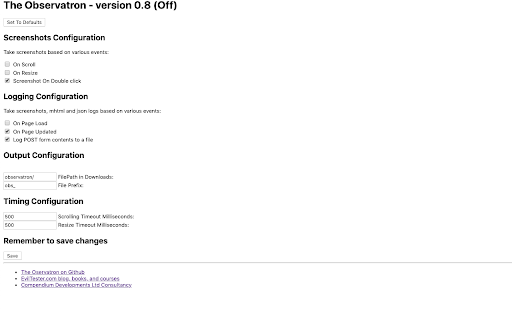
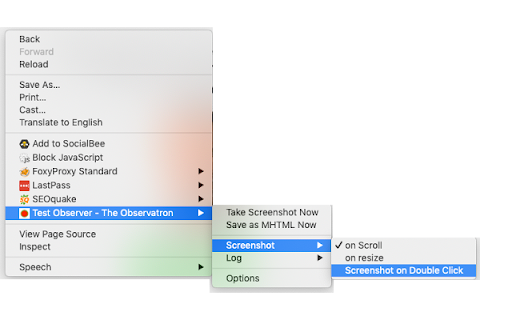
Exploratory Testing Tool - Observes browser actions to automatically create logs and screenshots, while you test. The Observatron supports Exploratory testing by taking screenshots and creating .mhtml files as you test. It also logs urls and form submissions. All logging is performed in your downloads folder so that you have control over the information. No information is sent to external servers. Logging and screenshots saved when: - when a page loads - when a page updates - when you double click on the page - when you resize the page - when you scroll through the page - when you submit a form - etc. All of the above can be switched on and off from the options. All images are stored in your downloads folder so you can easily find them and see them being saved. You can also save logs of: bugs, todos, questions, or any custom information. To do this: - from the context menu choose "Take Note", or open the sidebar, or use the extension in the dev tools panel - in the dialog, write your note - you can choose if you want a screenshot with that - the note and optional screenshot will be saved to your downloads - the note will be tracked in the notes session and shown in the note taking panel UI Notes take the format: - "? question text to output as the note" - "! description of the bug to output as the note" - "- todo text to output" - "@type text to output as custom type" Questions, Todos, and Bugs can be opened and closed (with a closing note), notes are simple logs. Custom types can be 'closable' if input with a trailing `[]` e.g. `@check[] check this thing` When you save a screenshot with the note screenshot it will have `_note_noteid` at the end of the filename. This can help you cross reference screenshots to notes, although the timestamping should mean that the screenshot is the next file saved after the note. Control the folder the files are saved in by giving your session a name. This extension is open source.

PT QA HELPER
Very useful QA tool for copying test results and viewing the build information of the current browser tab. The “QA Helper” extension is a powerful Google Chrome tool designed to streamline QA workflows by enabling quick copying of test results and easy access to build information for the current browser tab. With this extension, you can: View the current tab URL and identify portal URLs. Quickly access build details for the portal’s Front End, Back End, and CMS components. Copy test statuses directly to the clipboard. Copy the developer’s fix stamp to the clipboard. Copy a preformatted bug template to the clipboard. View the latest GitLab commits. Register new users. Generate test credit cards. Create QR codes.

AIFEX | AI For Exploratory testing
AIFEX (AI For Exploratory testing) helps testers to collaborate during exploratory test sessions by advising them to perform interactions that have rarely or never been explored. The main advantage is that it promotes diversity of tests. AIFEX consists of two main elements: * A chrome plugin that listens to all interactions performed by testers, transmits them to the server, requests predictions for future interactions and visually highlights the expected interaction. * A central server that stores all interactions performed by testers, integrates them into an AI and returns predictions calculated by the AI indicating future interactions that should be performed by testers.

TweakSync
TweakSync lets you style web elements in real-time from Chrome and sync changes with VS Code for a smooth development experience. TweakSync is a powerful tool designed for front-end developers and web designers who want to streamline their styling workflow. This Chrome extension enables real-time styling of web elements directly within Chrome, allowing you to see changes instantly as you tweak styles. Real-Time Styling: Easily select any element on a webpage and adjust its styles on the fly. With live previews, you can see the impact of your changes immediately, making the styling process more efficient and intuitive. Seamless Integration with VS Code: TweakSync syncs your style changes directly with your VS Code environment. This integration allows you to apply and save your CSS changes effortlessly, ensuring that your development process remains smooth and uninterrupted. Efficient Workflow: By bridging the gap between your browser and your code editor, TweakSync eliminates the need to switch back and forth between tools. This results in a more streamlined workflow, saving you time and effort. Boost Your Efficiency: Save time with instant style updates and seamless integration with VS Code. TweakSync helps you make changes faster and more accurately. Improve Your Design Process: Experience a smoother design workflow with live previews and direct synchronization between Chrome and VS Code. Streamline Your Development: Minimize context-switching and keep your development process focused with TweakSync is real-time styling and VS Code integration.

InfoSE
Quickly access relevant information for selected word Introducing "InfoSE," the ultimate extension for lightning-fast access to relevant information right at your fingertips. With InfoSE, effortlessly explore top relevant results for selected word, neatly organized within accordion-style panels, each offering a concise summary for quick insights. Key Features: Effortless Access: Simply highlight any word or phrase on your browser, and InfoSE springs into action, fetching relevant information instantaneously. Accordion Interface: InfoSE presents search results in a sleek accordion format, allowing you to expand and collapse each panel effortlessly. This intuitive design enables efficient browsing without cluttering your screen. Comprehensive Summaries: Dive into succinct summaries within each accordion panel, providing essential details without overwhelming you with excessive information. Whether it's definitions, explanations, or background context, InfoSE delivers the highlights at a glance. Wikipedia Integration: Seamlessly explore Wikipedia entries directly within InfoSE. With a single click, delve into comprehensive articles, gaining in-depth understanding on your chosen topic without leaving your browsing session.
