
gdbcgainnnnpplnddfdimjicphadlibg
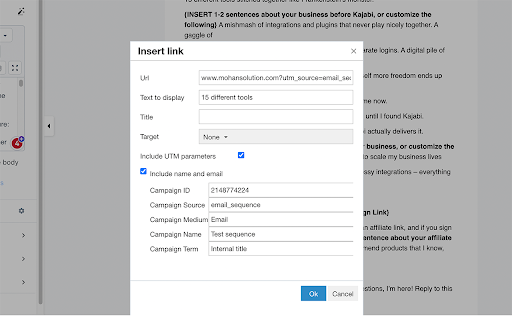
Add UTM parameters to Kajabi links, auto-detect campaign details, customize UTM values, and pass contact info via URL. Kajabi Link Optimizer is a must-have extension for Kajabi users who want to take their marketing efforts to the next level. With this extension, users can easily add UTM parameters to their links, which can help them track and analyze the effectiveness of their marketing campaigns. One of the key features of the extension is its ability to automatically detect email campaign ID, Subject, and Internal title, which saves users time and effort. Users can also customize or insert their own UTM values, which gives them even more control over their marketing analytics. But that's not all – Kajabi Link Optimizer also allows users to pass the contact name and email ID with the URL parameters, which can help personalize their marketing efforts and create a more engaging experience for their subscribers. Overall, Kajabi Link Optimizer is an essential tool for any Kajabi user who wants to optimize their marketing efforts and get the most out of their campaigns. Whether you're a seasoned marketer or just starting out, this extension is a must-have for anyone looking to take their Kajabi marketing to the next level.

Bogoo – Reviews Analysis Tool
Buyer reviews are a form of User Generated Content (UGC), containing users' experiences and feelings about a product, and can truly reflect the Voice of Customer (VOC). Reviews are not as standardized as surveys, so it is necessary to first quantify and tag the content of reviews using Natural Language Processing (NLP) technology. Then use Business Intelligence (BI) technology to provide visual multi-dimensional analysis, followed by summarizing reports with ChatGPT. This process transforms unstructured text into objective analysis reports, allowing product managers to make subjective decisions. In addition to providing analysis for individual products and product categories, this tool also offers comparative analysis across multiple categories, allowing you to quickly understand different products and customer feedback to identify common issues and make differentiations. It can help you optimize: product development, marketing, and customer service strategies.

Interactive Demos | Demos.page - Create Demos & Guides in Minutes
Create and customize step-by-step directions for any website to help your audience understand the product better. What can you do with the Demos.page Chrome Extension: Once you have installed the Demos.page Chrome extension, you can start capturing the required steps on the required web page by just clicking on the "Start Capture" button. Demos.page will capture your screen with the clicks you make. You can Restart, Delete, Pause, and Resume the steps that you have captured at any time. With Demos.page, you have the advantage of switching between various tabs to capture steps on other pages altogether. You get the URL of the web page that you are capturing as step 1, which makes it much easier to understand the steps. Demos.page offers the option of editing all the captured steps after being redirected to the editing page once completed capturing. On the editing page, you can preview all the changes that you want to make to your captured steps. On the player by clicking on the "View It" button, you can manually view all the captured steps. By clicking on the "Try It" button, you can see the automated steps that you have captured. By clicking on the "Watch It" button, you can see all the steps that you have created and edit them. By clicking on the "New Out" button, you can see all the steps like a walkthrough. With the "Brand Kit" option you can customize the details of your captured steps like, the front cover, back cover, button color, font styles, and much more. You can share your video documentation after completing all the necessary edits as a link to anybody, anywhere, and at any time. You can also copy the "Embed" link and run it on any website and anywhere you want. Some Use Cases for the Demos.page Chrome Extension: 1. Onboarding and Training: The Demos.page Chrome Extension can help new employees understand how to complete specific tasks and procedures within a company. This can help streamline the onboarding process and ensure consistency in training. 2. Software Development: The Demos.page Chrome extension can be useful for software development teams to document and share the steps to reproduce a bug or error, making it easier for team members to identify the issue and fix it quickly. 3. Customer Support: The Demos.page Chrome Extension is particularly useful in providing customer support by recording the steps to solve common issues and providing a video tutorial for customers to follow. This can help reduce the number of support tickets and improve customer satisfaction. 4. Sales and Marketing: For sales and marketing teams, video documentation can be used to demonstrate the features and functionality of a product or service. The videos can be used in presentations, on websites, and during client demonstrations to showcase the unique selling points of a product or service. 5. E-learning: A teacher or instructor can use the Demos.page Extension to record educational content, which can serve as an aid to students in revising lessons or in understanding complex topics. This can help students to grasp the concept more easily and quickly, thus improving their grades and reducing learning time.

Semiant
Your Virtual Quality Assistant NEW: Major version 5 of Semiant makes team use even easier! Share glossaries with your team, your organization or even external collaborators while maintaining privacy. Generate and manage your product glossary with Semiant. The AI scan works with Polarion, Jira, Confluence, DOORS Next, Jama Connect and many other web applications. You can try it for free. Semiant has many more skills. Contact us to find out how Semiant can make your product development teams more efficient and effective. Like Semiant? Then please rate it. Not so much? Then contact us for suggestions: support@formalmind.com Want to stay informed? Sign up for our newsletter: https://www.semiant.com/get-started/

Progressive Media Investments
The New Statesman is a leading progressive political and cultural magazine in the United States and around the world Political News in United States and United Kingdom, Latest Political News in United States and United Kingdom, progressive political magazine, cultural magazine, The New Statesman is a leading progressive political and cultural magazine in the United States and around the world. State of the Nation, Press Gazette has been reporting on British journalism without fear or favour since 1965, Tech Monitor Data-driven insight and authoritative analysis for business, Capital Monitor is dedicated to tracking the impact finance and investment has on our environment, City Monitor covers housing, transport, infrastructure, design, zoning and urban policy innovations in cities around the world, World Of Fine Wine Wine tasting advice, wine awards and wine related events, Elite Traveler focuses purely on content that champions sustainable, ethical and environmentally conscious luxury, The latest news on wealth, business, culture and luxury, for ultra high net worths and the people who advise them.
