
gdagbfinacglcidekklbmfecndkmicna

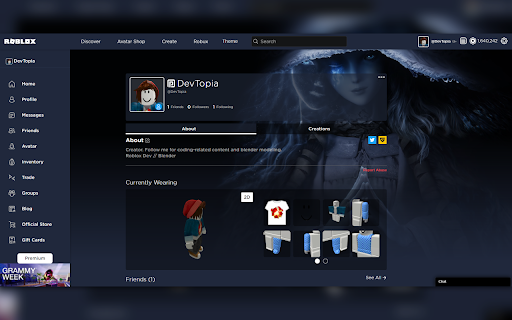
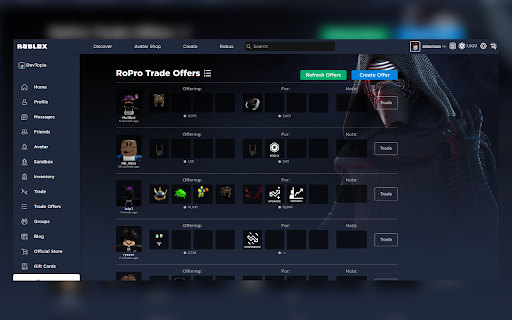
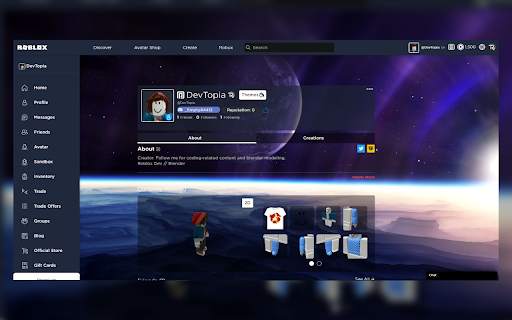

Users can add their own background image and a unique custom color scheme for their Roblox profile. Users can add their own background image and a unique custom color scheme for their Roblox profile. [Latest Updates v.1.5.4] - Added video wallpaper support. Upload video wallpaper. - Fixed alert box bug - Fixed minor UI bugs - Improve UI design minor [Latest Updates v.1.5.3] - Fixed bug where the colors would only change for one page - Fixed minor UI bugs - Improve UI design minor [Latest Updates v.1.4.2] - [New Feature] Customize background colors and text colors - Fixed minor bugs that slowed the previous version [Latest Updates v.1.3.1] - [New Feature] Users can now customize their background image. The background image will also be saved until overwritten. - FIXED!!! Substituted the "Image URL upload" with a "File Upload" system. You can now upload downloaded images. - [Bugs] Fixed minor bugs and image upload issue. ------------------------------------------------------------------- ** Stay up to date or Request Future Features ** ------------------------------------------------------------------- Join the Discord: https://discord.gg/5EW65hH6UF Twitter: https://twitter.com/DevTopia_ RoPlus is a third party Chrome browser extension, we are not affiliated with Roblox.

RoSeal - Augmented Roblox Experience
Improve your Roblox website experience, seals included! A sneak peak at some new features in the latest 2.1 update: - Inventory and Favorites Sort Filters - Archive items in your inventory - Improved Servers Tab * Show server locations * Region filters * Show the distance between the server and you * Show server place version * Toggle showing the connections in a server * Show server update delay * Show server performance as percentage (server physics frame rate) * Show expiring/renewing date on all private servers * Show share link button on public servers * Customize the pagination type (Load More, Pagination) and per-page size * Show Private Servers in a row list instead of a column list * If you attempt to create a new free private server while having the maximum amount of private servers, RoSeal will prompt you to disable some in a list - Experience playlists - Better private server subscriptions list in Account Settings - Improved User Connections Page * Sort connections by current presence status * Advanced connection request filtering * Connections types * Show mutual connections with other users * Attempt to get the accurate connection creation date - Avatar Editor item lists - Show when a user obtained Roblox Badges and Experience Badges on their profile page when hovering over their badges - Account Tracking Prevention * Update your avatar very slightly to where player snipers can not detect you in servers * Spoof your online status to either be online all the time or in a specific place in Studio For a full list of new features and other changes, please see https://www.roseal.live/changelogs#2.1.0 Enjoy features including: - Organize your home page sorts the way you want - Archiving items in your inventory and avatar editor in order to never see them again - Customize your Roblox headshot and full body thumbnail like you can in the Roblox app - Change the positioning/rotation/scaling of some of your items like you can in the Roblox app - View more experience server information like server location and place version, and filter by region - Connection status filtering, and connections types - Community drag-and-drop organization with folders - Improved experience badges list with the ability to compare progress between 2 users - Block experiences, avatar items, name/description keywords, and item creators from appearing for you - Store, import, and export lists of private server links - View all the developer products of any experience to preview possible microtransactions - Refreshed home header to greet you on the home page - Quick actions on your Connections page to remove connections, follow, or remove followers faster - Check whether you can actually join your connections before you attempt to join them - View the date of when you first purchased items in your inventory - View your playtime of any experience in the past 14 days or 28 days (data is fetched directly from Roblox) - View and cancel or disable private server subscriptions easily - Counting the total amount of items in a category in your inventory - Bulk delete, archive, unfavorite items in your Inventory and Favorites - Create playlists with as many experiences as you want to display on your home page, to save for later or pin them - View hidden unreleased/moderated avatar items on the website - Disable autoplay for videos in experience carousels - Check the status of your ban from an experience - Remove individual followers from your followers list .... and more! Please note that some features may need to be toggled manually, including experimental and beta features. See https://www.roseal.live for more information about the RoSeal extension.

Roblox Outfit Copier
Copy the outfit of any Roblox user to your own avatar with the click of a button. This extension allows you to copy the outfit of a ROBLOX user when you go on their profile! Simply navigate to a user you like and click 'Copy'. If they have paid items, you can also toggle opening the tabs for the items they don't have, otherwise if they are free, it will buy them automatically for you.

Better Roblox Friendslist
Better Roblox Friendslist is an extension that replaces roblox's default friends list with an easier to use one. Toggle the extension with the button at the top right or you can pin the extension and click the icon to open it. Right click on friends to open the menu to join them

Roblox Themes
A ROBLOX chrome extension that allows users to pick custom colors for the website. "Roblox Themes" is an extension that allows users to create their own color themes for Roblox. The extension also contains default themes, such as "dark", which inherits the theme the from "Roblox Dark Mode" extension. v.1.0.1.0: Migrated to manifest V3. v.1.0.0.0: Official release! v.0.0.1.1: CSS fixes, popup fixes, and data fixes! v0.0.1.0: Many bug fixes! v0.0.0.9: CSS fixes v0.0.0.8: CSS fixes v0.0.0.7: Added new icon and make extension title beta v.0.0.0.6: Fixed theme css not updating and text colors v.0.0.0.5: Fixed adding new themes v.0.0.0.4: Added new icons v.0.0.0.3: Fixed major saving bugs, organized popup code v.0.0.0.2: Adding popup v.0.0.0.1: First public version, added CSS functionality This is a beta version, please understand that the extension contains many bugs. You can help this extension, report bugs via my discord: https://discord.gg/FXpCGW.
