
gcnanmmaocdliblbbnbbjkjkjhcfldjd
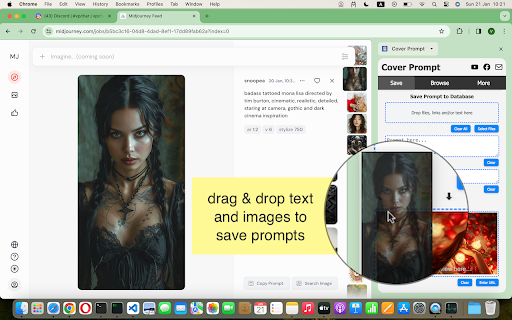


Save and manage AI prompts directly in the browser. Cover Prompt is sidebar extension that lets you add and search within your collection of AI - art generation prompts. * Quick Prompt Saving: Add the prompts you like along with thumbnails -- just drag and drop text and images and tag it. * Quick Search and Retrieve: Looking for that perfect prompt you used last week? Go to "Browse prompts" and search for keywords or tags. * Streamlined Workflow: Spend less time managing and more time creating. I believe I made the user interface intuitive and simple. * Local database: Your data stays stored locally in your browser (no remote connections, simple, private and secure) * Organize prompts with custom tags for sorting and categorization. * Export and Import: for Backup or exchanging database between computers and browsers.

Prompt Saver
Save and manage your prompts Prompt Saver is a handy Chrome extension designed for efficient management of frequently used prompts or text snippets. Perfect for writers, marketers, or anyone who often reuses specific text prompts in their work. - Save prompts with custom names for easy identification - Quick search through all your saved prompts - Expand/collapse functionality to view full prompt text - One-click copy to clipboard - Easy deletion of unnecessary prompts - Clean, user-friendly interface Prompt Saver streamlines your workflow by providing instant access to your commonly used text snippets, saving you time and ensuring consistency in your work. Whether you're crafting social media posts, responding to emails, or generating AI prompts, Prompt Saver keeps your go-to text at your fingertips.

Prompt Keeper - AI Prompt Manager
Store and manage AI prompts professionally PROMPT KEEPER: THE ULTIMATE AI PROMPT MANAGER FOR CHATGPT, GEMINI, COPILOT, GROK & DEEPSEEK Are you tired of losing your highest-performing AI prompts in endless, cluttered chat histories? Do you waste valuable time manually copying and pasting prompt templates from scattered Google Docs, Notion pages, Excel spreadsheets, or sticky notes? Prompt Keeper is a professional, privacy-first Chrome extension designed to solve this exact problem. Built for content creators, software developers, digital marketers, and AI artists, this tool empowers you to store, organize, and seamlessly auto-fill your customized AI prompts directly within your browser. Stop managing text files and start building your own centralized, highly efficient prompt library. WHO IS PROMPT KEEPER FOR? Software Developers: Save complex code generation, debugging, and refactoring prompts. Never type out the same system instructions twice. Digital Marketers & SEO Experts: Keep your proven copywriting frameworks, SEO article structures, and social media content strategies one click away. AI Artists & Designers: Perfectly organize your Midjourney, DALL-E, and Stable Diffusion parameters, aspect ratios, and style keywords. Students & Researchers: Store structured prompts for summarizing PDFs, formatting citations, or generating study guides. QUICK SAVE VIA RIGHT-CLICK (CONTEXT MENU) Frictionless saving is here. When you find a highly effective prompt on a blog, forum, or social media post, you no longer need to open the extension to save it. Simply highlight the valuable text, right-click, and select "Save to Prompt Keeper." The text is instantly added to your library without breaking your workflow or focus. SMART AUTO-FILL & 1-CLICK COPY Prompt Keeper is engineered to be fully compatible with today's leading AI platforms, including ChatGPT, Google Gemini, Microsoft Copilot, Grok, and DeepSeek. With a single click on our dedicated "Lightning" button, your selected prompt is automatically injected directly into the active chat input box. Prefer to copy? Use the 1-click copy feature to instantly send the text to your clipboard. ADVANCED SEARCH BY ID & SMART CATEGORIES As your prompt library grows, finding the right text becomes critical. Prompt Keeper features a lightning-fast search engine. You can filter prompts using our Notion-style category dropdown (e.g., Work, Personal, Coding) or use our unique "Search by ID" system. Every prompt is assigned a unique ID number (e.g., 1001), making it incredibly easy to reference, track, and share exact AI generation formulas with your team or community. MODERN, DISTRACTION-FREE INTERFACE (MATERIAL DESIGN 3) We believe productivity tools should look as good as they perform. Experience a clean, structured, and highly intuitive user interface built on Google's Material Design 3 (MD3) system. Enjoy dynamic visual hierarchies, responsive spacing, and a clutter-free workspace that minimizes distractions and maximizes your focus. 100% OFFLINE & ABSOLUTE PRIVACY Security and privacy are at the core of Prompt Keeper. The extension operates entirely offline using your browser's Local Storage API. We DO NOT require an account, we DO NOT track your usage, and we DO NOT collect, harvest, or store your prompts on external databases or third-party servers. Your data belongs exclusively to you and never leaves your local machine. BACKUP, RESTORE & SYNC (JSON) Take full control of your data. Prompt Keeper allows you to easily export your entire prompt collection as a structured JSON file. You can use this feature to back up your valuable templates locally or import them into Prompt Keeper on a different computer, ensuring you always have access to your workflow, no matter what device you are using. MULTI-LANGUAGE SUPPORT & CUSTOMIZATION Built for a global community, Prompt Keeper allows you to work comfortably with native support for 12 different languages. You can further tailor the extension to your specific habits through the Settings menu: toggle "One-click copy" for faster actions, enable "Auto-close" to hide the window after selection, or toggle the visibility of default prompts to keep your workspace truly personal.

CloudPrompt
Save, organize, and access your AI prompts instantly. Stored privately in your Google Drive. CloudPrompt is a privacy-first AI prompt manager for people who use ChatGPT, Claude, Gemini, and other AI tools daily. Save your best prompts, organize them with folders and tags, and access them anywhere with a keyboard shortcut. Works on Chrome, Edge, and Comet. Free forever. NEW in v1.2.0: Right-click to save prompts and redesigned popup Save any text as a prompt without leaving the page. Select text, right-click, and choose "Save to CloudPrompt." A floating dialog lets you add a title, pick a folder, and save — all without opening the popup or library. Plus, the popup has been completely redesigned with cleaner cards, hover-reveal actions, and improved badge icons for pinned and template prompts. What's new in v1.2.0 - Right-click "Save to CloudPrompt" on any webpage — select text and save instantly - Redesigned popup with cleaner card layout and hover-reveal action buttons - Improved pin and template badges — compact SVG icons replace emoji badges - Unified modal design across popup, library, and save dialog - Architecture improvements for faster load times and better reliability How it works 1. Install CloudPrompt and connect your Google Drive (one-time secure OAuth setup) 2. Save prompts with a title, folder, and tags — or right-click any text to save instantly 3. Press Ctrl+Shift+Y (Cmd+Shift+Y on Mac) on any page to search and insert prompts 4. Your prompts appear in context — on ChatGPT, your ChatGPT folder shows first Key features - Right-click to save: select any text on any webpage and save it as a prompt instantly - Context-aware prompts: detects ChatGPT, Claude, Gemini, and Copilot and shows matching prompts first - Cross-browser: works on Chrome, Microsoft Edge, and Comet by Perplexity - Instant prompt overlay on any tab with Ctrl+Shift+Y keyboard shortcut - Folders, tags, and fast full-text search - Pin your favorite prompts for one-click access - Templates with {{variable}} placeholders — fill in the blanks and go - Google Drive sync using the drive.file scope (we only access files CloudPrompt creates) - Import and export your entire library as JSON or CSV - Dark mode with system preference detection - Offline access — cached prompts available even without internet - Storage monitoring with usage alerts Privacy and permissions, explained in plain English - Identity and Google Drive API: used only to connect to your Google Drive and read or write the CloudPrompt prompts file. Non-Chrome browsers authenticate via a secure OAuth flow through cloudprompt.app. No tokens or credentials are stored on our servers. - Storage: used to cache your prompt library locally, save your preferences like theme and view mode, and monitor storage usage. - Tabs: used to handle secure Google sign-in on non-Chrome browsers. CloudPrompt does not monitor or track your browsing activity. - Context menus: used for the right-click "Save to CloudPrompt" feature. Only activates when you choose it from the menu. - Host permissions (all websites): required so the keyboard shortcut overlay and right-click save work on any page. CloudPrompt does not track your browsing history and does not transmit your data to CloudPrompt servers. What you get — completely free - Unlimited prompts, folders, and tags - Right-click save on any webpage - Context-aware prompt sorting - Google Drive sync across all your devices - Full-text search, filtering, and pinning - Import and export (JSON and CSV) - Dark mode - Templates: 5 templates with up to 5 variables each Not affiliated with or endorsed by OpenAI, Anthropic, or Google. Google Drive is a trademark of Google LLC. Use of this trademark is subject to Google Permissions.

SuperPrompt - AI Prompt Saving Tool
Save & paste your AI prompts without switching tabs. SuperPrompt lets you save your favorite ChatGPT prompts and use them again with one click. It helps you stay organized and saves time by keeping all your prompts in one easy place. You didn’t forget your prompt, you just buried it in 17 open tabs. You had the perfect AI output yesterday. But today? You’re stuck retyping, scrolling, and thinking, “Did I save that? Where did I put it?” Wasting 10 minutes to reuse a 10-second idea is killing your workflow. Copying from Google Docs. Pasting from Notion. Manually formatting things again and again. Every time you context-switch, you lose focus—and those little losses add up to hours every week. SuperPrompt is your second brain for prompts, always a click away, never out of reach. It sits quietly in your browser, remembering what worked. Save once. Paste anywhere. Organize like a pro. And never switch tabs to find your genius again. ================ IMPORTANT NOTES ================ THIS EXTENSION ONLY WORKS IN GOOGLE CHROME. NOT CHROME CANERY, DIA OR FIREFOX. THIS IS A CHROME-ONLY EXTENSION ================ 🏆 CORE FEATURES 🏆 ================ 📝 Save Your Prompts Save your favorite prompts and use them anytime, on any site. 🌐 Works on Any Tab SuperPrompt lives in a sidebar that’s always one click away—no matter where you are. 🗑️ Delete with Ease Clean up your prompt list by removing ones you no longer need. 🔀 Reorder Freely Move prompts up, down, or anywhere you like. Your sidebar stays organized, your way. 📋 One-Click Paste Paste any prompt into any chatbox—fast and effortless. 🤖 Works with All AI Chatbots ChatGPT, Claude, Gemini, Perplexity—you name it. SuperPrompt works with them all. 📂 Folders Organize and store your prompts to reduce the mess 💻 Account Synching Synch your AI prompts across devices securely (login users only)
