
gchjibpadfmjeadkgfoaokbncnljefjc
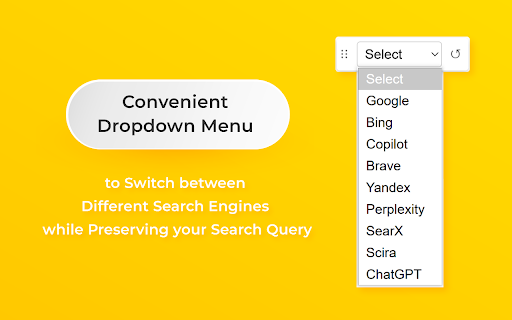


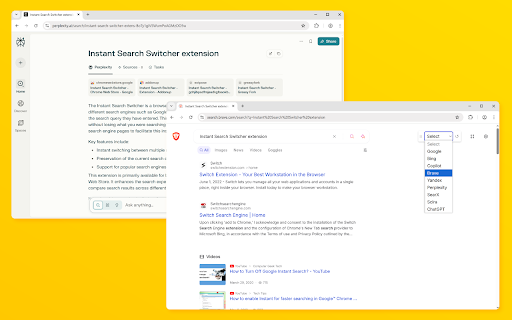
Adds a convenient dropdown menu to switch between different search engines while preserving your search query Instant Search Switcher is a powerful browser extension that transforms the way you perform search on the Internet. With Instant Search Switcher, you can instantly switch between search engines while keeping the same search query, giving you full control over search results. This Search Switcher extension allows you to compare search results across multiple search engines without retyping or copying your search query. Instant Search Switcher is designed for fast search switching, efficient research, and professional analysis. Instant Search Switcher provides a simple and minimal interface. A single button in the browser toolbar opens a list of available search engines, allowing you to switch search engines in one click. Your original search query is always preserved, no matter which search engine you choose. With Instant Search Switcher, you can also add custom search engines using a URL template. This makes Search Switcher flexible and adaptable for any workflow, including internal tools, niche search platforms, and custom services. Instant Search Switcher is especially useful for SEO specialists, content managers, marketers, bloggers, journalists, and anyone who works with large amounts of information and performs search frequently. By using Instant Search Switcher, you improve search efficiency, save time, and increase productivity. One extension replaces multiple tabs, repeated copy-paste actions, and manual search switching. Instant Search Switcher runs locally in your browser. No tracking, no analytics, and no data collection.

Context Search
An enhanced context menu search. Add and customize multiple search engines to your right-click pop-up menu. Select text, then right-click to access a fully customizable list of search engines in the pop-up context menu. Modify your search engine list at any time in the options menu. 【Features】 • Drag and drop to reorder your search engines. • Add multiple search engines with a single click. • All settings are synced with your Google Account. • Option to hover right-click instead of highlighting text first. 【Known Issues】 • The hover right-click feature may not work on some webpages. • The absence of favicons for your search engines has not been overlooked. Chrome currently does not support adding custom icons to the context menu.

Leap Search
LeapSearch is a search tool that allows users to quickly and easily switch between different search engines when searching online. It provides a convenient way to compare results from different search engines and find the most relevant information. Additionally, it could also help users save time by allowing them to quickly switch between search engines, rather than manually entering the same query multiple times. It also allows users to customize their search engine preferences and save their favorite search engines for easy access. This extension is designed to make searching online more efficient and effective, allowing users to quickly find the information they need. Contact with me: Twitter: - https://x.com/pekingmuge - https://x.com/_leapsearch Email: - setimouse@gmail.com

Search Tool (AI)
Quickly switch between customized search engines; Add a custom search engine in the right-click menu. New AI model support. Integrated with leading global Large Language Models (LLMs)! Instantly summarize web content, ask intelligent questions, and generate quick insights—all within your browser. Effortlessly connect to OpenAI (ChatGPT, GPT-4), Azure OpenAI, Anthropic Claude, Google Gemini, DeepSeek, and more. Just add your API Key and enjoy AI-powered productivity anywhere on the web! It supports configuring any search engine, similar to the search engine configuration in chrome settings, such as Baidu search, Bing search, JD search, Douban search, headline search, etc. After configuration, support: 1. shortcut keys switch between search engines. For example, on the Baidu search page, press the shortcut key (configurable) to quickly switch to Google search without reentering the search term, and then press the shortcut key to quickly switch to Bing search. 2. click the plug-in pop-up menu in the upper right corner (shortcut keys can also be configured) to quickly switch to the specified search engine. If it is on the search engine page, it will automatically bring the search term and jump to the specified search result page; Otherwise, directly jump to the specified search results page. 3. support the configuration of search engines in the right-click menu. If only one search engine is configured, it is in the top-level menu, or multiple search engines can be configured. After selecting a text, right-click it, and "search for" selected text "using XX" will appear in the right-click menu

ContextSearch web-ext
Add search engines easily and search from the context menu and convenient popup The most powerful, most complete search enhancement for Firefox comes to Chrome This Add-on was written as a Firefox 57+ web-extensions compatible replacement for Ben Basson's popular Context Search Add-on but has grown into much more. * Access search engines from the Context Menu * Manage search engines using subfolders and separators * Access search engines from a popup menu (QuickMenu) * Compatible with all search engines using POST or GET requests * International character-set support * Reverse-image search * Site search compatible * Add new search engines simply with a right-click * Edit search engine parameters and icons * Access bookmarklets from the context menu * Toolbar Search * Set hotkeys for each search engine * and much more
