
gccpalfakgndbhdlfbhjbajjjnggcfmf
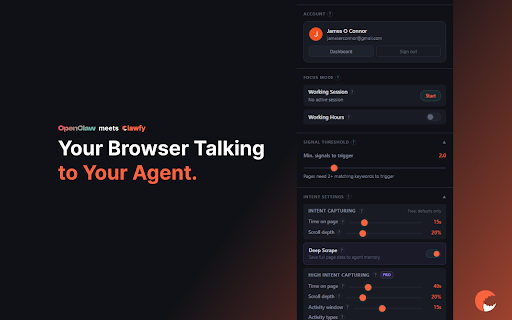


Your browsing talking to your OpenClaw agent. It sees what you're working on, suggests tools, and saves pages to agent memory. Your browser talks to your agent so you don't have to. Clawfy watches what you're researching and browsing and feeds real-time context to your OpenClaw agent. No copy-pasting URLs, no explaining what you're reading. Your agent just knows. HOW IT WORKS: Clawfy runs silently in the background. When you visit a relevant page, it extracts context from the page and sends it to your agent via webhook. Your agent then goes back over your conversation to see if the data it receive is relevent to what you spoke about. If not, it suggests things you might do with the data. It also searches ClawHub for relevant skills and suggests them to you automatically. FREE TIER — Page titles, meta descriptions, and headings detected — Signal matching across 100+ keywords — ClawHub skill suggestions sent to your agent — 5 minute cooldown between detections — Works with any OpenClaw agent (local or remote) PRO TIER ($12/month) — Everything in Free — Deep Scrape: captures full page data as clean markdown — Persistent Memory: saves pages to your agent's memory for later recall — Body text, code blocks, and URL analysis — Conversation awareness: agent checks what you're already discussing — Focus sessions and working hours scheduling — 1 minute cooldown PRIVACY FIRST — Browsing context goes only to YOUR agent (localhost or your own server) — No data sent to Clawfy servers — No browsing history collected — No URLs leave your browser on Free tier — You control everything: pause, disable, or uninstall at any time REQUIREMENTS — An OpenClaw agent with a webhook endpoint — Works with local agents (127.0.0.1) and remote agents (SSH tunnel or HTTPS) — Install the Clawfy and Clawfy PRO skills from clawhub. Clawfy is built for the OpenClaw + ClawHub ecosystem. If you use OpenClaw, this is the missing link between your daily browsing and your agent.

OpenClaw Copilot
OpenClaw (MoltBot & ClawdBot) in your browser: Chat directly in the side panel, no need to switch IM apps. OpenClaw Copilot - OpenClaw MoltBot or ClawdBot in your browser: Chat directly in the side panel, no need to switch IM apps. Experience the future of browsing with OpenClaw Copilot, a powerful third-party OpenClaw Chrome extension that integrates your personal AI assistant directly into your browser's side panel. Disclaimer: This is an unofficial community extension designed to enhance your experience with OpenClaw, MoltBot, and ClawdBot. It is not affiliated with the official development team but offers full compatibility and enhanced features. ✨ Key Features - Side Panel Chat: Chat with OpenClaw directly alongside your web pages. No more Alt-Tab switching to external IM apps. - Tab Control: Seamlessly connect the AI to your current browser tab for context-aware assistance. - Unified Experience: Combines the capabilities of MoltBot and ClawdBot into one sleek interface. - Secure Connection: Connects directly to your local or remote OpenClaw gateway via WebSocket. - All-in-One: Replaces the need for the standalone MoltBot Browser Relay. 🚀 How to Use 1. Install: Add the OpenClaw Chrome extension to your browser. 2. Configure: Click the Settings icon (⚙️) in the side panel. Enter your OpenClaw Gateway URL (default: ws://127.0.0.1:18789). 3. Connect: Navigate to any webpage, open the side panel, and click "Connect". 4. Chat: Start interacting with your AI assistant immediately! Q: Is this the official OpenClaw extension? A: No, this is a third-party extension developed by the community to provide a better, integrated browser experience. It works perfectly with your existing OpenClaw backend. Q: Do I need to install MoltBot Browser Relay separately? A: No! This OpenClaw Chrome extension has built-in relay functionality. If you have the old relay extension installed, you can remove it. Q: Does it work with ClawdBot? A: Yes, OpenClaw is the evolution of MoltBot and ClawdBot. This extension supports the protocols used by these systems. Q: Is my data safe? A: The extension communicates directly with your configured Gateway URL. No data is sent to any third-party servers other than your own OpenClaw instance. The Evolution of MoltBot and ClawdBot OpenClaw is the definitive evolution of the tools you know and trust. If you are a long-time user of MoltBot or have been looking for ClawdBot, you have found the right solution. We have unified the powerful automation capabilities of MoltBot and the versatile interaction of ClawdBot into this single, robust OpenClaw Chrome extension. Why Install the OpenClaw Chrome Extension? - Native Experience: Unlike standalone bots, the OpenClaw Chrome extension lives inside your browser, offering superior context awareness and control. - Zero Context Switching: Chat with OpenClaw while you browse. Whether you are conducting research or managing tasks, the OpenClaw Chrome extension is your always-on companion. Install the OpenClaw Chrome extension today to unlock a smarter, faster, and more integrated browsing experience.

OpenClaw Context Bridge
Connect your browser to your OpenClaw AI agent. Clip content, get page context, automate workflows. OpenClaw Context Bridge gives your browser a direct line to OpenClaw. Clip the entire current page (URL, title, and rich page context) in one click Paste or type any input and send it as user context to your OpenClaw workflow Stay fast and focused with a minimal, clean popup Built for people who work with AI assistants daily and want less copying, less switching, and better context transfer. Perfect for: Research capture Page-to-agent handoff Quick notes, prompts, and task inputs Workflow automation via your OpenClaw setup Requirements: You must have access to your OpenClaw gateway through Tailscale Configure your gateway URL and optional token in the extension settings

OpenClaw Browser Relay — EasyClaw
Connect your OpenClaw AI bot to Chrome. Navigate, read pages, click links and fill forms — via conversation. The only Chrome extension that connects your OpenClaw AI agent directly to your browser. No local server, no code, no setup — just instant browser automation through conversation. How it works: Install the extension, sign in to EasyClaw, select your OpenClaw bot, connect it to any tab — and your AI agent takes control. Tell it what to do in plain language. It navigates, clicks, reads, and fills forms autonomously. 🤖 Full OpenClaw browser control — Your OpenClaw bot navigates pages, clicks links, fills forms, and extracts data on any website 🔐 Works with logged-in sessions — Automate tasks on sites you're already signed into, no re-authentication needed ⚡ Instant setup — Select your bot and target tab in seconds, no configuration required 🔀 Multi-bot support — Switch between multiple OpenClaw bots from the same extension ☁️ No local server needed — Everything runs through your EasyClaw account in the cloud Perfect for: Developers and power users who want their OpenClaw AI agent to handle real browser tasks — web scraping, form automation, data extraction, research, and workflow automation. Get started free at ezyclaw.com — create your OpenClaw bot in under 1 second, no account required.

OpenClaw Token Monitor
OpenClaw calculates real-time token usage and enforces strict AI budget limits. OpenClaw Token Monitor is the ultimate enterprise-grade budget protector and real-time expenditure tracker for AI enthusiasts, developers, and power users. If you use AI agents or tools, OpenClaw ensures you never face an unexpected bill again. Managing API costs across multiple providers can be a nightmare. OpenClaw Token Monitor acts as a high-performance "kill-switch," sitting between your browser and AI endpoints to calculate every token in real-time. Whether you are using OpenAI, Anthropic, or OpenRouter, OpenClaw gives you total financial control. Core Features: Real-Time Token Calculation: Instantly calculates prompt and completion tokens as requests are made. Hard Budget Kill-Switch: Automatically blocks API requests the millisecond you hit your pre-set dollar limit. Multi-Provider Support: Seamlessly monitors OpenAI (GPT-4o/o1), Anthropic (Claude 3.5), Google Gemini, and OpenRouter. Custom Rate Pricing: Manually set your own "In" and "Out" token rates to match your specific API tier or discounted pricing. Visual Progress Tracking: A sleek, "Lobster-inspired" glassmorphism dashboard showing your session spend, token count, and active model. Privacy-First Architecture: Your data never leaves your machine. All calculations and storage happen locally on your browser. How to Use: 1. Install OpenClaw Token Monitor. 2. Set Your Budget: Open the settings () and enter your maximum spend. 3. Define Rates: Input the current pricing for your preferred models. 4. Work with Confidence: Watch the live "Claw" monitor your session. If you hit 100%, the kill-switch activates!
