
gbgikggnnjnaoijehochipfjbinjehcc

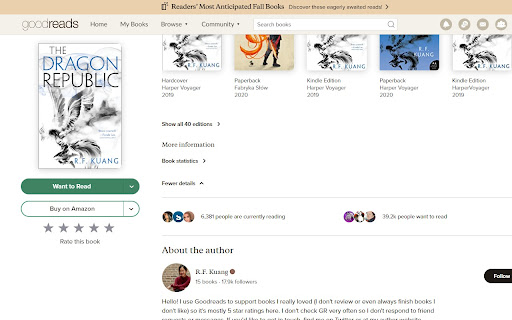
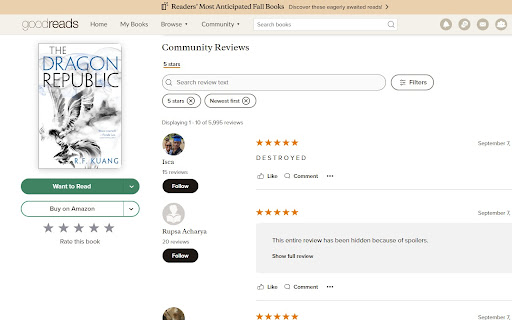
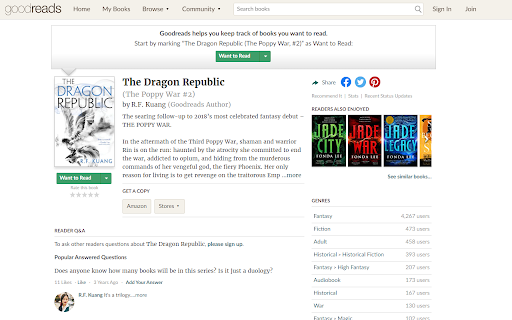
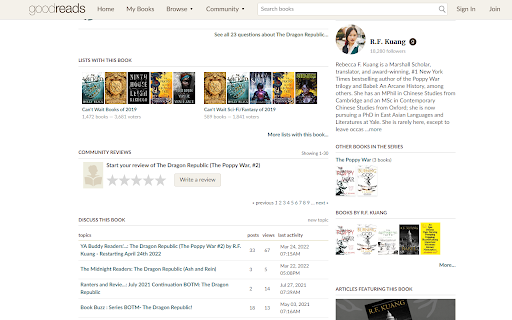
Goodreads for Authors to protect their mental health that hides ratings and low reviews. This plugin was made for authors who would like to use Goodreads but not at the cost of their mental health. When enabled in the NEW Goodreads theme (as shown in screenshots 1-3) it automatically sorts your reviews to 5* and most recent. If you're still on the OLD theme, you can try opening an incognito window and paste the link to your book. There's a high chance it will be the new theme (might take a few tries), just make sure to enable the extension to work with private browsers first AND once you get the new theme you have to reload the page once for the sorting to adjust. In the new theme it immediately hides: 1. Star ratings on all pages, including individual book pages and author profile. 2. Number ratings on book pages and author profile. 3. Ratings graph below Community Reviews on book pages. 4. Social ratings on the book pages. 5. All reviews that are not set as 5* on book pages. 6. Average number rating on the Author Dashboard. 1. Currently Reading and Want to Read numbers. You can still see them above the About the Author portion, or on your Author Dashboard. 2. If you or your mutual friends rated and/or reviewed a book. 3. You can still see all ratings information if you click on Book statistics without turning off the plugin. When enabled in the OLD Goodreads theme (as shown in screenshots 4-5) it: 1. Automatically hides ALL ratings and reviews except ones you write as there is no way to auto-sort or hide only the lower ratings (sorry!). 2. Also hides sort controls to avoid seeing the numbers of low star reviews. You can still see your currently reading and want to read numbers if you click on Author Dashboard under Your Books (all star and # ratings are hidden so there's no risk).

StoryGraph Right Click
Right click selected text to search for books on StoryGraph. Search for books on StoryGraph with a right click! You can toggle whether your search opens Now (go directly to search) or Later (open tab in the background) via a dropdown on the extension options page. Just click the Extensions icon in the top right of your browser (it looks like a puzzle piece), then click the three dots next to StoryGraph Right Click and select Options. Select the text that you'd like to search (book title, author, ISBN), right click, and choose "Search StoryGraph." Your results will show up in a new tab, and you can add the book to one of your lists, create a new review, or get more information about the book. If you would like to say thanks and support continued development of this and other extensions, consider buying me a coffee: If you have any suggestions or bugs that you find, let me know! I'll be looking into adding features in the future, but for now enjoy this fast way to get right to the book you want on StoryGraph!

Goodreads Wizard
Goodreads Wizard (ex GoodReads Enhancement) is an unofficial extension that allows modifications to certain aspects of Goodreads. All changes are client-side. If you want to check out what's new or what's coming, please follow this url : https://giant-hook-119.notion.site/GoodReads-Wizard-181e22c283118092be50f4ebc6e2eec9?pvs=73 ----------------------------------------------- It let you to : - Hide Goodreads top bar annoucements => Or place it under the menu (only on home), so it's not sticky anymore - Editions : always expand details => Edition lists will be expanded by default and the number of edition is set to 100. Let you find more easily books in your language since Goodreads not let you filter - Hide home elements : * Goodreads top bar annoucements under the menu (Not sticky anymore (And only on home)) * Site announcements (Top of home feed) * Currently reading * Reading challenge * Want to read * Bookshelves * News & interviews * Recommendations * Improve recommendations * Goodreads choice awards * Goodreads company information - On My book page : * Cover view : display title under cover * Cover view : Full size - On a book page : * Show entire summary * Show all genres * Replace left notation by edition notation (Note this edition of the book) * More info on the right * Possibility to move notation on the left * Friends notation on top (If there is a review, it will be displayed in a popup)

Goodreads Stats
Goodreads extension that adds data export capability and displays extensive analytics about your reading habits. Features: - Export entire library - Compare reading rates between years - Show insights about your favorite books - Search your entire book library

LinkedIn Profile Privacy Shield
Hides your photos and names while browsing LinkedIn Protect Your Professional Privacy with One Click LinkedIn Privacy Shield is the essential Chrome extension for professionals who want to browse LinkedIn anonymously in shared environments like libraries, coffee shops, and co-working spaces. 🔒 Instant profile anonymization 👤 Blocks personal photos 🏷️ Conceals names on all LinkedIn pages 🚫 Prevents over-the-shoulder privacy breaches 💻 Lightweight and quick to activate Our extension ensures you can browse freely without revealing your identity. We don't track you No personal information stored Works with all LinkedIn pages Supports latest Chrome versions Minimal system resources Zero performance impact Download now and take control of your professional browsing privacy! The author of the extension is not affiliated with LinkedIn
