
gbdfmlkiafpjocliomeeabjikgbjgian

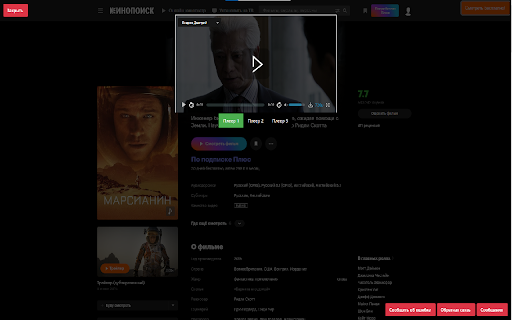
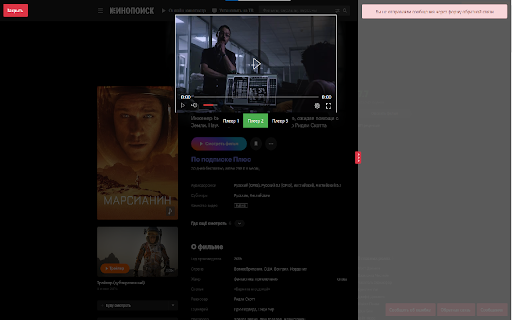

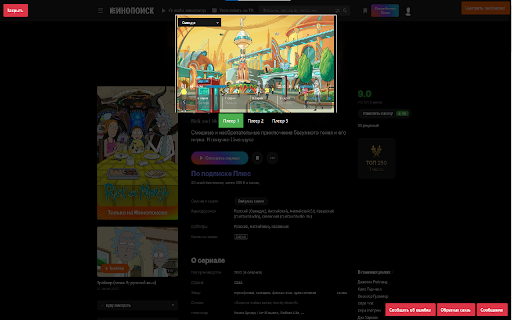
Kinopoisk Player - это бесплатное расширение, которое позволяет смотреть фильмы и сериалы онлайн на сайте Кинопоиска без… Kinopoisk Player - это бесплатное расширение, которое позволяет смотреть фильмы и сериалы онлайн на сайте Кинопоиска без необходимости регистрации или оплаты подписки. Расширение обеспечивает высокое качество видео и звука, а также удобный интерфейс для управления воспроизведением. Вы можете выбрать любой фильм или сериал из огромной библиотеки Кинопоиска и смотреть его в любое время, не выходя из браузера. Кроме того, Kinopoisk Player поддерживает русские субтитры, что делает просмотр фильмов и сериалов на иностранном языке более комфортным. Расширение также предоставляет возможность скачивать фильмы и сериалы на компьютер для просмотра в офлайн-режиме, что особенно удобно для тех, кто часто путешествует или находится в местах с ограниченным доступом к Интернету. Кроме того, Kinopoisk Player имеет функцию автоматического воспроизведения следующей серии сериала, что позволяет смотреть сериалы без перерывов и не тратить время на поиск следующей серии вручную. Kinopoisk Player - это отличный выбор для тех, кто хочет смотреть фильмы и сериалы на Кинопоиске бесплатно и без регистрации, с высоким качеством видео и звука, удобным интерфейсом и поддержкой русских субтитров. Расширение легко устанавливается и совместимо с различными браузерами.

Youtube Unblocked
Unblock YouTube & enjoy unrestricted access for free, using Youtube Unblocked! Are you tired of being blocked from accessing YouTube? Say goodbye to restrictions and hello to limitless entertainment with the YouTube Unblocked Chrome extension! What is YouTube Unblocked Chrome Extension? YouTube Unblocked is a powerful tool that allows users to bypass restrictions and access YouTube seamlessly. Whether you're at school, work, or in a country where YouTube is restricted, this extension enables you to enjoy unrestricted access to YouTube, and that too for free! How Does it Work? In many institutions such as offices, schools, workplaces, and colleges, YouTube access is often restricted using ISP or firewall-based restrictions. Additionally, some countries have enforced a ban on YouTube and its services. YouTube Unblocked Chrome extension comes to the rescue by leveraging a tunneling-based mechanism. It bypasses all restrictions, allowing users to access YouTube content without any limitations. Key Features: - Unrestricted Access: Enjoy seamless access to YouTube, bypassing ISP or firewall-based restrictions. - High-Speed Proxy Servers: YouTube Unblocked fetches YouTube content from high-speed proxy servers, ensuring high-quality streaming without buffering. - Single Website Proxy: With its single-website-based proxy, YouTube Unblocked ensures that access to all other websites on the internet remains quick, snappy, and free from hiccups. Key Benefits: - Unrestricted Access: Enjoy YouTube from anywhere, anytime, without worrying about the restrictions. - High-Quality Streaming: Enjoy high-quality YouTube content with smooth streaming, thanks to our high-speed proxy servers. - Snappy Browsing: YouTube Unblocked ensures that access to other websites remains fast, seamless, and uninterrupted. How to Use YouTube Unblocked? YouTube Unblocked is simple & easy to use. - Click on "Add to Chrome" to install the extension - Once installed, click on the extension icon in the browser toolbar to access main interface - Click on the "Unblock" button to unblock the restrictions - In 5 to 10 seconds, the extensions establishes connection to its proxy servers - You can then access YouTube without any restrictions. Top Use Cases: At Work: Stay entertained during breaks without worrying about the restrictions. At School/College: Access educational content and tutorials on YouTube for academic purposes. In Restricted Areas: Enjoy YouTube content without worrying about the country or area based restrictions Note: YouTube Unblocked is an independent project and is not affiliated with Google, LLC. Who is it for? YouTube Unblocked Chrome extension is the ultimate solution for anyone who wants to enjoy unrestricted access to YouTube, be it students, working professionals, users living in places where YouTube is banned or restricted. Remember, this extension is designed for educational and entertainment purposes only. Always respect the policies and guidelines of your institution or country. Experience the freedom with the YouTube Unblocked Chrome extension today!

Censor Tracker – Proxy for Privacy & Security
A censorship circumvention extension. Stay safe online with our proxy extension. Censor Tracker for Chrome is an extension that allows you to bypass Internet censorship, notify about sites that pass information to government agencies and identify new blockages. Works in Russia, Ukraine, Belarus, Kazakhstan, Kyrgyzstan, Uzbekistan and other countries. The key features are: — Bypass blocking in Russia, Ukraine, Belarus, Kazakhstan, Uzbekistan, Kyrgyzstan and other countries, including DPI blocking — Stay anonymous with fast and safe proxies — Learn about sites that share your data with third parties (for Russia) — Open *.onion and *.i2p sites without using third-party software — Use your own HTTPS-proxy — Use your own list of domains that should be proxied

VK Next - functions for VK
The best add-on for VK with many features, some of which are exclusive. Among the features: • Disable ads • Hide community ad posts • Hide posts with source • Make feed wider • Hide stories block • Post filters • Disable people recommendations • Disable post recommendations • Disable community recommendations • Disable clips recommendations • Disable VK Video recommendations • Disable story recommendations • Disable service recommendations • Disable game recommendations • Themes • Accents • Page background • Emojis • Logo customization • Custom font • Alternative site header • Alternative scrollbar • New "Communities" interface • Compact community list • Compact friends list • Compact stories block • Garland above the logo • New Year logo 2023 • Falling snowflakes effect • Garland on the site header • VK SquaRE+ • Animated splash screen on load • Rounded design elements • Change corner radius • Change sticker size • Inline commands • Show deleted messages • Show disappearing messages • Show message edit history • Ignore incoming calls • Confirm before calling • List of online members in chats • Highlight chat admins in messages • Transcribe messages • Expanded message action menu • Don't mark voice messages as listened • Ghost mode (unreads) • Typing hider • Classic interface • New media viewer • Old message read indicator style • Disable server reconnection indicator • Change reactions to Apple emojis • Alternative input bar view • Reduce graffiti size • Button to open Favorites • Message templates • Jump to start of chat • Display my mentions in chat • Message encryption • Download chat history • View chat statistics • Send graffiti • Send audio messages • Send video messages • Hide NFT avatars • Hide emoji statuses • Hide names and avatars • Hide quick chats • Hide recent communities block • Hide unviewed reactions indicator • Hide unhideable sections • Custom links • vk.cc link shortener button • Display current online status • Fix left menu position • Rename section titles • Alternative menu view • Make menu more compact • Name and avatar instead of "My Profile" • Avatars instead of icons for favorite communities, games, and apps • Hide section titles • Hide settings gear icon • Hide counters • Hide additional pages under the menu • Hide recommendations • Don't mark stories as viewed • Notification ghost mode • Partial offline • Manage online hiding via VK Messenger • Bypass online hiding • Display verification badges next to names • Set custom verification badge • Animated profile cover • Alternative profile view • Additional info in profiles and communities • Disable tracking • Highlight friends with selected color • Highlight mutual groups with selected color • Telegram stickers • View and set all emoji statuses • Number tracks when downloading playlists • Add ID3 tags to music • Insert lyrics from Genius into track metadata • Alternative player view in site header • Block ads while listening to music • Show track bitrate next to duration • Disable away.php • Show poll results without voting • Scroll through photos with mouse wheel • Photo spoofing button • Display media download buttons • Disable analytics • Disable tracking/telemetry • Clean up friends • Clean up followers • Clean up chats • Clean up blacklist • Clean up wall • Clean up photo albums and much more.

VKSaver - скачать музыку ВК
Скачать музыку с ВК с VKSaver это легко! Скачать музыку и видео с ВК вместе с обложками и тэгами, один трек или плейлист целиком. Скачать музыку с ВК с помощью VKSaver всегда легко и просто! VKSaver это самый надежный, простой и удобный способ скачать музыку с вк, а также скачать видео с социальной сети ВКонтакте, т.к. VKSaver позволяет скачать музыку с ВК вместе с обложками и тэгами, один трек или плейлист целиком. При этом скачивание музыку и видео будет происходить с экономией ресурсов Вашего компьютера, т.ч. даже старые конфигурации компьютеров и ноутбуков не будут тормозить при работе расширения VKSaver. Это официальное расширение VKSaver - все остальные являются подделками и мы не рекомендуем их использовать. Как скачать музыку с вк? Этим вопросом задаются многие пользователи компьютеров и ноутбуков, которые хотят найти удобные способы как скачать свои треки с вк на компьютер. Ответ прост - не тратить время зря, ведь, чтобы скачать музыку с ВКонтакте нужно всего лишь выполнить следующие шаги: 1. Установите официальное расширение VKSaver • Перейдите в Chrome Web Store • Найдите расширение "VKSaver - скачать музыку ВК" и установите его 2. После установки VKSaver • Расширение само откроет страницу VK Музыки • Кликните мышкой на появившуюся синюю кнопку напротив трека • После чего откроется страница, на которой можно будет скачать музыку • На странице скачивания музыки нажмите красную кнопку "Скачать" • Дождитесь загрузки файла в загрузках браузера VKSaver поможет Вам: • скачать Вашу музыку с ВК • скачать Ваше видео с ВК • скачать Ваши клипы с ВК • скачать Ваши плейлисты с ВК целиком • скачать Ваших треки с записей в ВК При этом скачивание происходит с обложками треков, тэгами и с экономией ресурсов Вашего компьютера, т.ч. даже старые конфигурации компьютеров и ноутбуков не будут тормозить при работе нашего расширения. В планах: • упрощение скачивания больших плейлистов • скачивания Ваших фото с ВК по отдельности и целиком • добавление гибких настроек для расширения • и многое другое ^__~ Код нашего расширения проверен сотрудниками Google и антивирусами, что гарантирует безопасность расширения и отсутствие вредоносного ПО. В случае вопросов или обнаружения недочётов и багов, пишите на форму обратной связи на официальном сайте http://audiovk.com/feedback.php Если же Вы хотите расширенные возможности при скачивании музыки и видео с ВК, то скачайте и установите официальное приложение VKSaver, которое совместно с официальным браузерным расширением VKSaver даст вам дополнительные возможности и удобства при сохранения Вашей музыку и видео с ВК. Обнимаем, команда AudioVK.COM
