
gbcfdjgipmpinkahpiambcikjkijimhi
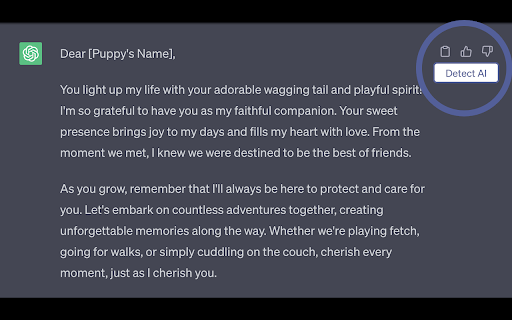


Quickly check if any content was AI generated, and make sure your writing isn't! Check if any content on the internet was generated using an AI service like ChatGPT, GPT-4, Bard, or Claude. Verify that the content was written by a human and not an AI chatbot. Detect AI content while you're browsing. Use this AI Content Detector to select or highlight any text on the internet, and quickly check if it was generated by AI. Our AI Detection extension will also generate certificates that you can use to share your results, or as proof that your work was not AI generated. Check your writing to detect AI content, verify that AI detectors will classify your writing as human-written. Run AI detection on LinkedIn posts. Use the AI content detector to see if LinkedIn content was AI-generated. Run AI detection on Reddit posts and comments. Use the AI content detector to see if Reddit content was AI-generated. Run AI detection on Facebook posts. Use the AI content detector to see if Facebook posts were AI generated. The extension works as a ChatGPT checker - Check ChatGPT outputs easily to see if they would be flagged as having been written by AI. We analyze the overall text, but also detect and highlight sections and sentences that look like they were content written by an AI chatbot. == How you can use this extension == • On popular generative AI sites, like ChatGPT (chatgpt.com) and Claude (claude.ai) we automatically embed a "Detect AI" button next to every response. • Anywhere on the internet, from social media and news sites, to anywhere you're typing out your content, simply select the text you want to check and click on our button to analyze it. • Once you've run a text for analysis, you can edit it inline to and re-submit it till you've removed any suspicious pieces of text! AI generated content is proliferating across the internet. Services like ChatGPT, Bard, Claude make it easier than ever before to write long articles, LinkedIn posts, or other piece of published text - including homework assignments and work reports. Companies, content platforms, schools, universities are becoming more and more sensitive to content that is purely AI generated, and may use tools, similar to ours, to penalize or block such content. This technology also makes it easier for bad actors to rapidly generate misleading or disingenous content. We hope our extension can help users quickly detect such work. This AI Content Detector is built by Sapling.ai (https://sapling.ai/). We offer a free trial for one month, with all functionality provided. After that, AI detection is a premium-only feature. Head over to https://sapling.ai/pricing for our latest premium plans, currently starting at $25 a month. Yes! Sapling.ai has a stellar history of providing grammar checking and writing assistance tools to many companies - and AI content detection is our latest offering. Drop us a note on https://sapling.ai/contact or support@sapling.ai and we'll be in touch. Absolutely, head over https://sapling.ai/docs/api/detector/ for sample code and documentation. You should be able to run your first API call in just a few minutes. Note that API pricing is usage-based, and is separate from the chrome extension subscription. You can find more details at https://sapling.ai/docs/api/pricing/

It's AI: AI Detector
Detect AI-generated content within one click. Just highlight text and get instant results. ChatGpt plugin included. Detect AI-generated content within one click. Just highlight text and get instant results. ChatGpt plugin included. It's AI is an industry-leading AI detector tool, which is the most accurate AI detector according to RAID (ACL paper, 2024) and several other benchmarks (GRiD, HC3, GhostBuster). We stand to be #1 AI checker with more than 98% accuracy, outperforming other solutions like GPTZero, CopyLeaks, Originality etc. 🎯 Simple and accurate AI detector It's AI Chrome extension allows you to scan text to check if it was written by an AI or a human. You can use the extension on any website - just highlight text or copy-paste it into the text box and get accurate results in mere seconds. You can customize shortcuts and manage tool behavior in the settings section. 🔍 ChatGpt Plugin Working a lot with ChatGpt and want to make its texts natural before using them? A built-in ChatGpt plugin allows you to automatically scan all generated answers right on the ChatGpt website. Don't waste your time copy-pasting it from chatgpt to our website/extension. Edit your text, play with prompts and try other models - we'll be here for you to monitor the progress and show the probability of being detected as AI for each text. 🥇 Why It's AI content detector stands out Highest accuracy. It’s AI provides the highest accuracy rate in detection results according to academia-known benchmarks and achieve 98% on average among them. Increased efficiency and workflow optimization. With our extension you can analyze huge documents with unparalleled speed. Painstaking multi hour tasks now take just a few minutes of your working time. Educators, students and writing and editing teams can spend their time on more important strategic tasks. User-friendly interface. Extension is so simple, that you will spend just a few seconds to start working with it. Open it in your browser and start processing immediately! ⚡️ Explore full functionality on our website (its-ai.org): - Deep scan. In addition to just classifying texts, It's AI also provides a deep scan functionality, which shows probabilities of AI for each sentence in the text. - Plagiarism checker. Instantly find plagiarism by pasting or uploading your research paper, essay, or article. - Sharable reports. Someone questions the originality of your work? Share an instantly generated report from It's AI with the results of scanning your text. - File upload (pdf, doc, docx) . Flexible file upload options. Upload your Microsoft Word (docx, doc), PDF file, copy and paste text, or type in the editor directly. - Scans history. Don’t lose your texts. Access all your scans for the last 30-day in the history section. - Britishizer. Today up to 80% of all Large Language Models (including ChatGPT) write answers in American english. Rewrite them into British english in one click with It’s AI Britishizer.

Trace GPT AI Detector by PlagiarismCheck.org
Check content, websites, and emails for AI presence with an accurate Trace GPT AI Detector by PlagiarismCheck.org Find out whether the text is human-written or AI-generated with our ChatGPT Detector and be confident in the web content's authenticity. Browse safely 🔒by using a secure AI Writing Detector and ensure the posts on blogs or social media, reviews on the websites, and web texts are human-written. An accurate and free AI Detector Chrome Extension becomes handy in your everyday browsing, teaching, or business routine. Just select the text you want to check on the webpage and launch our AI Detector Chrome Extension, or paste your text in the Extension window to get an accurate, reliable result in no time. How you can benefit from Trace GPT AI Detector: 💡Rely on the real 97% accuracy with extremely low false-positives 💡Catch popular AI generators, including Google Bard and ChatGPT 💡Get convenient and clear reports in one place 💡Download a pdf report to share with others 💡Check your texts for FREE How to use: ✅ Click “Add to Chrome” ⬇⬇⬇ ✅ Click on the extension's icon in the extension bar ⬇⬇⬇ ✅Click “pin near TraceGPT AI Detector ⬇⬇⬇ ✅ Register/Login with your email or Gmail ⬇⬇⬇ Enjoy! 🏁 Select the text from a webpage and launch our extension to see the result, or copy-paste text or a file in AI Detector Chrome Extension by PlagiarismCheck. 🙌🏼 We would appreciate you leaving us a 5-star review 😉

AI Detector for text and images - Winston AI
Winston AI is the most trusted AI detector to help identify AI generated content and AI images. The most trusted AI detector is now available wherever you go. Winston AI allows you to accurately detect if any text or image is generated with an AI tool, on any website. Our AI writing checker is used by hundreds of thousands of users and is the solution trusted by the largest publishers and institutions around the world. Our AI image detector is able to identify with remarkable accuracy images generated by Nano Banana, ChatGPT, Midjourney, Grok, Stable Diffusion and more. Our assessment includes a complete digital forensics analysis, including C2PA and IPTC watermarks, and full Exif details to help identify AI-generated images and assess their origins accurately. With our Chrome Plugin, you can now instantly scan any content or images for AI directly on the webpages by highlighting and-or right clicking on the text or image. For maximum privacy, scans using the Chrome extension are not saved anywhere. 💡Industry leading accuracy in detecting AI content (99.98%) 💡Detects AI writing from all known AI writing tools including ChatGPT 💡Detects AI writing from all known AI writing tools including Nano Banana 💡Scan content directly on the web page 💡Multilingual: works with content in English, French, Spanish, Portuguese, German, Dutch, Polish, Italian, Indonesian, Russian, Romanian and Chinese (Simplified). Detection for more languages is coming soon. ✅ Click on the “add to chrome” button to add the Chrome extension. ✅ Pin the extension to your browser by clicking on the puzzle icon in the top right of your browser, then clicking on the pin icon next to the Winston AI chrome extension. ✅ Create a free account on Winston AI (https://app.gowinston.ai/register) - No credit card required. You will receive 2000 free credits that can be used towards ai detection for text and images, for a period of 7 days. ✅ Click on the Winston AI logo (blue "W" on white circle) in your extension toolbar. ✅ Click on the "Login" button. If you are not logged in to the website, you will be prompted to log in with your credentials. ✅ Click on the Winston AI logo (blue "W" on white circle) to view your credits and plan info. ✅ Highlight any content (min. 500 characters) or image directly on any website and right click on it. ✅ Click on “scan for AI content” or “Scan image for AI’. ✅ Each word scanned requires one credit, image scans require 200 credits. ✅ Your score and assessment will be displayed on the bottom right corner of your browser, along with the complete forensics analysis of your image including metadata (when applicable).

Passed.ai Extension
Passed.ai Extension for Google Docs Passed.AI allows academic institutions to prove that submitted work is either student or AI generated. By combining both AI detection and an audit report of document revisions, Passed.AI is the only tool that provides an enforceable level of detection. Passed.AI works with any Google Doc to which a teacher has Edit access. Our Chrome extension shows the probability that a document was generated by AI, along with a Document History Audit that lets teachers “watch” a student write the text. 1. Student Submits Work as a Google Document Passed.AI requires work to be submitted in Google Document format with edit access. No additional software is required for the student. 2. Passed.AI Analyzes the Document Teachers click on the Passed.AI button within the Google Document. Passed.AI then analyzes the text and creates a detailed Human vs AI report. 3. Receive Audit Report and “Watch” Student Write Receive an AI probability score. Plus, teachers are able to watch as the document is created based on the revision history. The final report provides an enforceable level of certainty on the true source of the text. AI Trained to Recognize AI Generated Text Passed.AI uses leading AI models trained on all popular NLP models to predict if written text was AI or student created. Receive a probability that the work was student or AI created. Quick and accurate scoring “Replay” How Your Students Wrote Their Papers AI Detection alone is NOT enforceable. Combining AI detection with a Document History Audit provides unparalleled confidence. All you need is edit access to the Google document the student submitted and Passed.AI can provide you a detailed audit. This audit allows you to… See the number of contributors and the size of their contributions to the text See if the words/minute were natural or not No software for your students to install Secure We take security seriously with military grade 256 bit encryption. Your account and information is secure. Affordable for Teachers Passed.AI is priced with teachers in mind. We want to make this tool and workflow available to all teachers, regardless of your institution’s readiness to adopt. Easy to Get Started Whether you are a solo teacher questioning one paper or responsible for technology implementation at a top 100 university, you can try out Passed.AI today. LMS Integration (future) Push results from Passed.AI audit into your LMS using our REST API. Passed.AI works with any Google Doc to which a teacher has Edit access. Our Chrome extension shows the probability that a document was generated by AI, along with a Document History Audit that lets teachers “watch” a student write the text.
